Your workflow is unique 👨💻 - tell us how you use Dropbox here.
Forum Discussion

sarasheep
1 year agoExplorer | Level 3
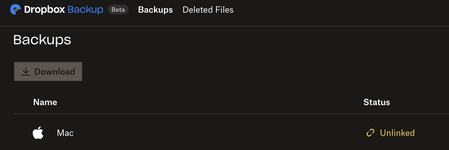
My Mac appears as "Unlinked", syncing icons missing and unable to open files
Anyone experience similar situation?
My Mac is suddenly disconnected from dropbox and on the website it shows "Unlinked".
All my files are missing icons and I cannot open files eit...

sarasheep
1 year agoExplorer | Level 3
Hannah, offline files refers to all my previously online files are downloaded somehow and occupy space in the drive. And I cannot access to them when I open my Dropbox app.
So that answers your second questions, no I cannot see my Mac files when visiting my account online/via linked mobile app.
I've tried the steps you provided and no Mac files are backed up. :'(

Megan Dropbox Community Moderator
1 year agoDropbox Community ModeratorHey sarasheep, earlier you sent me a screenshot of the app's syncing status, which wasn't updated yet. Is it still the same?
I'm asking, because I want to identify if that might be the culprit as to why you're not seeing your files locally.
Also, I can see from the latest screenshot that the Dropbox folder only has your camera uploads & Vault there. Is that all that should be there?
I'd also love a screenshot of the app's preferences, and specifically what you see when you click your Backup tab, and them Manage Backups.
- sarasheep1 year agoExplorer | Level 3
Hannah, please see the screen cap of my Backup status (which is "Done") and Backup files (desktop, documents & downloads), which are missing from the Dropbox app.
- sarasheep1 year agoExplorer | Level 3
I deleted the dropbox app from my Mac and tries reinstall & relink my account, however new problem arises /_\ why is this so hard...
- sarasheep1 year agoExplorer | Level 3
Hannah, I couldn't find the Dropbox file anywhere so the steps weren't really helpful. However after many attempts to install the app suddenly it works again, so my Mac is linked to dropbox again and now that the problem is solved. Thanks for your advices along the process.

About Apps and Installations
Have a question about a Dropbox app or installation? Reach out to the Dropbox Community and get solutions, help, and advice from members.
The Dropbox Community team is active from Monday to Friday. We try to respond to you as soon as we can, usually within 2 hours.
If you need more help you can view your support options (expected response time for an email or ticket is 24 hours), or contact us on X, Facebook or Instagram.
For more info on available support options for your Dropbox plan, see this article.
If you found the answer to your question in this Community thread, please 'like' the post to say thanks and to let us know it was useful!


