Your workflow is unique 👨💻 - tell us how you use Dropbox here.
Forum Discussion

VasilyD
4 years agoHelpful | Level 5
Red box on the Dropbox tray icon
Hello everyone!
Why is the red box on my dropbox Windows taskbar icon?
I've read in another thread that it's not a big deal and it's about some notification problem.
But I have all notification...
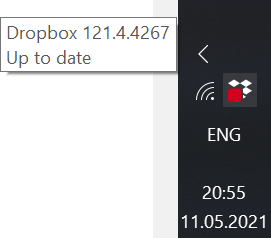
 3 years ago
Hello all!
I have a laptop 1ith 1920x1200 resolution. When I clicked on that Dropbox icon which has the red square on it, I only was getting the Dropbox file explorer window. But then, after two days of frustration, I realized when I clicked on the Dropbox icon, to the extreme right hand side of my screen it looked like there was the edge of some other window appearing. But I couldn't grab and move that window to see it. I my display at 150% size so things are not too tiny, but I changed that to 100% and then I could see that other window (in tiny size), and it was the Dropbox user screen. There was a notification at the top about choosing to turn on automatic backup or not, and when I declined that, the red square on my Dropbox icon disappeared. So the answer is that the Dropbox user screen doesn't resize itself for high resolution screens and when we use 150% or so magnification on our computers so things aren't too tiny, that Dropbox user screen is displaced to the right, nearly (or totally) off of our desktop.
So, reduce you screen magnification, click on the Dropbox icon, answer that query Dropbox is showing about letting it automatically back up folders, and the red square on the icon is gone. So that red square IS Dropbox telling us there is an "important" message for us from Dropbox, but we can't see it with our modern, high resolution screens set up with magnification on.

Megan Dropbox Community Moderator
4 years agoDropbox Community ModeratorCan I ask if you have two monitors VasilyD?
Can you also click straight on that red dot icon, and get a screenshot of that?
If I were you, I'd also update the app to its latest version.

VasilyD
4 years agoHelpful | Level 5
Yes, sometimes I connect a second display to my laptop, connecting it doesn't change the look of the icon. I updated the app to the newest version. The red box still remains. Nothing happens when I click on it. Double click pops up my dropbox folder in file explorer.
For now I just hid it into notification area so it won't annoy me.
About Apps and Installations
Have a question about a Dropbox app or installation? Reach out to the Dropbox Community and get solutions, help, and advice from members.
The Dropbox Community team is active from Monday to Friday. We try to respond to you as soon as we can, usually within 2 hours.
If you need more help you can view your support options (expected response time for an email or ticket is 24 hours), or contact us on X, Facebook or Instagram.
For more info on available support options for your Dropbox plan, see this article.
If you found the answer to your question in this Community thread, please 'like' the post to say thanks and to let us know it was useful!


