We’re Still Here to Help (Even Over the Holidays!) - find out more here.
Forum Discussion

pgr
3 years agoHelpful | Level 6
Remove Dropbox options from the context menu.
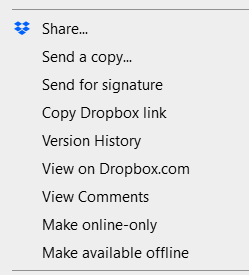
Hi, recently Dropbox has started cramming my Explorer context menu with all of these options I mostly don't plan to use:
Come on. Do you think it's ok to just dump all your stuff in ther...

midrare
2 years agoHelpful | Level 5
You need to edit the .reg file. You see the lines with =""? There's one for each context menu item. ="" adds to the blacklist (disables) and =- removes from the blacklist (enables). You need some trial and error to determine which ones you have to set to what. If you do this, please do report back and tell me which items correspond to which menu items so I can update the labels.

JohnCoool
2 years agoExplorer | Level 4
Ok I got it. I saved the reg file and ran it.
Seems good so far.
Thanks Midrare
About Apps and Installations
Have a question about a Dropbox app or installation? Reach out to the Dropbox Community and get solutions, help, and advice from members.
The Dropbox Community team is active from Monday to Friday. We try to respond to you as soon as we can, usually within 2 hours.
If you need more help you can view your support options (expected response time for an email or ticket is 24 hours), or contact us on X, Facebook or Instagram.
For more info on available support options for your Dropbox plan, see this article.
If you found the answer to your question in this Community thread, please 'like' the post to say thanks and to let us know it was useful!


