Your workflow is unique 👨💻 - tell us how you use Dropbox here.
Forum Discussion

JohnSmith4
3 years agoExplorer | Level 3
Startup error on the Dropbox desktop app on macOS Monterey 12.6
Hello. My Mac is running on OS Monterey 12.6.
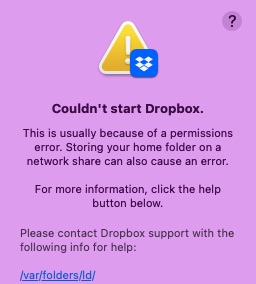
Today, I was cleaning out some of my files and I received the following message from Dropbox:
"Couldn't start Dropbox.
This is u...

Megan Dropbox Community Moderator
2 years agoDropbox Community ModeratorHi SuuCh10, thanks for posting here!
Can you please reboot your computer and then relaunch the Dropbox desktop app again, in order to remedy this?
Keep me posted, and we'll take it from there!

SuuCh10
2 years agoExplorer | Level 3
Hi
It's not working. I've rebooted my computer before I emailed you the first time and also after you've replied below. Still doesn't work.
- Nancy2 years ago
Hi SuuCh10, hope it’s OK to jump in.
Have you also made sure to provide Dropbox with full-disk access on your device? If you’re not sure about this, please check these steps.
In case that doesn’t make any difference, we can log a ticket for you and have our support team investigate this further.
Keep me updated!

About Apps and Installations
Have a question about a Dropbox app or installation? Reach out to the Dropbox Community and get solutions, help, and advice from members.
The Dropbox Community team is active from Monday to Friday. We try to respond to you as soon as we can, usually within 2 hours.
If you need more help you can view your support options (expected response time for an email or ticket is 24 hours), or contact us on X, Facebook or Instagram.
For more info on available support options for your Dropbox plan, see this article.
If you found the answer to your question in this Community thread, please 'like' the post to say thanks and to let us know it was useful!


