Your workflow is unique 👨💻 - tell us how you use Dropbox here.
Forum Discussion

EastyT
3 months agoNew member | Level 2
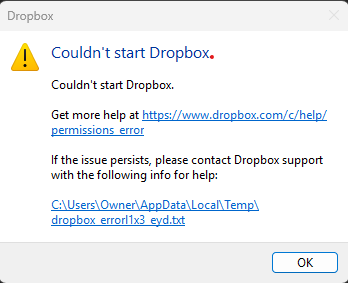
The Dropbox desktop app won't start or sync on Windows 11
Application Affected Dropbox Operating System/Browser (if using the web) Windows 11 Dropbox App Version (if using the app) App won't launch but i have installed the latest version
Question o...
 3 months ago
Well, it took a week of thrashing around, but support eventually came up with the answer. This entire issue had to do with a Dropbox update to make it compatible with Microsoft's new sync API called Cloud Files The solution was to unlink my desktop from the Dropbox dashboard, uninstall, reboot, reinstall. Then during the welcome process at the end choose advanced setting Check the Opt Out checkbox under Dropbox for Windows Updates.
That's it, it all works now.
Thanks for everyone trying to help solve this issue. It seems that Dropbox is aware of the issue, it just took some time to find the right support rep that was aware of it.
Thanks Again!

WRiedel
3 months agoNew member | Level 2
Maybe check Windows event log. Windows Logs, System, and look for Source: Schannel and A fatal error occurred while creating a TLS client credential. The internal error state is 10011.
The SSPI client process is Dropbox (PID: xxxxx).
If that's the case your TLS restrictions are to secure for Dropbox ;-)
- EastyT3 months agoNew member | Level 2
i checked the System log and there are no errors that reference TLS or Dropbox. I checked the Application log and found one, but I don't think it is what you are looking for:
Log Name: Application
Source: SideBySide
Date: 11/22/2025 10:09:45 AM
Event ID: 33
Task Category: None
Level: Error
Keywords: Classic
User: N/A
Description:
Activation context generation failed for "C:\Program Files (x86)\Dropbox\Client\Dropbox.exe". Dependent Assembly 237.4.5655,language="*",type="win32",version="901.520.64.112" could not be found. Please use sxstrace.exe for detailed diagnosis.When I go to the preferences tab (about all that's available while "starting up", it does have an option to sign in. When I do this, it says I'm already signed in under this account. Is there a way to sign out on this computer and force the app to sign in itself?
About Apps and Installations
Have a question about a Dropbox app or installation? Reach out to the Dropbox Community and get solutions, help, and advice from members.
The Dropbox Community team is active from Monday to Friday. We try to respond to you as soon as we can, usually within 2 hours.
If you need more help you can view your support options (expected response time for an email or ticket is 24 hours), or contact us on X, Facebook or Instagram.
For more info on available support options for your Dropbox plan, see this article.
If you found the answer to your question in this Community thread, please 'like' the post to say thanks and to let us know it was useful!


