Your workflow is unique 👨💻 - tell us how you use Dropbox here.
Forum Discussion

EastyT
3 months agoNew member | Level 2
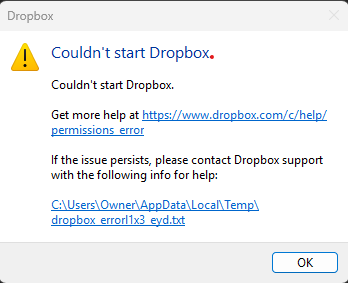
The Dropbox desktop app won't start or sync on Windows 11
Application Affected Dropbox Operating System/Browser (if using the web) Windows 11 Dropbox App Version (if using the app) App won't launch but i have installed the latest version
Question o...
 3 months ago
Well, it took a week of thrashing around, but support eventually came up with the answer. This entire issue had to do with a Dropbox update to make it compatible with Microsoft's new sync API called Cloud Files The solution was to unlink my desktop from the Dropbox dashboard, uninstall, reboot, reinstall. Then during the welcome process at the end choose advanced setting Check the Opt Out checkbox under Dropbox for Windows Updates.
That's it, it all works now.
Thanks for everyone trying to help solve this issue. It seems that Dropbox is aware of the issue, it just took some time to find the right support rep that was aware of it.
Thanks Again!
EastyT
3 months agoNew member | Level 2
I'm looking forward to a solution, but the Holiday and switching to Dropbox support has slowed things down.


About Apps and Installations
Have a question about a Dropbox app or installation? Reach out to the Dropbox Community and get solutions, help, and advice from members.
The Dropbox Community team is active from Monday to Friday. We try to respond to you as soon as we can, usually within 2 hours.
If you need more help you can view your support options (expected response time for an email or ticket is 24 hours), or contact us on X, Facebook or Instagram.
For more info on available support options for your Dropbox plan, see this article.
If you found the answer to your question in this Community thread, please 'like' the post to say thanks and to let us know it was useful!


