Your workflow is unique 👨💻 - tell us how you use Dropbox here.
Forum Discussion

mducharme
4 months agoHelpful | Level 5
The Dropbox folder icon appears as a blank page on my newly-installed Windows 11.
Application Affected
Dropbox (Microsoft Store version) Device
Windows 11 Custom Build PC Operating System/Browser (if using the web)
Windows 11 Pro 24H2 and now 25H2 Dropbox App Versio...
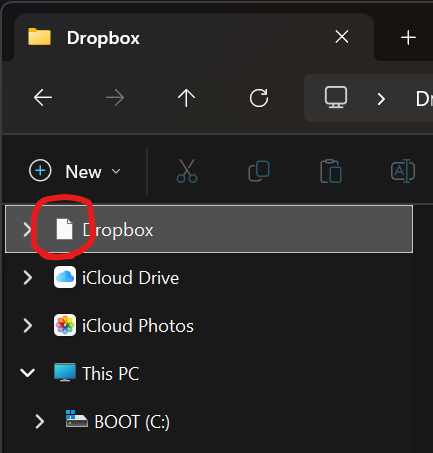
 4 months ago
Rich my replies have disappeared twice now. I've replied to myself and this is the second time it has vanished so you've not not seen what I said.
This is now the third time I've typed this up and I hope it sticks.
It was NOT the icon cache, it was a registry edit that fixed it.
That registry key HKEY_CLASSES_ROOT\CLSID\{915856B3-76E9-47CC-B16D-2C7B120DAF27}\DefaultIcon had a wrong path to Dropbox.exe
I fixed it (the version number should have been 234.4.5591.0)
Then restarting explorer fixed it.
One of my replies completely VANISHED after that leaving behind the "that fixed it - the question is, how did that end up getting wrong in the first place" that made it look like clearing the icon cache fixed it. Why is this forum deleting replies to myself after I post them and make sure they show up.
mducharme
3 months agoHelpful | Level 5
I use the Windows Store version of Dropbox. This is now the third or fourth time I've had the issue I described in this thread:
In there I found that the registry key for Dropbox was referencing the wrong version number in the path so it wasn't showing the icon in explorer. I manually updated it and it was fine.
But then Dropbox updated itself again and the version number in the folder changed again, so again the icon was broken. I had to go fix it again the same way as before.
It happened again twice, last time a few days ago. I'm getting tired of having to manually fix this registry key each time it updates.
Any ideas for a permanent fix so I don't have to keep doing this? I believe it is a bug in the Windows Store version, I just don't know how to report it to the developers.

Walter Dropbox Community Moderator
3 months agoDropbox Community ModeratorHi there mducharme - thanks for bringing this to our attention.
Can you please clarify the version of the Dropbox desktop app you're running at the moment?
Also, do you happen to be running any 3rd party apps that might be interfering somehow?
Any additional information or even screenshots are more than welcome!
About Apps and Installations
Have a question about a Dropbox app or installation? Reach out to the Dropbox Community and get solutions, help, and advice from members.
The Dropbox Community team is active from Monday to Friday. We try to respond to you as soon as we can, usually within 2 hours.
If you need more help you can view your support options (expected response time for an email or ticket is 24 hours), or contact us on X, Facebook or Instagram.
For more info on available support options for your Dropbox plan, see this article.
If you found the answer to your question in this Community thread, please 'like' the post to say thanks and to let us know it was useful!


