We’re Still Here to Help (Even Over the Holidays!) - find out more here.
Forum Discussion

Redderz
3 years agoNew member | Level 2
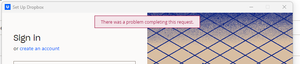
"There was a problem completing this request" on my Windows device when I try to log in.
I have recently changed laptop so am trying to add Dropbox to my desktop as before. Every time I log in I get the error "there was a problem completing this request":
I have changed my emai...
- 3 years ago
Hi jannegue, let's jump right into this!
In regards to your account access in the app, we'd need to check your security page online, to see how many active devices you have there.
If you're on a Basic plan, with more than 3 devices connected already, this might be the issue.
As for the browser, can you try to clear your cache there, or use an incognito mode, and see if you can access your account and put the security code that way?
Keep me posted!


jannegue
3 years agoExplorer | Level 3
Hello, I seem to have a similar issue.
I also switched laptops and am now unable to log into my account on the app. I am currently logged into my account with my main browser and I don't want to log out there, as I am needing at least that access to continue my work.
On another browser I have the issue that, after logging in, I receive an email with the needed security code but in the we window the page doesn't load any further, I thus cannot enter any code.
This has been going for 3 days now.
Can anybody help?

Hannah Dropbox Community Moderator
3 years agoDropbox Community ModeratorSorry to see you're having trouble here, onake.
Do you happen to have some kind of security app installed on your computer, like an antivirus, VPN, firewall etc. that could be blocking the Dropbox app?
If so, try temporarily disabling them, to see if that helps.
 onake3 years agoExplorer | Level 3
Thanks.
I have checked. No firewall nor VPN running.
Issues happens only while logging in from Dropbox App; logging in via Safari or Chrome web browsers are fine.
About Apps and Installations
Have a question about a Dropbox app or installation? Reach out to the Dropbox Community and get solutions, help, and advice from members.
The Dropbox Community team is active from Monday to Friday. We try to respond to you as soon as we can, usually within 2 hours.
If you need more help you can view your support options (expected response time for an email or ticket is 24 hours), or contact us on X, Facebook or Instagram.
For more info on available support options for your Dropbox plan, see this article.
If you found the answer to your question in this Community thread, please 'like' the post to say thanks and to let us know it was useful!


