Your workflow is unique 👨💻 - tell us how you use Dropbox here.
Forum Discussion

beaniew
1 year agoHelpful | Level 5
Ubuntu 23.10 - No menu
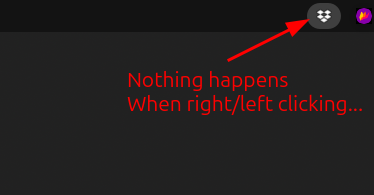
Ubuntu there's no menu for Dropbox, when I right click the App indicator in the top bar (see image) › dropbox version Dropbox daemon version: 195.4.4995 Dropbox command-line interface...
 1 year ago

beaniew
1 year agoHelpful | Level 5

FeRDNYC
1 year agoHelpful | Level 6
beaniew That's very strange — without that extension, you shouldn't even have had an icon there. That extension is the thing that provides the system tray itself, for Dropbox to show up in.
I do have that extension installed, on Fedora 40, and the situation is the same as you originally reported — nothing happens when I click the icon. When I deactivate the extension, the Dropbox icon disappears entirely, as I'd expect.
- FeRDNYC1 year agoHelpful | Level 6
HUH! But, turns out RESTARTING the extension (just switching it off and on again) did actually make Dropbox's menu accessible!
 notredruide1 year agoHelpful | Level 5
Thanks all, this does indeed work -- but it's not a satisfactory solution because it looks like I'll have to stop and restart the extension on every boot. That may be trivial for Linux mavens but I am not one of them.
- FeRDNYC1 year agoHelpful | Level 6
No, I agree, and I've already reported the issue to the extension maintainers.
No response yet.
About Apps and Installations
Have a question about a Dropbox app or installation? Reach out to the Dropbox Community and get solutions, help, and advice from members.
The Dropbox Community team is active from Monday to Friday. We try to respond to you as soon as we can, usually within 2 hours.
If you need more help you can view your support options (expected response time for an email or ticket is 24 hours), or contact us on X, Facebook or Instagram.
For more info on available support options for your Dropbox plan, see this article.
If you found the answer to your question in this Community thread, please 'like' the post to say thanks and to let us know it was useful!


