Need to see if your shared folder is taking up space on your dropbox 👨💻? Find out how to check here.
Forum Discussion

beaniew
2 years agoHelpful | Level 5
Ubuntu 23.10 - No menu
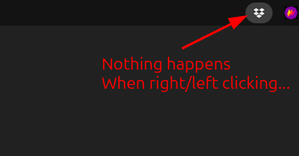
Ubuntu there's no menu for Dropbox, when I right click the App indicator in the top bar (see image) › dropbox version Dropbox daemon version: 195.4.4995 Dropbox command-line interface...
 2 years ago


FeRDNYC
2 years agoHelpful | Level 6
HUH! But, turns out RESTARTING the extension (just switching it off and on again) did actually make Dropbox's menu accessible!

notredruide
2 years agoHelpful | Level 5
Thanks all, this does indeed work -- but it's not a satisfactory solution because it looks like I'll have to stop and restart the extension on every boot. That may be trivial for Linux mavens but I am not one of them.
- FeRDNYC2 years agoHelpful | Level 6
No, I agree, and I've already reported the issue to the extension maintainers.
No response yet.
- FeRDNYC2 years agoHelpful | Level 6
One thing that might help, notredruide, is to make sure dropbox is started before the extension. That's how I have it set up on my system, and as a result I don't have to restart the extension every boot, only after I restart dropbox manually.
On my system I've done that by setting up a systemd service to start the daemon, in place of $HOME/.config/autostart/dropbox.desktop. That's a bit technical, but I'll provide the service file definition for anyone interested.
But if you don't want to go that route, by default $HOME/.config/autostart/dropbox.desktop contains an autostart delay:
X-GNOME-Autostart-Delay=10Deleting that line might help it start up before the extension, in which case you wouldn't need to restart anything.
For anyone who wants to have their systemd user session manage the daemon, instead of relying on autostart, you can delete the autostart file and create a dropbox.service file instead. My service definition, with dropbox installed into /usr/bin/ from the Dropbox RPM repository, is:
[Unit] Description=Dropbox Network Storage Daemon After=network-online.target graphical-session.target gnome-shell.service [Service] Type=forking PIDFile=%h/.dropbox/dropbox.pid ExecStart=/usr/bin/dropbox start -i ExecStop=/usr/bin/dropbox stop Restart=on-failure [Install] WantedBy=default.target - FeRDNYC2 years agoHelpful | Level 6
FeRDNYC wrote:For anyone who wants to have their systemd user session manage the daemon, instead of relying on autostart, you can delete the autostart file and create a dropbox.service file instead.
Actually, instead of just deleting the autostart file, you should switch off "Start Dropbox on system startup" in the Dropbox preferences. That'll delete the autostart file for you, and won't re-create it later when it notices it's missing.
- notredruide2 years agoHelpful | Level 5
Thank you FeRDNYC, you have gone to a lot of trouble! Unfortunately I'm not well enough versed in under-the-hood Linux to adopt that method. I can live with restarting the extension for now. But I may try commenting out that Autostart-Delay line -- that's within my (limited) competence.
 netsurfer382 years agoNew member | Level 2
It does appear that one needs to have the AppIndicator and KStatusNotifierItem Support gnome extension installed for the Dropbox menu to work.
However the menu no longer works after Powering Off or doing a Restart. However other forums state that the menu is restored after locking the screen by pressing "Windows+L" or "Super+L" and then unlocking the screen again. This has worked for me.
see 2304_dropbox_icon_is_not_clickable & nautilus-dropbox/+bug/2015620
It seems that Dropbox does not play well with some gnome extensions such as Dash to Panel. However the aforementioned Lock screen trick works with Dash to Panel enabled.
Ref: https://github.com/ubuntu/gnome-shell-extension-appindicator/issues/346
I attempted to delay the autostart of Dropbox, but unfortunately that did not work for me. Some other options for delaying autostart may be found here delay-startup-application-ubuntu
- FeRDNYC2 years agoHelpful | Level 6
Oh, one thing there — you wouldn't want to delay the autostart of dropbox, you'd actually want to ACCELERATE it. Delaying it is going in the wrong direction.
If the Dropbox daemon starts before the "AppIndicator and KStatusNotifierItem Support" extension is initialized, then there are no issues with its menu; effectively, the extension's initial startup is equivalent to restarting it after the daemon.
The menu problem only comes up when the extension is started FIRST. (As it normally will be, when Dropbox is being started by $HOME/.config/autostart/dropbox.desktop, since the Shell and its extensions get initialized well before anything starts processing autostart files.)
About Apps and Installations
Have a question about a Dropbox app or installation? Reach out to the Dropbox Community and get solutions, help, and advice from members.
The Dropbox Community team is active from Monday to Friday. We try to respond to you as soon as we can, usually within 2 hours.
If you need more help you can view your support options (expected response time for an email or ticket is 24 hours), or contact us on X, Facebook or Instagram.
For more info on available support options for your Dropbox plan, see this article.
If you found the answer to your question in this Community thread, please 'like' the post to say thanks and to let us know it was useful!


