Our Community is in read-only mode until April 8th, learn more here. You can still search existing threads or get help via Dropbox Support, the Dropbox Help Center, or Learn.
Forum Discussion

JasonGreenwalt
2 years agoNew member | Level 2
Unable to see the Finder sub-menu on mac to share a file or folder.
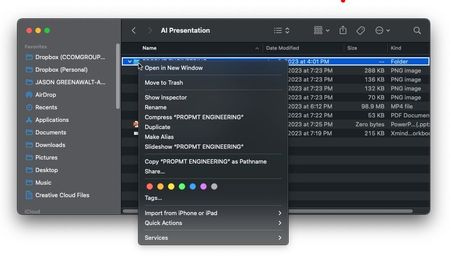
When I right click on the Dropbox folder in my finder (Mac) there is no submenu option to share, transfer or any other dropbox action available.
Accessibility is enabled under the settings
Fu...
 2 years ago
Hi Nancy
I just finally was able to test your settings and it works. it was indeed the extension that was unchecked for Dropbox. I restarted and it works now.
Thank you,
Jason

Rich Super User II
2 years agoSuper User II
JasonGreenwalt wrote:
When I right click on the Dropbox folder in my finder (Mac) there is no submenu option to share, transfer or any other dropbox action available.
To be clear, are you actually right-clicking on the Dropbox itself, or one of the folders within it? You won't get those options on the Dropbox folder; only on the items within it. You can't share or transfer your entire Dropbox.
 JasonGreenwalt2 years agoNew member | Level 2
Correct, the file that I want to share or any other submenu options available for Dropbox use are not showing up.
About Apps and Installations
Have a question about a Dropbox app or installation? Reach out to the Dropbox Community and get solutions, help, and advice from members.
The Dropbox Community team is active from Monday to Friday. We try to respond to you as soon as we can, usually within 2 hours.
If you need more help you can view your support options (expected response time for an email or ticket is 24 hours), or contact us on X, Facebook or Instagram.
For more info on available support options for your Dropbox plan, see this article.
If you found the answer to your question in this Community thread, please 'like' the post to say thanks and to let us know it was useful!


