Your workflow is unique 👨💻 - tell us how you use Dropbox here.
Forum Discussion

mrmrtno
1 year agoExplorer | Level 3
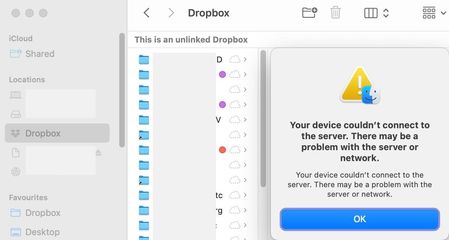
Unlinked Dropbox folder after restoring mac OS from Time Machine.
Hi there
I've been searching for a while, no solution in sight:
After restoring mac from time machine, most things worked as before, dropbox was re-linked (had to remove mac and link again,...

Megan Dropbox Community Moderator
1 year agoDropbox Community ModeratorThanks for the info mrmrtno!
Got it! Initially I thought that the new Dropbox folder was empty. However, it sounds like you can indeed see your content inside your Dropbox folder, but they are zero kb, right? Feel free to correct me if I'm wrong.
Also, based on what you described your content might have synced locally as online-only. If you try to follow these steps, in order to change it to available offline, does that work?

mrmrtno
1 year agoExplorer | Level 3
thanks Megan
yes, all there, but zero kb
so what you're suggesting is to try and sync/download all again into the new folder and then eventually deleting the old original (which is somehow "mounted" as a volume or sth..)?
Then I can use the new folder as before, adding/modifying stuff..?
yes, all there, but zero kb
so what you're suggesting is to try and sync/download all again into the new folder and then eventually deleting the old original (which is somehow "mounted" as a volume or sth..)?
Then I can use the new folder as before, adding/modifying stuff..?
- Hannah1 year ago
Hey mrmrtno, I hope it's okay for me to jump in as well.
You're quite right, that's how the process is going to be.
Just to make sure that the new Dropbox folder works correctly, though, do you see all the Dropbox options when you control/right-click on a file?
If so, instead of making all your files available offline one by one, you can also switch the Dropbox folder itself to available offline.
- mrmrtno1 year agoExplorer | Level 3
Thanks Hannah
what's confusing me is that the SYNC options are exactly the opposite:
Here "Available offline" is tagged and not "Online-only".
What about
– toggling that to "Online-only"
(should not change anything because that's how it actually seems to be)
– then toggling back to "Available offline"
shouldn't that make it download all files completely?
Am I missing sth here?
Thanks again
- Jay1 year ago
Hi mrmrtno, this setting is only for new files added to the Dropbox account itself on the site, and not for files that are already there.
If you want to make changes to the Dropbox folder, you'd need to right click the folder itself and choose the appropriate option to mark it as available offline or online-only.


About Apps and Installations
Have a question about a Dropbox app or installation? Reach out to the Dropbox Community and get solutions, help, and advice from members.
The Dropbox Community team is active from Monday to Friday. We try to respond to you as soon as we can, usually within 2 hours.
If you need more help you can view your support options (expected response time for an email or ticket is 24 hours), or contact us on X, Facebook or Instagram.
For more info on available support options for your Dropbox plan, see this article.
If you found the answer to your question in this Community thread, please 'like' the post to say thanks and to let us know it was useful!


