Need to see if your shared folder is taking up space on your dropbox 👨💻? Find out how to check here.
Forum Discussion

mrmrtno
2 years agoExplorer | Level 3
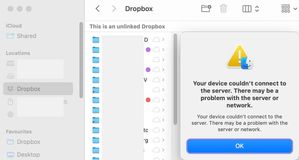
Unlinked Dropbox folder after restoring mac OS from Time Machine.
Hi there
I've been searching for a while, no solution in sight:
After restoring mac from time machine, most things worked as before, dropbox was re-linked (had to remove mac and link again,...

Walter Dropbox Community Moderator
2 years agoDropbox Community ModeratorHey mrmrtno - it seems that the desktop app is still linked to the wrong Dropbox folder somehow.
Could you try the advanced reinstall as Jay suggested and let us know how it goes?
If you end up with two folders again, send us a screenshot of both of them so that we can check the syncing icons in their contents.

mrmrtno
2 years agoExplorer | Level 3
Thanks Walter
the advanced reinstall wouldn't include deleting the old unlinked Cloud Storage folder?
This "File Provider" option does not have to do with anything?
That wouldn't change the DB-location to ~/library/CloudStorage (where that unlinked DB apparently was located before all that annoying screwed up system restore) …?
- Jay2 years ago
If you update to File Provider, this will use the CloudStorage location on your machine, as that's the only place it can be stored for Mac devices.
Since you don't want to lose links already linked to that location, this would be the best option to have the Dropbox folder back there.

About Apps and Installations
Have a question about a Dropbox app or installation? Reach out to the Dropbox Community and get solutions, help, and advice from members.
The Dropbox Community team is active from Monday to Friday. We try to respond to you as soon as we can, usually within 2 hours.
If you need more help you can view your support options (expected response time for an email or ticket is 24 hours), or contact us on X, Facebook or Instagram.
For more info on available support options for your Dropbox plan, see this article.
If you found the answer to your question in this Community thread, please 'like' the post to say thanks and to let us know it was useful!


