Your workflow is unique 👨💻 - tell us how you use Dropbox here.
Forum Discussion

ar1zona1
2 years agoHelpful | Level 5
Why can't I backup up any folder with Dropbox Backup?
We recently upgraded to Dropbox business and I am trying to give guidance to our team members for using dropbox backup to backup key folders from their computers.
I cannot seem to figure this out. ...
- 2 years ago
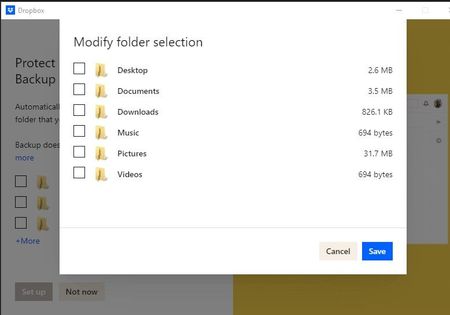
The Backup beta is currently only available to personal accounts, and not for Dropbox Business teams, which is why you might not be seeing this option.

GlasgowJill
2 years agoHelpful | Level 5
Hello,
I have Dropbox Basic (personal) with Backup beta (unpaid, not sure how I came to have it but I do). I've been trying to rationalise my storage and backup, after a critical data fail last week which highlighted the difference between a true, one-way backup and file sync.
I keep my main working files on Dropbox. However, as I understand it, these are not included in the Dropbox beta backup, which limits folder selection to Documents, Music, etc. The Dropbox files are in another part of my c drive and are not covered.
How is it not possible to back up files in Dropbox using Dropbox backup? In searching through the forum for an answer, I see that many people have been asking the same question.
I understand that the backup feature is still being developed and has limitations, but the exclusion of Dropbox files is very strange.
-Jill

Jay Dropbox Community Moderator
2 years agoDropbox Community ModeratorHi GlasgowJill, the Dropbox Backup feature is primarily for syncing certain folders one-way to the site. Those files could still be deleted from the site and backup if the original file is deleted from those folders on your computer, so the syncing of deletions is possible.
The normal Dropbox folder which has two-way syncing is the main service that Dropbox provides, since those files can be updated by other machines, devices and from the site, and has many more features available like sharing, unlike with the Backup feature.
Since the two services are separate, and provide different features, you could choose to save your files in one of the computer backup folders, if you wish for them to be separate from the main Dropbox folder.
About Apps and Installations
Have a question about a Dropbox app or installation? Reach out to the Dropbox Community and get solutions, help, and advice from members.
The Dropbox Community team is active from Monday to Friday. We try to respond to you as soon as we can, usually within 2 hours.
If you need more help you can view your support options (expected response time for an email or ticket is 24 hours), or contact us on X, Facebook or Instagram.
For more info on available support options for your Dropbox plan, see this article.
If you found the answer to your question in this Community thread, please 'like' the post to say thanks and to let us know it was useful!


