We're making some changes to the Dropbox Community 👩💻 - Find out more here.
Forum Discussion

joecohs
1 year agoHelpful | Level 5
Why does Dropbox for MacBook keep 'removing' itself?
Hi, Myself and multiple users in my organisation have an issue where the Dropbox installed App on our MacBooks 'removes itself. By this, I mean, Dropbox will still be installed, we can navigate ...
 7 months ago
One of the solutions which helped me was, on the offline installer, when its window pops up for you to double click to install, instead of doing the double click, drag and drop the Dropbox Icon into your Apple applications folder instead.
No idea why, but this worked for some of our users.

bkimball90
11 months agoHelpful | Level 5
I spoke too soon. It was removed again today without a restart of my Mac. This time though, in the Applications folder, I still saw Dropbox but it was a 3kb file that I'm almost positive was just a shortcut to my files. I reinstalled again and it's back up to the 528MB version. This is so annoying!
- Walter11 months ago
Dropbox Community Moderator
If you see it acting up again, you might want to reach out to our support team for further assistance with device and account specific information directly bkimball90
Let us know of any updates anyhow!
 marksow10 months agoExplorer | Level 4
Hi - did you ever resolve this? I'm having exactly the same issue!
- Nancy10 months ago
Sorry to hear that, marksow. Are you also experiencing the same behavior the OP mentioned where the Dropbox icon doesn’t show in the menu bar (even though the spot still seems to be taken by it)? What do you see, if you click on that spot?
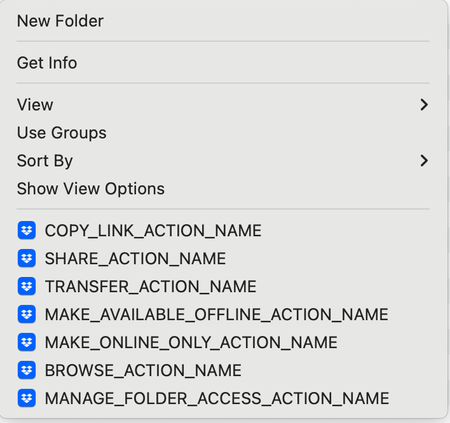
As for the Dropbox folder, do you see the same options, when right-clicking on your files/folders? Are there any syncing icons next to your files?
I understand you said you're having the exact same issue, but in some cases, the experience may slightly differ from user to user, so I'd like to make sure that's not the case here.
Feel free to send me a couple of screenshots as well of what you see; it’d really be helpful to have a visual.
- marksow10 months agoExplorer | Level 4
I have the exact same issue as joecohs above - the app keeps removing itself after I restart my macbook. The usual sign is that the dropbox icon disappears from the menu bar (no space for it there at all). I also have an issue sometimes that my Dropbox folders (work and personal) disappear from the Online Locations section of the Finder sidebar.


About Apps and Installations
Have a question about a Dropbox app or installation? Reach out to the Dropbox Community and get solutions, help, and advice from members.
The Dropbox Community team is active from Monday to Friday. We try to respond to you as soon as we can, usually within 2 hours.
If you need more help you can view your support options (expected response time for an email or ticket is 24 hours), or contact us on X, Facebook or Instagram.
For more info on available support options for your Dropbox plan, see this article.
If you found the answer to your question in this Community thread, please 'like' the post to say thanks and to let us know it was useful!


