Your workflow is unique 👨💻 - tell us how you use Dropbox here.
Forum Discussion

KathyMc4
10 months agoHelpful | Level 5
I can no longer open my Microsoft files via my Android mobile app. They throw all sorts of errors.
Please help, I am in a HUGE panic. As of this morning, my Android Microsoft mobile apps no longer open my more than 1000 Dropbox files. I cannot save a newly created Microsoft file to Dropbox either....

KathyMc4
10 months agoHelpful | Level 5
I tried both to no avail. When I tried to add Dropbox to word, I received the message "Can't complete task."
Logging in using email and password instead of through my Google account didn't work either. While I was able to successfully log in, I received the same error message as before.
I should mention that this problem only occurs on my Pixel phone and not on my Mac
- Walter10 months ago
Dropbox Community Moderator
Thanks for the update on this KathyMc4 - much appreciated.
Could you also send us a screenshot of the error(s) you're getting so that we can have a visual too?
Apart from that, what is your device's OS version and the version of the Dropbox app and the Microsoft apps you're using?
- KathyMc410 months agoHelpful | Level 5
I have a pixel 8 pro running android version 15. I have Dropbox Plus 418.2.2. Microsoft Word version is version 16.0.18623.20090
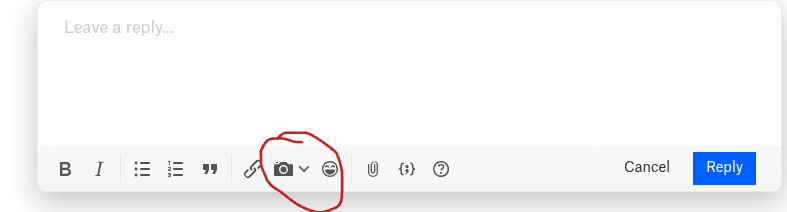
com.microsoft.office.wordI don't see a place here to add photos. What is the best way to send screenshots to you?

About Integrations
Get help with third-party integrations from the Dropbox Community.
The Dropbox Community team is active from Monday to Friday. We try to respond to you as soon as we can, usually within 2 hours.
If you need more help you can view your support options (expected response time for an email or ticket is 24 hours), or contact us on X, Facebook or Instagram.
For more info on available support options for your Dropbox plan, see this article.
If you found the answer to your question in this Community thread, please 'like' the post to say thanks and to let us know it was useful!


