We’re Still Here to Help (Even Over the Holidays!) - find out more here.
Forum Discussion

jrc2
6 years agoHelpful | Level 5
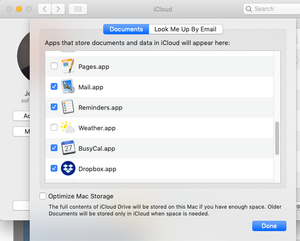
MAC: Why does Dropbox appear in iCloud Drive settings?
In my Mac's System Preferences for iCloud, iCloud Drive has an Options button next to it. Clicking that shows a list of apps below a statement "Apps which can store documents and data in iCloud will ...

savagekevin
6 years agoNew member | Level 2
I have this question too
have we got an answer yet?
jrc2
6 years agoHelpful | Level 5
It's been a month. I've not heard back from anyone!!
About Integrations
Find solutions to issues with third-party integrations from the Dropbox Community. Share advice and help members with their integration questions.
The Dropbox Community team is active from Monday to Friday. We try to respond to you as soon as we can, usually within 2 hours.
If you need more help you can view your support options (expected response time for an email or ticket is 24 hours), or contact us on X, Facebook or Instagram.
For more info on available support options for your Dropbox plan, see this article.
If you found the answer to your question in this Community thread, please 'like' the post to say thanks and to let us know it was useful!


