Your workflow is unique 👨💻 - tell us how you use Dropbox here.
Forum Discussion

tsw
3 months agoNew member | Level 2
There's no option to remove the Dropbox for Outlook add-in on Windows 11.
Hello,
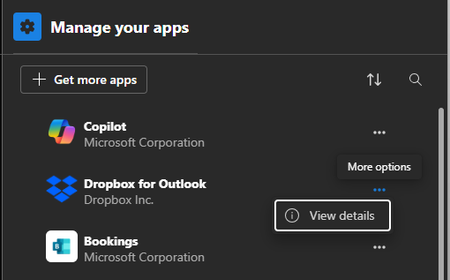
I'm trying to remove "Dropbox for Outlook" Addin from Microsoft Outlook (new, lite version) running on Windows 11.
It should be as easy as clicking "Remove" from the "Manage your apps" set...
 3 months ago
Hi Jay,
The URL from the Step 1 of the linked article renders the 404.
I also went to https://admin.cloud.microsoft/ -> Integrated Apps, and removed "Dropbox for Outlook"
to no avail. Dropbox is still in Outlook
tsw
3 months agoNew member | Level 2
Hi Jay,
The URL from the Step 1 of the linked article renders the 404.
I also went to https://admin.cloud.microsoft/ -> Integrated Apps, and removed "Dropbox for Outlook"
to no avail. Dropbox is still in Outlook
tsw
3 months agoNew member | Level 2
Scratch that - it took few minutes for Outlook to reflect the change on Microsoft 365 admin center. It's gone !
Thank you both
- Jay3 months ago
Dropbox Community Moderator
Thanks for the update. I'm glad to hear that the change has removed the Dropbox add-on in Outlook.
If you have any further questions, please feel free to contact us back!

About Integrations
Find solutions to issues with third-party integrations from the Dropbox Community. Share advice and help members with their integration questions.
The Dropbox Community team is active from Monday to Friday. We try to respond to you as soon as we can, usually within 2 hours.
If you need more help you can view your support options (expected response time for an email or ticket is 24 hours), or contact us on X, Facebook or Instagram.
For more info on available support options for your Dropbox plan, see this article.
If you found the answer to your question in this Community thread, please 'like' the post to say thanks and to let us know it was useful!


