Your workflow is unique 👨💻 - tell us how you use Dropbox here.
Forum Discussion

GDuncan
7 years agoNew member | Level 2
Unable to open Dropbox files in Word
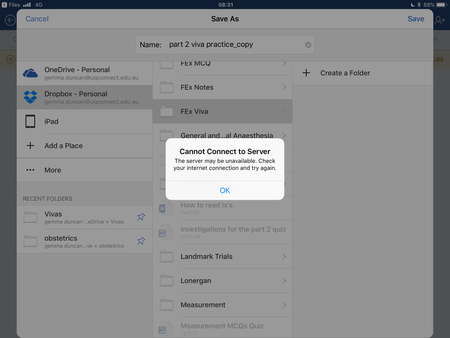
When I attempt to open a word document from the Dropbox App on iPad I receive an error message saying “Cannot Find File. The location changed since you last opened the file. “ (see below) Secondl...
- 7 years ago
I'm hazarding a guess its a Word issue because it is Microsoft that creates the software which links the two services together.
Maybe try again in a few hours and if it still causes issues have a look on the Microsoft forums?[This thread is now closed by moderators due to inactivity. If you're experiencing a similar behavior, feel free to start a new discussion in the Dropbox Community here.]

Jvalenci
7 years agoHelpful | Level 5
Hi
My Dropbox files won’t load on my ipad’s Microsoft Word app and a notification come up saying something about the server and internet connection. I have the Dropbox app on my iPad and that syncs my file fine with my computer and I can view all files, however I can’t open them in Microsoft Word on my iPad. I managed to open them in Read-only but as soon as I tried to edit, it said the same thing about the server and internet connection.
This never used to be an issue so not sure what has changed and why it no longer lets me use the files.
Jennifer
My Dropbox files won’t load on my ipad’s Microsoft Word app and a notification come up saying something about the server and internet connection. I have the Dropbox app on my iPad and that syncs my file fine with my computer and I can view all files, however I can’t open them in Microsoft Word on my iPad. I managed to open them in Read-only but as soon as I tried to edit, it said the same thing about the server and internet connection.
This never used to be an issue so not sure what has changed and why it no longer lets me use the files.
Jennifer

Mark Super User II
7 years agoSuper User III'm hazarding a guess its a Word issue because it is Microsoft that creates the software which links the two services together.
Maybe try again in a few hours and if it still causes issues have a look on the Microsoft forums?
[This thread is now closed by moderators due to inactivity. If you're experiencing a similar behavior, feel free to start a new discussion in the Dropbox Community here.]
About Integrations
Get help with third-party integrations from the Dropbox Community.
The Dropbox Community team is active from Monday to Friday. We try to respond to you as soon as we can, usually within 2 hours.
If you need more help you can view your support options (expected response time for an email or ticket is 24 hours), or contact us on X, Facebook or Instagram.
For more info on available support options for your Dropbox plan, see this article.
If you found the answer to your question in this Community thread, please 'like' the post to say thanks and to let us know it was useful!


