Our Community is in read-only mode until April 8th, learn more here. You can still search existing threads or get help via Dropbox Support, the Dropbox Help Center, or Learn.
Forum Discussion

9798
7 years agoNew member | Level 2
Why are my Dropbox folders not showing in the iOS Files app on my iPhone?
iphone 6
latest ios
in dropbox ios app (and on Mac Desktop), both my DB accounts show up.
In mail, go to "attach file" and no DB accounts show up in Locations.
In ios Files, no DB accounts show up in Locations.
This happened last time there was a major ios upgrade, and we had to stand around while DB blamed Apple.
(Please join this with the same issue feedback I just sent, that DB just acknowlkedged with a link that I can't open using these credentials - add feedback to THIS Q&A please, not the other way around)
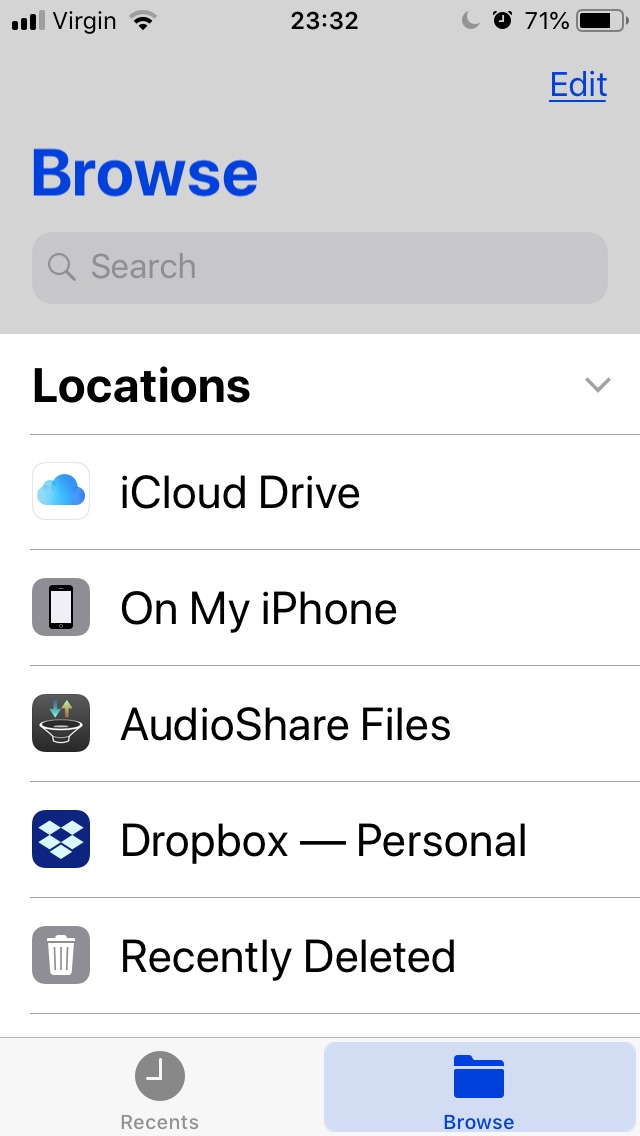
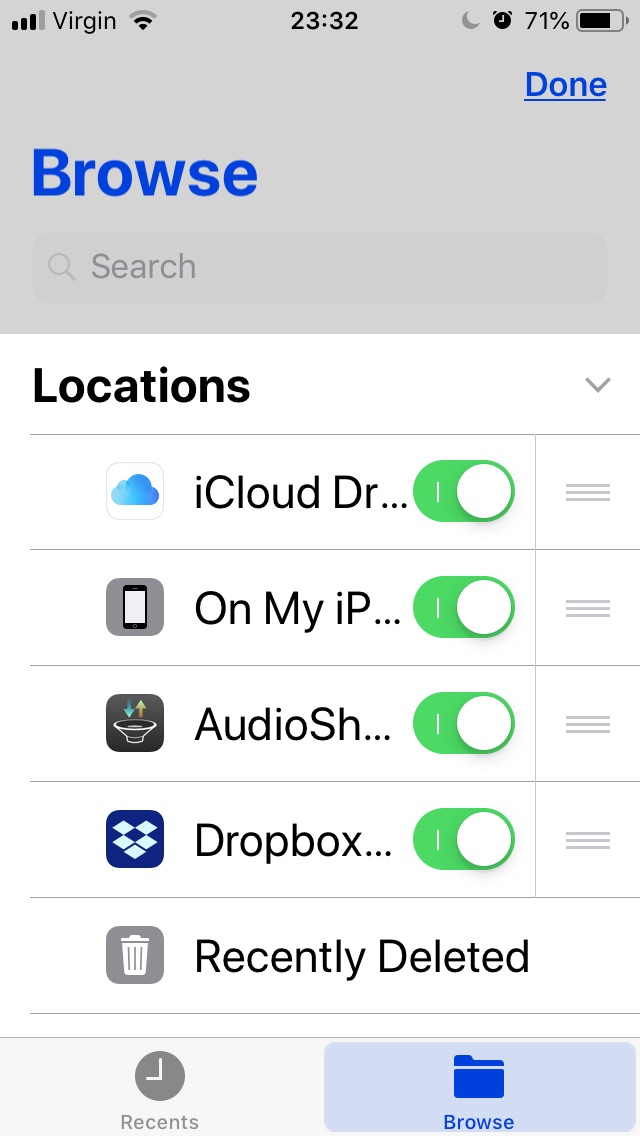
- Hi there, in the iOS Files app, could you try tapping the ‘Edit’ button on the top right and see if the Dropbox locations are there, but deselected.If so, try enabling them, tap ‘Done’ and see if this works for you now.Keep me posted with any updates.

21 Replies
Replies have been turned off for this discussion
- Jay7 years ago
Dropbox Community Moderator
Hi there, in the iOS Files app, could you try tapping the ‘Edit’ button on the top right and see if the Dropbox locations are there, but deselected.If so, try enabling them, tap ‘Done’ and see if this works for you now.Keep me posted with any updates. - 97987 years agoNew member | Level 2
"I don't know whether to slap you, kiss you, or salute you!"
- Bill Guarnere, Band of Brothers
*** thank you.
Also, FileNames are showing up now, but without suffixes
Makes it hard to choose if user has multi types of a file normally only distinguished by .txt, .pdf, .doc
- Jay7 years agoGlad to have helped with that!Thanks for the new info, this might be more related to how the integration with the iOS Files app works, since iCloud files appear the same way when viewing via their location in the app.However, I’ll forward this feedback to our dev team for their awareness to see if this can be improved in future!
- 97987 years agoNew member | Level 2
"this might be more related to how the integration with the iOS Files app works, since iCloud files appear the same way when viewing via their location in the app."
When you're right, your're right!
PS - I can't hit reply or upvote an answer on this page until AFTER I "Accept as Best Answer".
- 97987 years agoNew member | Level 2
Now the upvote button doesn't work at all.
Please ask DB forum page designers to test on Safari.
Thanks!
- Jay7 years agoHmm… I just tested that out here on another thread and it seems to upvote fine.If you’d like to try, you can try using incognito/private browsing mode without any extensions running, or clearing your cache to see if this helps.
- sleekitwan6 years agoNew member | Level 2
Thankyou Jay, this feature was blocking my use of NCH Wavepad to get audio available easily from iphone to other devices. See pics below - Their size seems a little indiscriminate...shows clearly what the controls look like once you hit the ‘files’ icon...
best
sleekitwan
HIT the EDIT then you see this...
- Mpm20196 years agoExplorer | Level 3
Jay. My Dropbox shows only two pages of the pdf of Science magazine (I haber full subscription). I used to view all types of pdf s on my iPad, iPhone and my Mac. Now the files seem to be there at iPad but content does not come up when I click on the pdf. It keeps waiting.
There are no problems with any connections or permissions.
thanks.
- Jane6 years ago
Dropbox Staff
Hey Mpm2019, welcome to the Dropbox Community; you’ve reached Jane this time!It sounds like the issue you’re experiencing is slightly different than the OP’s. In order to make sure I’m further advising correctly, can YOU clarify the following for me?- Are you facing an issue previewing your .PDFs through the Files app or through the Dropbox mobile app?
- Does your description apply to accessing your .PDFs when attaching to a third-party app?
- Could you include a screenshot (masking personal info) in your next message for me outlining me what this looks like on your end?
Once I have this info, I‘ll look into this further. Thanks again! - Mpm20196 years agoExplorer | Level 3
Thank you for the response Jane,
This happens on my iPad, where I use the Dropbox Mobile application. As you will see from the screen shot, I have several Science magazines, and I used to open and read them at my Dropbox. I also used access to all my other files (word, excel, etc.) from Dropbox app. I can still access to them without any problems using my iPhone 10. Yet, my iPad (a recent version, with the updated operating system) stopped opening up any of these files, even after I restarted it again and again several times.
Is there a solution?
Thank you.
MPM
MPM Problem page

About Integrations
Get help with third-party integrations from the Dropbox Community.
The Dropbox Community team is active from Monday to Friday. We try to respond to you as soon as we can, usually within 2 hours.
If you need more help you can view your support options (expected response time for an email or ticket is 24 hours), or contact us on X, Facebook or Instagram.
For more info on available support options for your Dropbox plan, see this article.
If you found the answer to your question in this Community thread, please 'like' the post to say thanks and to let us know it was useful!


