Your workflow is unique 👨💻 - tell us how you use Dropbox here.
Forum Discussion

mfalkvidd
4 years agoHelpful | Level 5
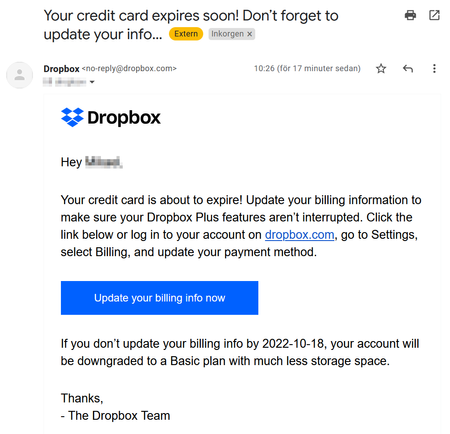
Erroneous "Your credit card expires soon! Don’t forget to update your info" email
Today, I received an email from Dropbox with the subject "Your credit card expires soon! Don’t forget to update your info" with the following text: Your credit card is about to expire! Update your b...

Megan Dropbox Community Moderator
3 years agoDropbox Community ModeratorHi MFNL, thanks for getting back to me!
It might sound trivial, however have you made sure that the email address that your Dropbox account is subscribed to, is the same as the one you received the message to?
MFNL
3 years agoExplorer | Level 4
yes, the e-mail account is the same
- Megan3 years ago
Hey MFNL, happy Friday!
When did you receive the second email?
I'm asking, because if you received it shortly after updating your billing info, then it might have been an automated email, that slipped through the system before registering that you've made all the necessary changes.
Have you recently gotten any new emails after the change?
 Jason S.103 years agoExplorer | Level 3I’ve gotten this email at least three times in the last few weeks. Each time I went in and updated my billing info to indicate the new CC expiry date. It’s not phishing in my case. It always takes me to the real Dropbox site to update my billing. Please fix this and stop wasting my time.
- Megan3 years ago
Hi Jason S.10, sorry to hear about that!
Your feedback regarding this has been very valuable and I will endeavor to make sure your voice is heard.
I understand this is not ideal, however the culprit must be that the automation potentially takes some time to "recognize" the fact that you've updated your billing info.
I'll forward your feedback to the appropriate areas so we can continue to improve. If you have further trouble with it, let me know!
About Plans and Subscriptions
Ask the Dropbox Community for help if you have questions about your Dropbox plan or subscription. Find solutions and share advice with members.
The Dropbox Community team is active from Monday to Friday. We try to respond to you as soon as we can, usually within 2 hours.
If you need more help you can view your support options (expected response time for an email or ticket is 24 hours), or contact us on X, Facebook or Instagram.
For more info on available support options for your Dropbox plan, see this article.
If you found the answer to your question in this Community thread, please 'like' the post to say thanks and to let us know it was useful!


