2025 sparked some incredible conversations across our community 👩💻. Discover the highlights and see what’s ahead in 2026.
Forum Discussion

Time2
1 year agoExplorer | Level 3
I can't update my billing info, as I'm asked to select a different plan.
Hey, My account billing information needs to be updated (because there was not enough credit in the card when the invoice was issued).
Now i update the billing information and i cant porceed be...

Rich Super User II
1 year agoSuper User II
Time2 wrote:
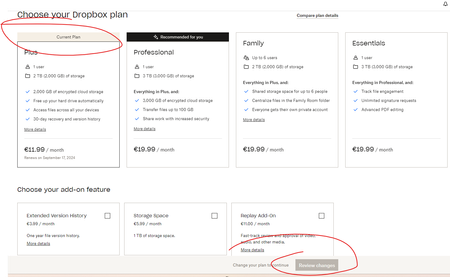
Now i update the billing information and i cant porceed because i need to select the plan, but i dont want to select upgraded version as i am totally ok with the plan i have.
It looks like you've clicked on upgrade plan, rather than update for your billing information. Make sure you're on the Billing page, then click the Update link.
 Time21 year agoExplorer | Level 3
Thanks for the reply!
I tried both ways, and when i'm on Billing page, after all the billing information is provided i am automatically linked to the page with plans and i can't choose the plan that i have right now.- Nancy1 year ago
Dropbox Community Moderator
Time2, can you send us one more full screenshot of what you see when trying to save your new billing info? Please hide your personal info before attaching it here.
- Time21 year agoExplorer | Level 3
Sure,
here is one by one screenshots of what is going on:
1. Filling billing info:2. Then i'm automaticaly linked to this:
3. An then automaticaly linked here (where i can't select current plan anymore):

About Plans and Subscriptions
Ask the Dropbox Community for help if you have questions about your Dropbox plan or subscription. Find solutions and share advice with members.
The Dropbox Community team is active from Monday to Friday. We try to respond to you as soon as we can, usually within 2 hours.
If you need more help you can view your support options (expected response time for an email or ticket is 24 hours), or contact us on X, Facebook or Instagram.
For more info on available support options for your Dropbox plan, see this article.
If you found the answer to your question in this Community thread, please 'like' the post to say thanks and to let us know it was useful!


