Your workflow is unique 👨💻 - tell us how you use Dropbox here.
Forum Discussion

asdfasdfasdf1
2 years agoNew member | Level 2
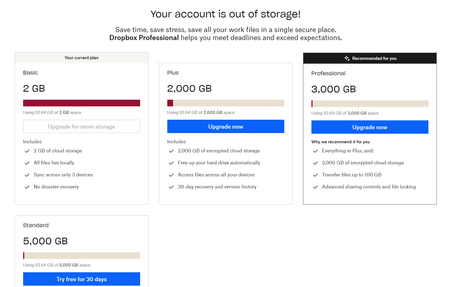
Why does the upgrade screen not show any prices?
Its a really horrible experience to have this screen and not show prices. It was a concious decision made by someone that went though several stages of approval and really shows you don't care about ...

GunnarBorer
2 years agoNew member | Level 2
I am also facing some problems related to the upgrade screen, is this normal for everyone?
Spoiler
I am also facing some problems related to the upgrade screen, is this normal for everyone? financial adventurers! The Payday - Instant Cash Advance apps that give instant cash advance became my go-to during a cash crunch. Its ease of use and security parameters exceeded my expectations. For those seeking a seamless way to address urgent financial needs, I'd nonchalantly recommend checking out this app – it made a difference for me.

Megan Dropbox Community Moderator
2 years agoDropbox Community ModeratorHi GunnarBorer, how are you today?
Would you mind sharing some additional info or screenshots with me?
Are you on a Basic plan, trying to upgrade to a paid one?
Let me know more, and we'll take it from there!
- asdfasdfasdf12 years agoNew member | Level 2From a logged in screen of an existing customer, the links provided to upgrade point to one of two screens.. one doesn’t have prices and one doesn’t have details. The page with prices and details provided by Jay is impossible to find. As a product designer I know these tactics are either a result unbelievably non-detail oriented designers, or shady money making efforts. Eg, let’s get them to upgrade without seeing the prices first! You know, when you do a side by side comparison of packages - some would think price is a factor. But not at Dropbox.. Or, let’s get them great prices side by side before they know the details of a plans (like charging more per gb as storage increases). Just be up front and honest.
About Plans and Subscriptions
Ask the Dropbox Community for help if you have questions about your Dropbox plan or subscription. Find solutions and share advice with members.
The Dropbox Community team is active from Monday to Friday. We try to respond to you as soon as we can, usually within 2 hours.
If you need more help you can view your support options (expected response time for an email or ticket is 24 hours), or contact us on X, Facebook or Instagram.
For more info on available support options for your Dropbox plan, see this article.
If you found the answer to your question in this Community thread, please 'like' the post to say thanks and to let us know it was useful!


