Your workflow is unique 👨💻 - tell us how you use Dropbox here.
Forum Discussion

GennadyKarasev
2 years agoHelpful | Level 5
Email notification settings are ignored
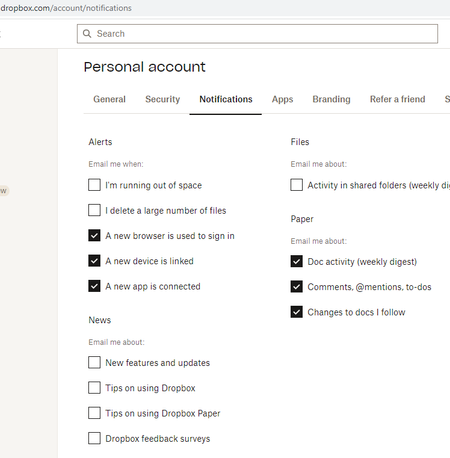
Why do i get spam emails from dropbox? My email settings are off for any emails (news).


BenDBX Community Manager
2 years agoCommunity ManagerHi Everybody,
Thanks for reporting these issues.
Unsubscribing should stop these emails. There can be a delay in processing the subscription opt-out that results in emails being sent for a short period of time, but this shouldn't persist.
We are currently investigating. These emails should stop being sent to you shortly if they haven't already. Feel free to report here if you are still receiving emails from us and I will make sure that information gets to the right team.
Regards,
Ben

amydcb
2 years agoHelpful | Level 5
This is also happening to me. When I click on unsubscribe in the emails, it takes me to settings, where I have very few options checked. There's no reason I should be getting tips and tricks emails.
- Jay2 years ago
Dropbox Community Moderator
Hi amydcb, joininonallthefun, are you still receiving these emails today?
- amydcb2 years agoHelpful | Level 5
The most recent one was sent to me today at 3:06 AM
 WhiteZero2 years agoExplorer | Level 4
I've also received this same "3 steps to make tax season as pain-free as possible" email FOUR times now. I have all email notifications turned off on my account. I've also tried enabling and disabling the emails in my preferences. There is obviously something wrong on Dropbox's side here.
 joininonallthefun2 years agoExplorer | Level 4
Yes, I received one today at 13:25 PDT.
 SurferVenus2 years agoNew member | Level 2I have also been having this problem. Every single notification type is unchecked in settings. My last email was half an hour ago advertising the Dropbox desktop app.

About Settings and Preferences
The Dropbox Community is here to help if you have questions about your account settings and preferences. Learn and share advice with members.
The Dropbox Community team is active from Monday to Friday. We try to respond to you as soon as we can, usually within 2 hours.
If you need more help you can view your support options (expected response time for an email or ticket is 24 hours), or contact us on X, Facebook or Instagram.
For more info on available support options for your Dropbox plan, see this article.
If you found the answer to your question in this Community thread, please 'like' the post to say thanks and to let us know it was useful!


