We're making some changes to the Dropbox Community 👩💻 - Find out more here.
Forum Discussion

Lynneth
3 years agoNew member | Level 2
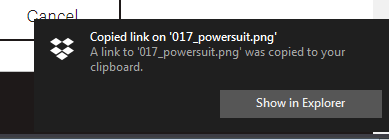
How can I disable the push notification when copying Dropbox link from PC
I don't want dropbox to tell me I just copied I file. I know I did, because I just told it to.
How do I disable that? I've already gone to Windows' Action Center and disabled Dropbox' icon and not...
- 3 years ago
Lynneth wrote:
Unfortunately that's a windows 8 or 10 solution - I'm still on windows 7, apologies for not making that clear in the first post.
If you're unable to use the Windows 7 notification settings to suppress this, then there won't be a way to do it. There's no option to do so in Dropbox.

Rich Super User II
3 years agoSuper User II
Lynneth wrote:
Unfortunately that's a windows 8 or 10 solution - I'm still on windows 7, apologies for not making that clear in the first post.
If you're unable to use the Windows 7 notification settings to suppress this, then there won't be a way to do it. There's no option to do so in Dropbox.

mgambrell
3 years agoCollaborator | Level 9
Please add an option. The new notification is huge and disturbing. There's already a place to control the notifications "notify me about". Want to hear something funny? The "snooze" "Turn off notifications for a limited time" CAN disable this notification. So it's managed by the same engine (in other words, it's not different somehow because it's issued by the explorer integration rather than the daemon or whatever). Someone just forgot to pipe this notification through to the "notify me about" configuration.
PLEASE FIX THIS
- mgambrell3 years agoCollaborator | Level 9
Now this thing is stuck on my screen because it popped under my mouse cursor while I was working on something and I accidentally click-mashed it and confused it.
About Settings and Preferences
The Dropbox Community is here to help if you have questions about your account settings and preferences. Learn and share advice with members.
The Dropbox Community team is active from Monday to Friday. We try to respond to you as soon as we can, usually within 2 hours.
If you need more help you can view your support options (expected response time for an email or ticket is 24 hours), or contact us on X, Facebook or Instagram.
For more info on available support options for your Dropbox plan, see this article.
If you found the answer to your question in this Community thread, please 'like' the post to say thanks and to let us know it was useful!


