Your workflow is unique 👨💻 - tell us how you use Dropbox here.
Forum Discussion

x184926
3 years agoExplorer | Level 3
Missing sync option (smart sync)
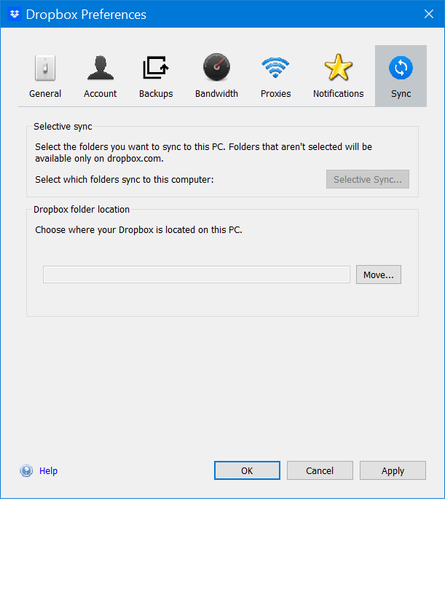
Where do i actually find the **bleep** smart sync, I either have to download and then sync or went to the website to access the file. With all the youtube guide I watched none of the preferences opti...


x184926
3 years agoExplorer | Level 3
Just ticks, there are more files that weren't synced

Megan Dropbox Community Moderator
3 years agoDropbox Community ModeratorHi x184926, thanks for the screenshot!
Have you tried sharing any other file/folder other than the Dropbox cache folder?
In your screenshot, I noticed that you're trying to share content from the Desktop backup folder, right? If that's the case, then this isn't something you can do at the moment due to security reasons.
Ideally, in order to check if the sharing context menu works as intended, you'd need to access your Dropbox folder, and find a file or folder that's not part of your Backup, and try it there.
- x1849263 years agoExplorer | Level 3
I don't need anything from my desktop end, I want to sync the file from the company files without download it into my laptop. Is there a way to fix that or not? And why I can't do it now when before it was fine.
Dropbox app should just stay it way it is, now it's a pain in the ass without a proper UI.
- Megan3 years ago
Hey x184926, you can always disable the Backup feature, by following these steps.
If you do that, your desktop files will stop syncing with Dropbox. Provided you want to sync something to us or share, you can always manually move it inside your Dropbox folder and proceed from there.
As for the files and how to stop them from taking space to your device, you can follow these steps.
I hope that clarifies.
- x1849263 years agoExplorer | Level 3
That is not what I want,
First, I never even wanted to sync anything from my desktop. No backup, no nothing. Just everything within the Dropbox folder.
Second, I just want to sync my company Dropbox by online-only, without me downloading everything to sync that way.
Third, my Dropbox option aren't even same to my co-worker which is the main thing I wanted to fix.
- Megan3 years ago
Hi x184926, thanks for writing back.
The info I've provided is based on the details you have given us here on the Community. I'd be more than happy to help you understand your options, or even troubleshoot further, in order to get to the bottom of this. However I do need some additional help from your end.
Could you kindly share another screenshot of the context menu when you select a folder or file within the top level of your Dropbox folder, showing the missing Dropbox icons?
As for your files being synced locally, you can select multiple folders together, and choose to make them available online-only at once. Also, make sure the app's preferences are set to sync new files as online only.
- x1849263 years agoExplorer | Level 3
Here's your context menu
\
Now tell me where's the option for online-only in this menu when I installed Dropbox
This the the amount that it's trying to download syce into my Laptop which is 0.9TB and I don't want that
- Hannah3 years ago
Sorry to jump in here, x184926, but I'm afraid that if your files are still syncing, you won't be able to make them online-only, until they're fully synced.
Can you right click on files that are fully synced (have a green check mark), to see if those ones have the option to make them online-only?
- x1849263 years agoExplorer | Level 3
No and it was never an option for me, which is why this post happen
Why can't the app be a lot more simple, just show the option at the first place and that's it
- Walter3 years ago
Hey x184926, sorry to jump in, but may I request another screenshot?
This time make sure to make it full-screen so that we can check the paths of the files you're clicking on and their syncing icons as well as the desktop app's status and version as shown in your system tray.
Thanks so much!
- x1849263 years agoExplorer | Level 3
How many screenshot do we need till it's easier to just add a stupid optional button to fix all this crap
- Megan3 years ago
Hey x184926, thank you for reaching back to us.
If you access the app's preferences, under the General tab, are you able to find the option there to opt-in or enable the functionality to make files online-only?
Keep in mind, that even if you enable the feature, you'd still need to wait for the files to be fully synced to the computer, in order to change them to online-only.
- x1849263 years agoExplorer | Level 3
No, I checked my company laptops and some of them have to option for online-sync in Sync tab
Does version of the Windows makes a different or just what cause my laptop missing the option in the first place?
- x1849263 years agoExplorer | Level 3
There is already a screenshot on the very first post but here you go
- x1849263 years agoExplorer | Level 3
I have already reinstall many time, that doesn't do jack
- x1849263 years agoExplorer | Level 3
It wasn't enable, what happen after I enable it?
Nothing change in my Preferences setting
- x1849263 years agoExplorer | Level 3
Finally, now this can use as a references to show how hard to fix a simple problem but the option aren't shows in the app UI obviously.

About Settings and Preferences
The Dropbox Community is here to help if you have questions about your account settings and preferences. Learn and share advice with members.
The Dropbox Community team is active from Monday to Friday. We try to respond to you as soon as we can, usually within 2 hours.
If you need more help you can view your support options (expected response time for an email or ticket is 24 hours), or contact us on X, Facebook or Instagram.
For more info on available support options for your Dropbox plan, see this article.
If you found the answer to your question in this Community thread, please 'like' the post to say thanks and to let us know it was useful!


