Your workflow is unique 👨💻 - tell us how you use Dropbox here.
Forum Discussion

x184926
3 years agoExplorer | Level 3
Missing sync option (smart sync)
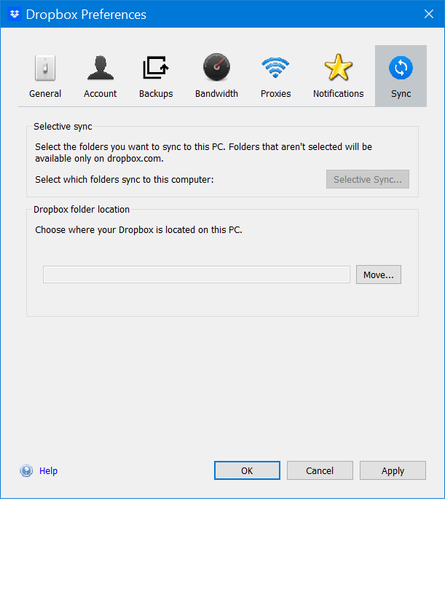
Where do i actually find the **bleep** smart sync, I either have to download and then sync or went to the website to access the file. With all the youtube guide I watched none of the preferences opti...


x184926
3 years agoExplorer | Level 3
There is already a screenshot on the very first post but here you go

Megan Dropbox Community Moderator
3 years agoDropbox Community ModeratorHi x184926, you're great, thanks for this!
Is there any possibility that you've opted-out of the Dropbox system extension? Can you try the steps mentioned in this Help Center article, and report back to me with your results?
- x1849263 years agoExplorer | Level 3
I have already reinstall many time, that doesn't do jack
- x1849263 years agoExplorer | Level 3
It wasn't enable, what happen after I enable it?
Nothing change in my Preferences setting
- x1849263 years agoExplorer | Level 3
Finally, now this can use as a references to show how hard to fix a simple problem but the option aren't shows in the app UI obviously.
About Settings and Preferences
The Dropbox Community is here to help if you have questions about your account settings and preferences. Learn and share advice with members.
The Dropbox Community team is active from Monday to Friday. We try to respond to you as soon as we can, usually within 2 hours.
If you need more help you can view your support options (expected response time for an email or ticket is 24 hours), or contact us on X, Facebook or Instagram.
For more info on available support options for your Dropbox plan, see this article.
If you found the answer to your question in this Community thread, please 'like' the post to say thanks and to let us know it was useful!


