Need to see if your shared folder is taking up space on your dropbox 👨💻? Find out how to check here.
Forum Discussion

Alexut
4 months agoHelpful | Level 6
Dropbox Passwords does not allow access due to device limit.
My laptop recently died, i can't connect to dropbox passwords because you're forcing me to upgrade rather than allowing me cancel the connection to the device that just died, since you're discontinui...
 3 months ago
I've circumvent this by guessing what other device i might have used (parents pc) that triggered the devices limit, i just exported the passwords, and completly removed the passwords extension. The problem was not fixed but theres a slim chance others might have the same problem as me. Goodbye.
Alexut
3 months agoHelpful | Level 6
I have removed absolutely everything there:
Dropbox Passwords Extension shows up each time i'm trying to connect to it in browser, but I removed it 5 times already and restarted browser. I still get this:
- Walter3 months ago
Dropbox Community Moderator
Hey Alexut - thanks for the updates and the screenshot too.
Can you navigate to the "More" icon shown in the left hand side pane and select the Passwords option? What do you see there?

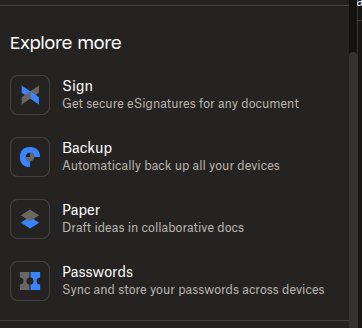
- Alexut3 months agoHelpful | Level 6
i have just home and folders. I do have more on the top section but it just redirects me to the chrome extension without the possibility to access it.
- Alexut3 months agoHelpful | Level 6
I've circumvent this by guessing what other device i might have used (parents pc) that triggered the devices limit, i just exported the passwords, and completly removed the passwords extension. The problem was not fixed but theres a slim chance others might have the same problem as me. Goodbye.

About Security and Permissions
Start a discussion in the Dropbox Community forum to get help with your account security and permissions. Find support from Community members.
The Dropbox Community team is active from Monday to Friday. We try to respond to you as soon as we can, usually within 2 hours.
If you need more help you can view your support options (expected response time for an email or ticket is 24 hours), or contact us on X, Facebook or Instagram.
For more info on available support options for your Dropbox plan, see this article.
If you found the answer to your question in this Community thread, please 'like' the post to say thanks and to let us know it was useful!


