Our Community is in read-only mode until April 8th, learn more here. You can still search existing threads or get help via Dropbox Support, the Dropbox Help Center, or Learn.
Error Messages
51 Topics
Getting an error when logging in my Dropbox account on an Android device
Application Affected Dropbox Samsung Note 10.1 Operating System/Browser (if using the web) Andriod Dropbox App Version (if using the app) (200.4.7123 - found in app settings or About section) Question or Issue "Error completing Goodle authentication. Please try again, or if the issue persists, sign in using your email and password" I have tried using my Google sign in and also email option. If sign in via email - "Sign-in Failed - Can't connect to Dropbox. Make suire you're online, or try again later"99Views0likes4CommentsI can't login to Dropbox at all on my paid account
Device: Lenovo T16 Operating System/Browser: Windows - All browsers: Chrome, Edge and Firefox Dropbox Plan: Plus Question or Issue When I enter my .edu email and password (which are correct) the screen just simply doesn't move. Initially I was getting an email to enter a 6 digit verification code but there was nowhere on the screen to enter it regardless of the browser or incognito window and I have no extensions etc. that may be blocking a screen. Eventually it stopped the 6 digit code and not asks for these long laborious captchas, which I have gone through about 7/8 times on three different browsers. I finish the captcha and it says "Congratulations you verified you are human" then depending on the browser the screen either just remains on the login screen or sends a yellow sticker saying the captcha wasn't verified correctly (which it was). Completely at a loss how to login to the web version because I have to recover something from the trash. This free account that I am using to post the issue (since I can't login on my paid one) is logging in just fine, as are a couple of my other free accounts with gmail domains. My paid account is an .edu domain.246Views0likes8Comments
I get an "email taken" error for an email address that's no longer linked to a Dropbox account.
Device Acer Swift X Operating System/Browser (if using the web) Windows 11 Dropbox App Version (if using the app) (200.4.7123 - found in app settings or About section) Dropbox Plan Basic I intend to change my email address soon, but couldn't find how to do it, so I created a new Dropbox for the new email [...]. Intending to somehow transfer all my files. Setting this up, I discovered Settings->General->Change email. So I went back to my original Dropbox [...] and tried to change that. Of course, it could not because one already existed. I therefore went back to the [...] Dropbox and successfully deleted it. Or so I thought. Unfortunately, attempting to change the email on the original [...] Dropbox fails saying that email address is already taken. My fault, I know. But any ideas? [personal details removed per Community Guidelines]Solved523Views0likes18Comments
Error when trying to receive a text message code for 2FA
Question or Issue I logged out of my Dropbox work account, to log into my personal account. After doing this, I tried to re-log back into Dropbox work account. I received the message to do the 6-digit authenticator code. Unfortunately, I cannot do that since my phone was recently replaced and I failed to reload authenticator for Dropbox. Other login options: Backup codes -- I do not have (who actually saves these!! I will once this fiasco is over). Desktop -- Do not have Dropbox saved to Desktop Last and final option-->Text to backup -- yes, I have my phone associated with the account (ending in the correct last two digits). But when I ask to send code, it says the phone is not available. The phone regularly receives text messages, as well as service texts from my bank, or amazon, etc. How am I to get access if the service that I'm limited to doesn't actually work?259Views0likes5Comments"Something went wrong with your team join request. Redirecting..."
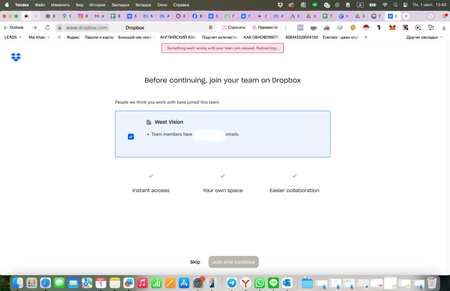
Hi! I registered in Dropbox with my corporate account using my company’s domain name. I received an email invitation from colleagues to join the company team. However, when I try to join, I see an error message and cannot proceed. Why is this happening and what should I do? My plan is still free, and I cannot upload files to the corporate folder. Device (Macbook Pro M4) Operating System/Browser (if using the web) (Sequoia 15.2)277Views0likes5CommentsI see a "This message cannot be found" error when trying to access my post.
Device (Macbook PRO M4) Operating System/Browser (if using the web) (Sequoia 15.2) Question or Issue Hi. Dear Dropbox support team. I posted this message 4 hours ago in search for a help but a post was deleted for no reason. Why? My problem is - I registered in Dropbox with my corporate account using my company’s domain name. Then I received an email invitation from colleagues to join the company team. However, when I try to join, I see an error message and cannot proceed. Why is this happening and what should I do? My plan is still free, and I cannot upload files to the corporate folder. Wondering why. Please help.91Views1like1Comment
I had linked my Apple ID to a now deleted Dropbox account and I can't use it to create a new one.
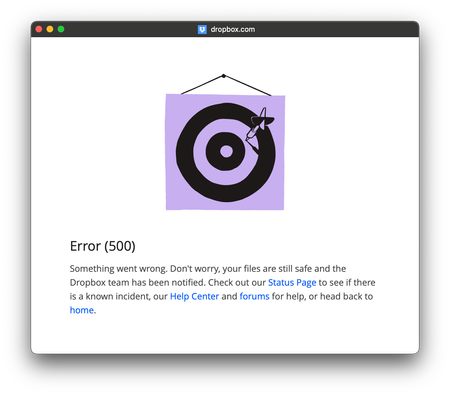
Dear Dropbox Support Team, I previously used Dropbox and had linked my account to my Apple ID. However, I deleted that account years ago. Since then, I’ve been unable to create a new account on iOS using “Sign in with Apple” or link my Apple ID to an account with the same email address. Every attempt results in an error message with ERROR 500, even when I try different email addresses or use Apple’s “Hide My Email” feature. It seems my Apple ID is now completely unable to use Dropbox, which is causing significant disruptions to my workflow. I would appreciate any guidance on resolving this issue. Thank you for your support! Best regards, HuaDeity656Views0likes11CommentsCannot login to our Dropbox Team accounts, due to a CAPTCHA error.
Hi, We are currently setting up new Mac devices for our company. These Macs are completely stock with no pre-configured installations. We’re encountering an issue where Dropbox cannot log in. The error message states that a CAPTCHA has not been filled in. The issue is inconsistent—on some Macs, Dropbox logs in without problems, while on others, the CAPTCHA error appears. We’ve only tested in incognito mode on devices where users are already logged in to avoid interfering with active sessions. Troubleshooting Steps Tried: Tested on Safari, Chrome, and Firefox (all latest versions) Rebooted the devices Completely reinstalled macOS Disabled the firewall Connected to different networks to rule out router limitations Despite these efforts, the issue persists unpredictably across devices. Some work fine, while others do not. Could you provide any insight into what might be causing this behavior and possible solutions?1.2KViews0likes14Comments