We’re Still Here to Help (Even Over the Holidays!) - find out more here.
Forum Discussion

ESTHERKIM2892
11 months agoNew member | Level 1
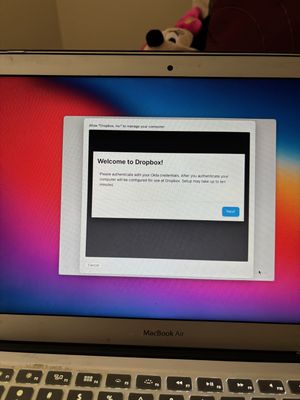
Dropbox Remote Management preventing access from reset MacBook Air
I did a hard reset of my Macbook Air, but I keep receiving this message preventing me from logging in. There are no devices set up connected to my account. How can I remove this request from Drop...

Rich Super User II
11 months agoSuper User IIESTHERKIM2892 wrote:How can I remove this request from Dropbox for Remote Management?
This isn't related to the Dropbox application. It looks as though this computer was originally a corporate device (used by a Dropbox employee) and secured through remote management. Did you purchase it used by chance? Or were you a Dropbox employee at one time?
I doubt anyone here will be able to assist with this. You'll probably need to contact Support, or maybe even their internal IT department directly, to see if they can remove the device from remote management.
About Security and Permissions
Start a discussion in the Dropbox Community forum to get help with your account security and permissions. Find support from Community members.
The Dropbox Community team is active from Monday to Friday. We try to respond to you as soon as we can, usually within 2 hours.
If you need more help you can view your support options (expected response time for an email or ticket is 24 hours), or contact us on X, Facebook or Instagram.
For more info on available support options for your Dropbox plan, see this article.
If you found the answer to your question in this Community thread, please 'like' the post to say thanks and to let us know it was useful!


