Our Community is in read-only mode until April 8th, learn more here. You can still search existing threads or get help via Dropbox Support, the Dropbox Help Center, or Learn.
Forum Discussion

RLAZ
3 months agoNew member | Level 2
Personal files not available since Dropbox team was 'disbanded'
Dropbox Plan - Plus, Personal Account
Do you have access to the email linked to the account?
Yes
Are there any devices connected to your Dropbox account?
iPhone, Macbook Pro
Question or Issue
I have had a dropbox account at least 5-10 years if not more. Recently a non-profit group that I was associated with experimented with the TEAM aspect of their free Dropbox account. I was an "invited" member. I was not involved in setting it up. About 3 months ago they upgraded to a new account and disabled the free account and removed all "invited" accounts. Since that happened I no longer have access to my files on my personal dropbox account.
I can see them in the side bar of my apple finder under DROPBOX-PERSONAL, but they are not syncing and when I click a file I get an error message: Your device couldn’t connect to the server. There may be a problem with the server or network.
I have upgraded my account to Dropbox Plus so that I could get support plus more space. I would like to get my files back now. I'd like to know how to re-link my files to my account. The account name remains the same - same email address.
Please help. Thank you.
14 Replies
Replies have been turned off for this discussion
- Jay3 months ago
Dropbox Community Moderator
Hi RLAZ, thanks for contacting us!
Just for clarification, did they delete the entire Dropbox team, including all member accounts, or did they convert your account back to a Basic personal plan before deleting the team?
Do you see any of your missing files on the Dropbox site on this page?
This will help me to assist further!
 RLAZ3 months agoNew member | Level 2
The team account is not deleted, they just removed the accounts. I was advised (via a message in dropbox) that my account was converted to a personal account (see below). I was able to access my files my own in my account (so maybe they could see them too, I'm not sure). I do not see any of my files on that page that you referenced. Those are files that belong to the non-profit.
Thanks for responding so quickly! Much appreciated.
Randi
- RLAZ3 months agoNew member | Level 2
To clarify - I was able to see and access my files until they disbanded the team. Now I can only see them but cannot open them.
- Mark3 months ago
Super User II
RLAZ wrote:
Now I can only see them but cannot open them.
Can you post a screengrab of the error messages?
- RLAZ3 months agoNew member | Level 2
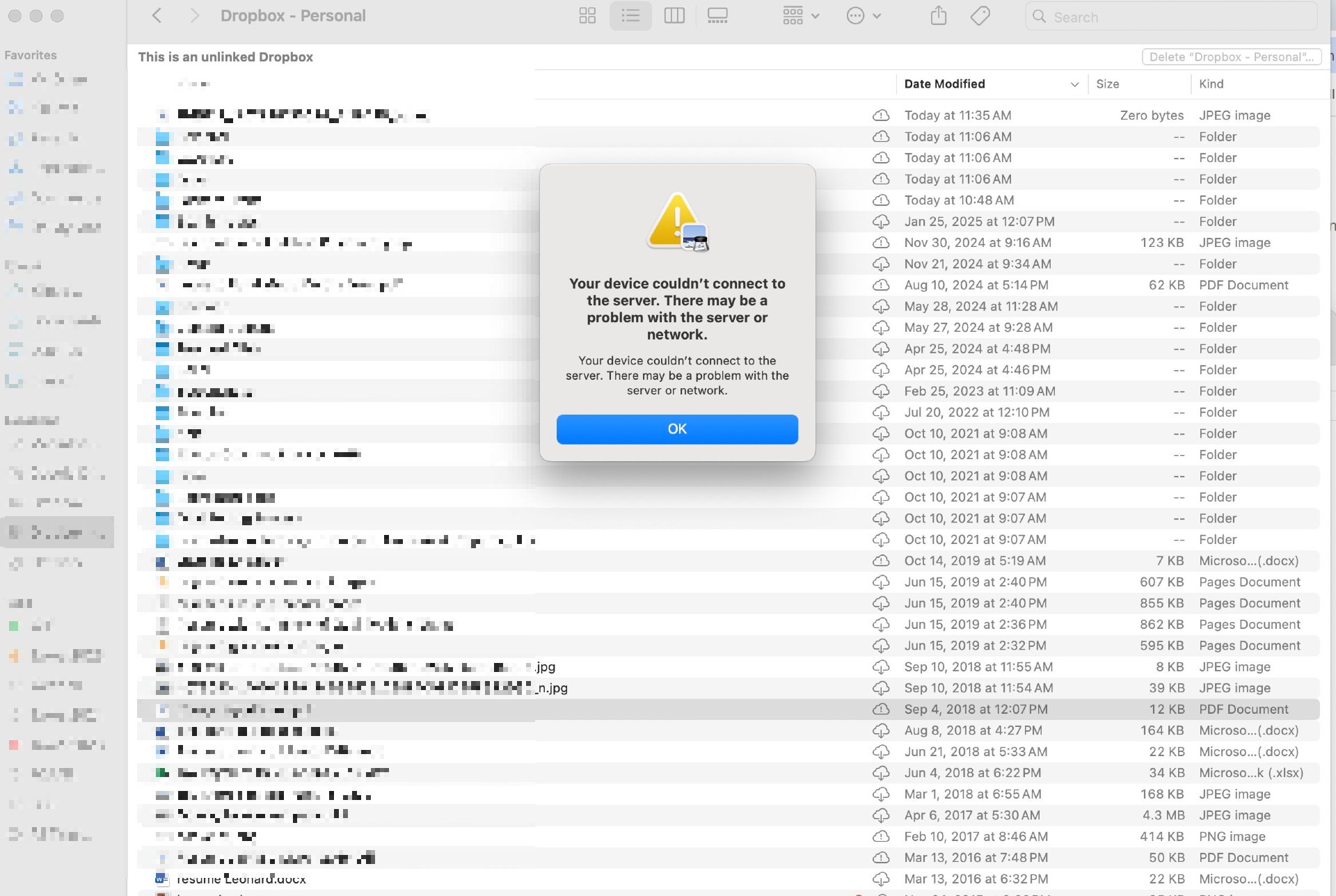
This is from the Dropbox folder that is no longer working. If you look to the sidebar you'll see that there is a NEW dropbox folder that was newly created when I upgraded, I guess? It's empty though. I unsuccessfully tried transferring files (drag and drop, also tried uploading to Dropbox).
- Jay3 months ago
As it says at the top that 'This is an unlinked Dropbox', this means it isn't live or connected to any account.
You'll need to sign into the correct account in the Dropbox desktop application. Have you tried signing out of the account and signing back in using these steps?
- RLAZ3 months agoNew member | Level 2
Yes, I've logged in and out many times into my personal Dropbox account. I just tried logging out now and logging back in and I received this error (below). I've tried 3x now
- RLAZ3 months agoNew member | Level 2
OK - logged in again. Still no files :(
- Jay3 months ago
You're signing into the Dropbox site, and not the Dropbox desktop application, could you ensure that the desktop app is installed and running when you attempt to sign into it?
- RLAZ3 months agoNew member | Level 2
Do you mean this


About Security and Permissions
Find answers to your questions about Dropbox account security and permissions.
The Dropbox Community team is active from Monday to Friday. We try to respond to you as soon as we can, usually within 2 hours.
If you need more help you can view your support options (expected response time for an email or ticket is 24 hours), or contact us on X, Facebook or Instagram.
For more info on available support options for your Dropbox plan, see this article.
If you found the answer to your question in this Community thread, please 'like' the post to say thanks and to let us know it was useful!


