Your workflow is unique 👨💻 - tell us how you use Dropbox here.
Forum Discussion

Megane Racat Dropbox Product Manager
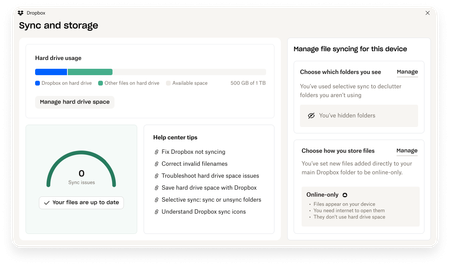
6 months agoDropbox Product ManagerExciting news — we’ve launched the new Sync & Storage Dashboard in the Dropbox desktop app!
This dashboard makes it easier than ever to keep your files organized and your computer running smoothly.
With just a click, you can:
Get a real-time view of your sync status
Quickly spot and...

jasonptaylor
5 months agoNew member | Level 2
I am not sure if my issue is connected but now I am getting a sync paused warning and that I am (close to) out of space. I was a very early adopter of Dropbox and participated in some campaigns to get new people using the platform by sharing invitations or something. Through this I was able to get more than the standard storage space. Now there seems to be a conflict with basic limit and what I have. I says I have 5.4G of 2G available through the notification (bell) center. When I go to the dashboard it shows 5.4G of 7G
- Megan5 months ago
Dropbox Community Moderator
Hey there, jasonptaylor, let's jump right into this!
Can you send me a couple of screenshots -omitting any personal info- showing your account's space when you check your notification center, and what you see in your dashboard too?
While you're at it, can you also check your account's plan page online, and let me know what it reports?
Keep me posted!

About Dropbox Tips and Tricks
Find helpful advice and smart ways to get more out of Dropbox.474 PostsLatest Activity: 19 hours ago
The Dropbox Community team is active from Monday to Friday. We try to respond to you as soon as we can, usually within 2 hours.
If you need more help you can view your support options (expected response time for an email or ticket is 24 hours), or contact us on X, Facebook or Instagram.
For more info on available support options for your Dropbox plan, see this article.
If you found the answer to your question in this Community thread, please 'like' the post to say thanks and to let us know it was useful!


