Your workflow is unique 👨💻 - tell us how you use Dropbox here.
Forum Discussion

RS2020
2 years agoHelpful | Level 6
Dropbox Sign link expires after 7 days ?
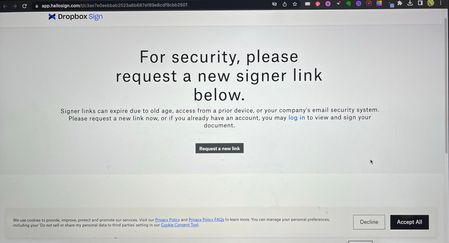
I have sent hundreds signatures requests via Dropbox Sign. 60%+ already signed without any problem but since Yesterday people started complaining the link is not valid any more. Multiple people infor...

Megan Dropbox Community Moderator
2 years agoDropbox Community ModeratorHi RS2020, how are you today?
First of all, let me apologize beforehand about the length of my message, I just want to make sure that I've covered everything.
In regards to this Dropbox Sign link error that you get, it looks like your mail client is likely scanning the links in the Dropbox Sign emails as a security measure.
The links in the notification emails are essentially one-click logins, so when security systems access them to assess whether or not they are a threat, they actually use the one click available, which leads to the error you are seeing.
Since this error is being caused by a security system in place on your end, we are a bit limited as to what we can do to work around this. Do you have a different email address that you could use on your account? Keep in mind that this would need to be a different email address that does not have the same email security settings in place.
You may also be able to work around this by whitelisting the email address, and IP address that the Dropbox Sign documents are coming from. If you are able to make these changes, please see the following instructions:
Ask your email administrator to add hellosign.com and mail.hellosign.com to their approved domain list or to add our IPs of 143.55.224.101, 143.55.234.242, 161.38.193.231, 198.61.255.111 to their approved IP list.
Feel free to also add noreply@mail.hellosign.com to your contact list.
Please let me know if there is anything else I can help you with, I’d be happy to further assist you!
About Dropbox Sign

Ask questions and get help with Dropbox Sign here.
The Dropbox Community team is active from Monday to Friday. We try to respond to you as soon as we can, usually within 2 hours.
If you need more help you can view your support options (expected response time for an email or ticket is 24 hours), or contact us on X, Facebook or Instagram.
For more info on available support options for your Dropbox plan, see this article.
If you found the answer to your question in this Community thread, please 'like' the post to say thanks and to let us know it was useful!


