We’re Still Here to Help (Even Over the Holidays!) - find out more here.
Forum Discussion

syibimian
3 years agoExplorer | Level 3
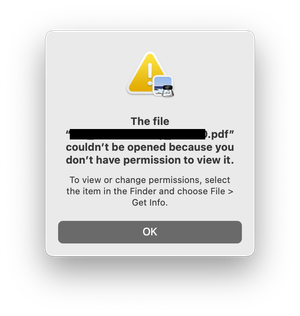
Permission error when trying to open files in the Dropbox folder
Hello, i keep getting these messages when trying to open files (pdf, jpegs, etc) that is located in the dropbox folder. restarting the computer helps but then the problem would return after opening a...

syibimian
3 years agoExplorer | Level 3
Dropbox is Up to Date, v180.4.4912 (i just did an advanced reinstall)
Mac is on Ventura 13.5.1
I tried quitting the dropbox app, and the error persists. If I quit preview and double click on the file, it opens, but then when i try to open another file on the dropbox folder, the error occurs again.

Hannah Dropbox Community Moderator
3 years agoDropbox Community ModeratorThanks for the update here!
Having the same issue with the Dropbox app closed, does indicate that this is not a Dropbox issue, but let's see what else we can find.
Can you give full disk access to Dropbox, to see if that helps?
- syibimian3 years agoExplorer | Level 3
i have given full disk access.
The thing is it only happens with the files in dropbox folder. could it be a permission issue or like a conflict of some sort?
- Megan3 years ago
Hi syibimian, sorry to jump in here!
Does this happen with all of your Dropbox files or just some of them?
Just wondering if it's affected by files being stored online-only, instead of available offline. Do you notice this pattern?
- syibimian3 years agoExplorer | Level 3
i havent checked all files (i have few TBs of file stored in dropbox), but all the ones i sampled is affected.

About View, download, and export

Need support with viewing, downloading, and exporting files and folders from your Dropbox account? Find help from the Dropbox Community.
The Dropbox Community team is active from Monday to Friday. We try to respond to you as soon as we can, usually within 2 hours.
If you need more help you can view your support options (expected response time for an email or ticket is 24 hours), or contact us on X, Facebook or Instagram.
For more info on available support options for your Dropbox plan, see this article.
If you found the answer to your question in this Community thread, please 'like' the post to say thanks and to let us know it was useful!


