2025 sparked some incredible conversations across our community 👩💻. Discover the highlights and see what’s ahead in 2026.
Dropbox Backup
827 Topics
Dropbox created a new folder after reinstalling and I can't access my Downloads folder.
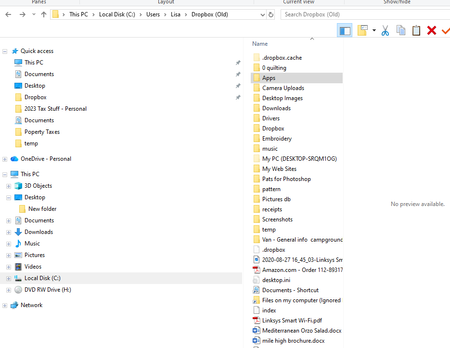
Application Affected Drobox Device Operating System/Browser (if using the web) Windows 10 Dropbox App Version (if using the app) Trying to reinstall Question or Issue I let CCleaner clean my Windows 10 desktop registry (I know.... big mistake). Afterward Dropbox did not work. I uninstalled and tried to reinstall (regular - not advanced) The reinstall renamed my Dropbox folder to DropboxOld, created a new dropbox folder and started downloading all my files again resulting in a full hard-drive. Next, I uninstalled it again and tried an advanced reinstall. Same problem. So I uninstalled it again and restarted. Next, I did some more research and found the page https://help.dropbox.com/installs/advanced-reinstall which contained directions for what to do before an advanced reinstall. The only place I found any Dropbox folders was in the PROGRAMFILES. There are Dropbox and DropboxOld folders there. The Old folder seems to have my stuff. The Drobox folder only has a dowloads folder and I get a message saying location is not available. Neither folder has a Client folder. Not sure how to proceed. Thanks!44Views0likes3Comments
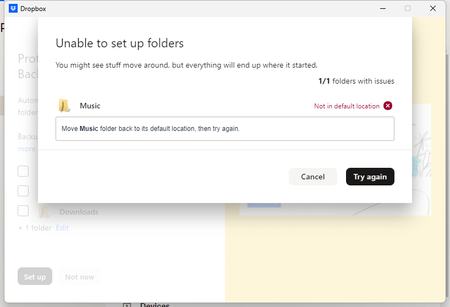
Backup unable to enable: Backup "Not in default location"
Device OMEN by HP 45L Gaming Desktop GT22 Operating System/Browser (if using the web) Windows 11 Home Version 23H2 Dropbox App Version (if using the app) v238.4.6305 Syncing Status Syncing Question or Issue Trying to use Dropbox Backup to "backup" my entire library, cover art and other audio archives. I'm received this error: Dropbox is on my "D" HHD drive...away from the system files on the "C" drive. The "Music" library is ALSO on the "D" drive. I am NOT syncing any of the music files to Dropbox...unlike documents and videos. I want them to live on my hard drive and simply backup to Dropbox. Otherwise, Dropbox is performing as it should: No sync issues, "screenshot" and "camera uploads" working perfectly. Backup seemed to be a natural solution for my music vs. me manually dragging music files from explorer to Dropbox. Please let me know what other info you need. Thank you.23Views0likes1Comment
Hidden Dropbox logs folder is stuck, continually growing bigger, now beyond 300GB
Application Affected (Dropbox app & backup) Device (Optiplex 3060 i5-8500, 16GB RAM, 500GB SSD) Operating System/Browser (if using the web) (Windows 10) Dropbox App Version (if using the app) (236.4.5918) Question or Issue For the past few days, a folder called "log" within the dropbox system folders, specifically "C:\Users\username\AppData\Local\Dropbox\logs" is constantly growing and growing.. occupying my entire hard disk! please help.. Not sure if they're at all related, but the following points have recently changed in this computer: 1. I bought a new SSD for backup purposes, which I have set to backup by Dropbox It's 2TB, 900GB of which are occupied, it's connected over USB and it doesn't seem to actually backup.. 2. I removed Avast and installed Bitdefender instead. I was running Malwarebytes and Spybot in parallel, though these have now been removed. I have noticed that the Tray Assistant almost maxes out my CPU use, as well.. Any ideas of how to troubleshoot/resolve this? Many thanks!866Views3likes34Comments
Can I delete the backup of PC that I can't access using my mobile browser?
I am running out of storage. But I do not have files on dropbox. But when I go to the backups page I saw a device which I think have linked to PC that I don't have access anymore. I cannot delete it. I tried to delete a file of that device then there pop up "delete [folder] from your [device] backup". I don't click backup settings because I don't have access to that PC. So instead I click "I don't have access" and it go me to settings/security and unlink the PC. But after unlinking I still can't delete the device or any of it's file from backup page of my browser. Can anyone help me to solve this issue.Solved221Views0likes6Comments
Attempted to zip too many files error when wanting to download backup
Hi, iv'e backed up my dropbox files and i'm attempting to download them from the backup site. i'm reffering to: https://www.dropbox.com/backup/ when i go to the website and ask to download it, it tells me "Attempted to zip too many files". this made me loose a heart beat, though i know everything is there. i'm relying on this, which i guess was a fatal mistake. iv'e got all of my important files there, and i need them to continue my work - i used this as actual backup for some files, a big mistake 😞 i know everything is there, but how can i reach it if it can't download them? Thank you in advance.Solved4.9KViews1like8CommentsIs it possible to view backup files on the mobile app?
Hi, all! I have some old flash drives that I just backed up on my MACBOOK. They appear in DropBox Backups. I can’t figure out how to view the backups in my mobile app. I can see the file names in my mobile app. But, when I click on them, it simply takes me to the general list (camera uploads, documents, etc.) TIA!Solved11KViews0likes12Comments
Can I upload from a external Hard drive straight to Dropbox?
Can I upload from a external Hard drive straight to drop box? It’s plugged into the computer and I can see the files when I look at it but when I try to upload to Dropbox it says there are no files there? I don’t have the space to transfer to computer and then upload so not sure where to go from here as I need all those files in my drop boxSolved5.4KViews0likes4Comments
How to view my Backup folder on my Mac's desktop app?
Greetings community! Previously, I used to be able to see my Mac represented on my Dropbox as a folder (I had enabled the backup option). This was super convenient because I could easily access my files on-the-go using my Dropbox iPhone app. However, due to a computer issue, I needed to wipe my MacBook Pro clean and reinstall everything (including Dropbox). I enabled backup for my MacBook. However, now, it doesn't show me the MacBook folder like it used to. So I can't access my files on the go. It shows me that I have backed up my files and I am able to see them through a web browser. However, the folder representing my MacBook (backup) has stopped showing on Dropbox. Is this due to some update in how backups work now for Dropbox on Mac? How do I get the backup folder to start showing up on Dropbox again. Thanks!8.5KViews1like26CommentsWhen I try to remove the Dropbox app from my computer I lose access to my desktop folders
Removing Dropbox from my computer is proving to be a nightmare. My computer Operating system is Windows 10. I have managed to un sync from my account and deleted all the folders concerned in my Dropbox account. On my computer the Dropbox folder is located C:\Users\dough\Dropbox and it contains a "PC" folder in which contains Desktop, Documents, and Downloads. Whenever I uninstall or delete the Dropbox folder I lose all the content from those folders Desktop, Documents, and Downloads. I have no need for Dropbox and wish to remove it completely from my computer, would you please explain to me how to do this. I would appreciate it very much. Thank you.Solved13KViews2likes27Comments