2025 sparked some incredible conversations across our community 👩💻. Discover the highlights and see what’s ahead in 2026.
Notifications
248 Topics
Search inside Comments + Jump to Timestamp in Audio - Please Help us Audio Professional teams!
Comments on audio files which allow for time stamped notes are incredibly powerful for audio engineers, musicians, voice talent, authors, and associated producers and editors who, if anything like me, have literally over a thousand hours of improvisational recordings / sketches / works in progress in my Dropbox, and that's just stereo mix-downs that I bounce down after each session and immediately upload to Dropbox as I head out for a walk to drive to skip through / review - sometimes up to 3-4 hours of material each day - and when I hear those magic moments, I add a comment! Sadly, as it stands, not only do I have to remember which file had which comments, but I have to sift through the comments individually to see details. Some ability to keyword search inside comments, or a custom Tagging ability to at least bring me to the correct file, would be incredibly helpful. To reduce UI disruption or clutter, perhaps searching for keywords inside comments via the iOS App (where I access my hours of daily Dropbox use) could simply be ignored unless enabled by selecting a newly added 'Comments' category in the File Type dropdown! The results could be anything from just a list of files with comments matching the query (that alone would be immensely helpful) to more of a list of the query highlighted among the comments context, or some other format of result. To make it invaluable for audio professionals - add the ability to click on the result to start playback of the audio at the Timestamp OF the comment! I'd gladly add RePlay to my account if similar features were added there, but crucially I'm interested in adding notes not from the editing platform, but from the simple, regular Dropbox App / player - in addition to my personal primary desire for such a feature, consider the advantage of being able to reliably receive and importantly find input from the NON-PROFESSIONALS in this new media market - a simple tap to add / search to find / scroll or filter to browse commenting system can easily manage that - something dead simple for the non-technical author's request / 'big idea' producer's note (which was previously done in sharpie; not in sophisticated software) / editor's last minute tweak/publisher's quirky demand / etc. - a timestamped comment is all a professional really needs - the important part is lowering the barrier so that non-technical contributors MAKE the comment. With the skyrocketing volume of Podcast and Audiobook content involving teams of professionals (Talent / Authors / Editors / Audio Engineers / Producers / Publishers / etc), just a little love in order to flesh out the Comments feature a bit could have a lot of professional applications and appeal! Alternatives exist, but I enjoy Dropbox. I've been a pro user for 17+ years, and I truly rely on it, and on the 3TB+ of audio files I'm constantly scrubbing through in the App. But as our libraries grow, so too must search and organizational tools! I can attest that being unable to track down a comment you just made the day before is definitely not fun! Anyway, thank you for the trusty and reliable service all these years, and for reading this long to anybody that has! : ) - jesse10Views0likes0Comments
I keep getting notifications that I'm out of space. Do I have a second Dropbox account?
Dropbox Plan basic Payment Method CC How did you upgrade? Didn't Question or Issue I have a Dropbox account. There is nothing in it - not even the tutorials. I keep getting notifications that my storage is full and that I need to upgrade. One of the threads asked a user if there was a second account that could be full. How do I find out if a second account exists for me?Solved34Views0likes3Comments
Getting low space notifications when I have plenty of space
I am getting extremely tired of getting "You're running out of space!" notifications. I'm not running out of space. I have more than 1GB free. If these don't stop, I think I'll just move everything to iCloud Drive and delete Dropbox.Solved366Views0likes12Comments
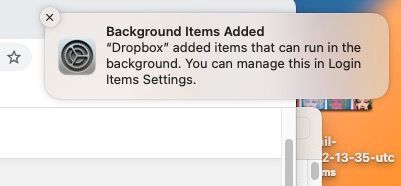
How do I end "Background items Added" notification and/or process?
I uninstalled Dropbox but keep getting this annoying notification on my mac that Dropbox is adding items that can run in the background even though the app is deleted and it is disabled in the appropriate setting. How do I get this to end once and for all? Thanks!Solved11KViews0likes19Comments
Turn off email notifications for file request uploads.
Hi there. We run a community radio station, and people are constantly uploading new audio files to us, so our email account is getting bombarded with notifications every time a new file arrives. We check our Dropbox account regularly, so these notifiations are completely unnecesssary, and we would like to have the option of turning them off. I looked through the Dropbox forums, and it appears as though other users have been requesting this feature for many years, but you still haven't implemented it! Can you pleae take this into consideration?248Views5likes4Comments
Constant notifications to update desktop app on Windows.
I am getting frequent notifications to update my Windows desktop Dropbox app, requesting permission to make changes to my system. It doesn't matter whether I respond yes or no, nothing happens after that. It just keeps happening over and over again.Solved18KViews5likes10CommentsDropbox Business: Disable "Request an invitation" popup for users after sharing
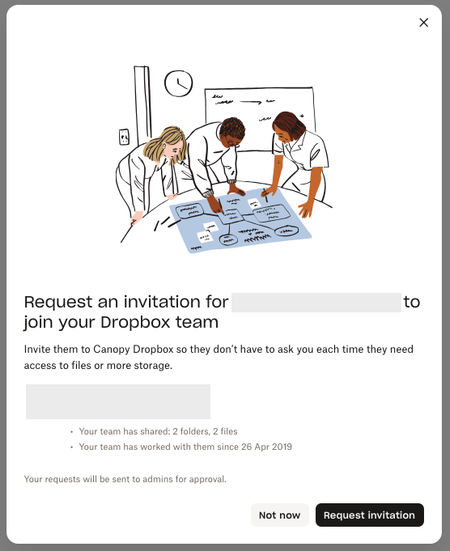
Using Dropbox Business Standard: When a user shares a folder with external users via their email, they get this pop-up: This is leading to numerous requests from users, not realizing that this is unnecessary in order to share their folder. Each requests results in a notification email, badge, and needing to deny the request. We do not want to add externals to our team at all. In our admin console, we have disabled "Members can invite people". However, they can still make these requests. Could you please provide a way to disable this popup? Thank-you!51Views0likes1Comment