Your workflow is unique 👨💻 - tell us how you use Dropbox here.
Windows
1198 TopicsAfter uninstalling the Dropbox desktop app many Dropbox driver files remain on system
Application Affected Uninstall Device Asus H670-PRO MB Operating System/Browser (if using the web) Windows 11 Dropbox App Version (if using the app) (Unknown) Question or Issue While examining the system log I see two errors related to DbxSvc which I've found is a DropBox service. To troubleshoot the issue, I uninstalled DropBox. But to my surprise, the DbxSvc service is still installed and running. I have stopped and removed the service but the drives still reside on my system. I want a complete uninstall so I can perform a clean install. What is the cause and solution to these errors? What is the supported way to remove this leftover debris from my system, including all registry junk? The errors I am encountering are: The DbxSvc service failed to start due to the following error: The service did not respond to the start or control request in a timely fashion. A timeout was reached (45000 milliseconds) while waiting for the DbxSvc service to connect. The driver files are residing in the following folders: C:\Windows\System32 C:\Windows\System32\drivers C:\Windows\System32\SecureBootUpdates C:\Windows\System32\DriverStore\FileRepository\ C:\Windows\WinSXS Plus a huge number of Registry Keys.26Views0likes2Comments
Syncing does not proceed on my fast W10 PC
I have DB 241.4.4853 on Win10 PC. Dropbox keeps Uploading 203,163 files and downloading 5 files, but no progress for days. I do not see any updated DB content on my laptop (my other computer, W11) Dropbox folders. I have very fast PC and light fiber connection 500 MB up and down. What may be the problem and solution? I have >700 MB on Dropbox, ca. 130 locally on my PC.53Views0likes5Comments
The desktop app on Windows 11 isn't connecting to the internet
Application Affected DropBox Windows App Device HP OmniBook Operating System/Browser (if using the web) Windows 11 Dropbox App Version (if using the app) 241.4.4853 Question or Issue I just purchased a new Windows 11 machine and downloaded the DropBox app. In the system tray, when I hover over the greyed-out app, it says "Dropbox 241.4.4853 Connecting..." and it never changes. I have a similar issue on another Windows 11 machine. Can someone help me get this connected?194Views2likes19Comments
Every time I open my Dropbox folder the tray window pops open
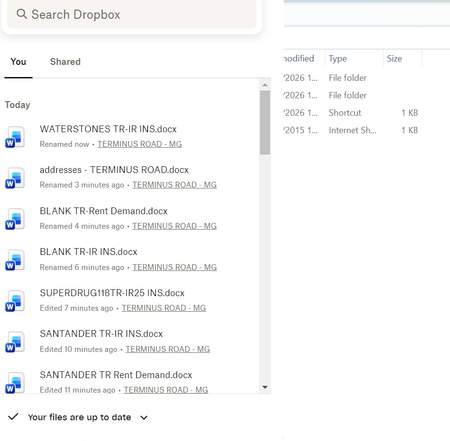
Question or Issue I am using an HP laptop running windows 11 with the Dropbox app downloaded Recently, every time I open Dropbox, a box with my history pops up - SEE BELOW This is REALLY annoying, as I can't access my folders list which is hidden behind it. I have to keep tapping things until it disappears! How do I stop it appearing please?22Views0likes1Comment
Dropbox icon not showing, although set to show
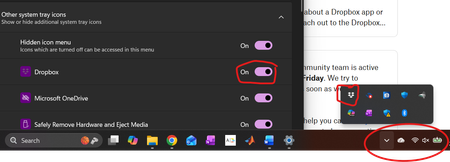
Application Affected Dropbox Desktop Device Thinkpad E15 Operating System/Browser (if using the web) Windows 11 Dropbox App Version (if using the app) 241.4.4853 Question or Issue I am running the latest version of Dropbox Desktop on Windows 11 (25H2 version, build 26200.7840). I set the system tray manager to show the Dropbox icon, and everything worked as expected. With the most recent Windows update to 25H2, the icon no longer shows, although the program is running and can be accessed by clicking the "expand hidden icon" buttons. You can see from the screenshot below that the Dropbox is set to display in the Windows -> Settings -> Taskbar -> Other System Tray Icons menu, yet is not shown in the (circled) home icon area, although it can be accessed by expanding hidden icons. Doing the obvious things have not helped (shutting down Dropbox and restarting it, rebooting, turning off the "Show Dropbox on System Tray" option, rebooting, then turning the option back on). Anything I can do short of uninstalling the entire desktop program, rebooting, and then reinstalling it from scratch?Solved84Views0likes7Comments
My Dropbox app on Windows is stuck indexing for 2-3 days now.
Hello, I am facing an issue with my Dropbox desktop app on Windows where it has been stuck on indexing for the past 2–3 days and no files are syncing. The Dropbox web version is working normally and uploads, transfers, and syncing through the browser are fine. The problem is only in the desktop app, which also does not show indexing progress or remaining files. I have restarted my laptop, uninstalled and reinstalled the app multiple times, cleared the cache, changed the Dropbox folder location, and checked antivirus and security settings, but the issue still continues. Any help or suggestions would be appreciated.108Views0likes12CommentsHow do I get rid of Dropbox showing in multiple places in Windows Explorer?
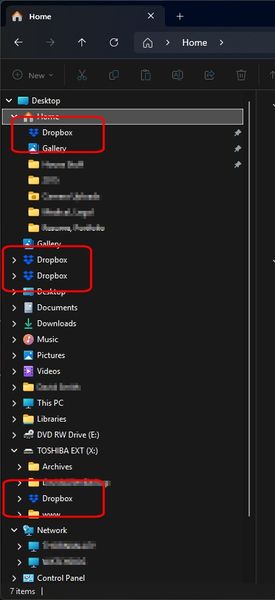
Device Dell Alienware 17 Operating System/Browser (if using the web) Windows 11 Pro Dropbox App Version (if using the app) 241.4.4853 Dropbox Plan Plus Question or Issue How do I get rid of Dropbox showing in multiple places in Windows Explorer? See screenshots. Dropbox functions fine it just appears in multiple places for some reason. This has actually been going on for a year or so but now there's four of them. How many am I really supposed to have? They all go to the same place but ...yea, this isn't right - is it? This feels like an obvious problem that should be addressed (like the various sync problems) but it doesn't seem like there have been many updates at all to the desktop app in quite some time.35Views0likes3CommentsSync arrows showing on my files in the Dropbox folder but the app is not syncing
Hi everyone, I’m seeing the sync arrows next to some files/folders in Explorer, but nothing seems to be actively syncing. Here’s what I’ve tried so far: Resynced files Toggled files between online-only and local Rebooted my machine Paused and restarted Dropbox sync The only thing I haven’t tried yet is completely uninstalling and reinstalling Dropbox. Has anyone else run into this? Any tips or workarounds before I go the uninstall route? Thanks in advance!36Views0likes5Comments
The Dropbox Icon is missing from my system tray on Windows 11.
Application Affected Dropbox Device Dell Operating System/Browser (if using the web) (Windows 11 Dropbox App Version (if using the app) PREVIOUS TICKETS RE THIS ISSE: 25970669, 25969165, 25897971, 25863084 Question or Issue Drobox stopped working on all three of my computers. I worked with the AI bot and FINALLY got it working on my main computer by moving my Dropbox folder to a different location, THEN pointed to that location during the advanced install. All was well.... for a few days. Then again dropbox wanted to install itself again, and the system tray icon is missing. When I view System > Apps > Dropbox there is an entry for Dropbox, but there is no size indicator beside it as all the other apps have. Clicking the three dots only gives the option to uninstall. Clicking the Program Icon takes me to my Dropbox folder on my computer. But it just looks like the folder in explorer. I have completely uninstalled OneDrive from my computer. I've enjoyed dropbox for years, but am almost ready to give up on it.75Views0likes2CommentsShould I make everything online only before moving my Dropbox folder to another drive?
Hi, so I want to move my dropbox folder to another drive with more space. Currently my dropbox have around 500 GB of available offline files. It's a company dropbox so in total it has 6 TB of files. I want to move the dropbox folder to a 2tb drive. I read so many problem about indexing that took forever or other syncing problems, so should I make all my 500gb of available offline files into online only before moving? And can I show all the 6 TB folders on my PC but make it available online only? because last time I tried to show the folder, it automatically tried to sync 6 TB into my PC. I only want to see the folder and it's content but not have it locally stored on my PC.29Views0likes1Comment