Your workflow is unique 👨💻 - tell us how you use Dropbox here.
Account Settings
40 Topics
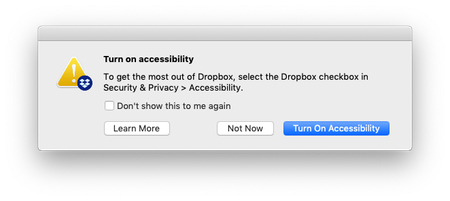
Mac client keeps asking to turn on accessibility
I'm running Dropbox for Mac v58.4.92, and every time I log in to my machine, I get a message from Dropbox asking me to turn on accessibility: Every time I tick 'Don't show this to me again' and then 'Not Now', but it comes back the next time I log in. What can I do to disable this message?Solved24KViews2likes14Comments
Linux - Unable to change Dropbox directory
I'm using Fedora Workstation 25 with GNOME. Trying to change the Dropbox directory results in the utterly useless message "Unexpected errors occurred. Your Dropbox is ok!". Steps to recreate problem: Dropbox directory is currently ~/Dropbox Start Dropbox application by running ~/.dropbox-dist/dropboxd Right click sys tray icon and select Preferences. Click "Move…" button under Account > Location Select directory /local on which my user has write permissions. The message "Unexpected errors occurred. Your Dropbox is ok!" appears. Observations: The directory /local/Dropbox is sucesfully created. One of the directories in ~/Dropbox is created in /local/Dropbox/ It's empty. Deleting that directory from ~/Dropbox before attempting the move doesn't help. Selecting other directories on which my user has write permissions results in the same behaviour. Permissions and ownership of my Dropbox directory and user's home directory are OK. (Troubleshooting advice for Linux at https://help.dropbox.com/desktop-web/move-dropbox-folder is pooly written. sudo is not needed on all those commands. "Internet menu" is not a thing in all (any?) desktop environments.) There's a log file in ~/.dropbox/logs/1 but it's a binary blob so useless without something to make it human readable and I can't locate such a thing. Deleting all my files from ~/Dropbox/ waiting for sync to complete and then attempting the move doesn't help. When attemping the move after deleting all my files from ~/Dropbox/ /local/Dropbox/.dropbox.cache/ is succesfully created. It's empty. Pausing syncing before attempting the move doesn't help. There don't seem to be any options that can be passed to ~/.dropbox-dist/dropboxd to get more info. (Adding --help prevents it running!)Solved20KViews0likes66Comments
iPhone app will not accept my login credentials
I am logged in to dropbox on both of my computers; I downloaded the Dropbox app from the App Store, and it will not accept those same credentials on my iPhone. Says logon andor password are incorrect. Everything I read says all information should be sharable across devices. What am I doing wrong? Thank you.Solved5.6KViews0likes5CommentsMoving Dropbox files to a "D" drive on Windows 11.
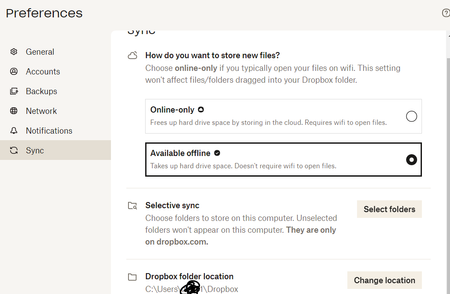
When I try to follow these instructions, I don't have a Move option. Windows: Manually move the Dropbox folder back to its default location Close any applications on your computer that may be using your Dropbox files and folders. Click the Dropbox icon in the taskbar. Click your avatar (profile picture or initials) in the top-right corner. Click Preferences. Click the Sync tab. Under Dropbox Folder Location, click Move. In the text box next to Folder:, type “$Home”. Click OK. You'll be asked to confirm if you wish to move your Dropbox folder location. Click OK. Log out and back in to the Dropbox desktop app to ensure that all of your preferences are moved as well. In that place it says change location. How do I move my files in this scenario? Can I simply create a Dropbox folder in my "D" drive and choose that location? I'm trying to make space on my "C" drive.Solved4.7KViews0likes4Commentshow to find dropbox account details from command line
I am using dropbox on my linux box (NO UI, just command line). I know how to find dropbox account details (eg: login email) from UI. Just do not know how to find account details from command line. Is that possible? Please help me. I just want to do something like this from command line: https://www.dropbox.com/help/account/find-account-emailSolved3.6KViews0likes5Comments
Dropbox on PC is inaccessible to the blind - I can't access the app preferences
Hello, I'm a blind user using a screen reader on PC. Dropbox has changed it's layout and now I can't get to the settings menu in the system tray icon. I can only view searches, recent activity, and upgrade button. No menu is visible to the screen reader like before... Can you please fix it so I can continue to use your service properly? I need to turn off auto-start with Windows but now I cannot since you had to change your layout.Solved3KViews0likes6Comments