Your workflow is unique 👨💻 - tell us how you use Dropbox here.
Desktop
1972 Topics
Cannot sync due to permissions on macOS Sonoma
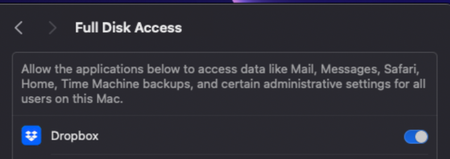
Device Mac Mini M2Operating System/Browser (if using the web) MacOS Sonoma 14.3.1 Dropbox App Version (if using the app) 242.4.5815 Syncing Status Files are unable to Sync Question or Issue Files won't sync on Mac OS. I have tried this on windows PC on the same network, and it works fine. I think this is a MacOS Bug with multiple versions of MacOS and dropbox that needs to be fixed. As you can see, has full disk access and no firewall issues, but won't sync. I have tried to "fix Hardlinks, etc". Fixing hardlinks only resolves it temporarily - when more files arrive in the folder, the issue persists. My dropbox storage is not full, neither is my computer. I have seen other troubleshooting steps to move images out then back in, but that is not a solution to me. Quitting, then relaunching does not solve. Dropbox Folder location: /Users/andrewwevers/Library/CloudStorage/Dropbox I have tried a reinstall as well. I have done this https://www.dropboxforum.com/discussions/101001014/syncing-problem-on-sonoma-14-1/733803 and this https://www.dropboxforum.com/discussions/101001014/my-desktop-app-is-stuck-at-syncing-and-i-need-help-with-the-buttons-to-fix-hardl/405492#M3494432Views0likes2Comments
I seem to have two Dropbox folders after updating to File Provider
Yesterday the desktop app was saying that my files were up to date, but they weren't. My Dropbox folder had sync icons, but if I right-clicked on one I got a message that "Your device couldn't connect to the server. There may be a problem with the server or network." Conversation with bot about this: #26110456 Today the app is syncing, but my Dropbox folder has no sync icons. I have tried reinstalling the app and restarting the Mac. I recently tried updating to File Provider, but it screwed things up and I went back to legacy. My other Mac, on the same network, has no problem. That one is using File Provider. This one is a 2020 iMac, Sequoia 15.7.4, Dropbox v.242.4.5815 Sorry about the formatting, I don't know how to correct it.63Views0likes11Comments
How safe is it to move my Dropbox folder to an external HDD drive?
Hi everyone, I am a video editor working with large RAW footage files through Dropbox and I'm trying to optimize my storage setup after adding a new drive. My setup is a newly purchased 10TB External HDD and a 2TB external SSD. The Dropbox folder is currently on the SSD because when I frist set everything up, the SSD was my only external drive. Now that I have the 10 TB drive, I am considering moving the main Dropbox folder there to free up space on the SSD. My proposed workflow is to move the dropbox folder to the 10TB HDD and let all synced files live there. When starting a project, I would manually copy the specific folder from the HDD to the SSD and edit directly from the SSD for performance. After finishing, I would move everything back to the HDD inside the dropbox folder for syncing. My questions are: Will it work? Is this a stable and safe setup long term? Are there risks if the external HDD disconnects while Dropbox is running? Does anyone here use a similar HDD and SSD setup for video editing? I am trying to balance performance and storage efficiency without creating sync conflicts or data loss risk. I appreciate any advice from people who have experience managing large media files with Dropbox. Thanks.44Views0likes5Comments
The app seems to be crashing on macOS Tahoe 26.4 (Beta 1)
Application Affected Dropbox Device mac studio Operating System/Browser (if using the web) macOS 26.4 Beta 1 Dropbox App Version (if using the app) 241.4.4853 Question or Issue Dropbox is crashing since I installed macOS Tahoe 26.4 (Beta 1) this morning. The errormessage is: DYLD_LIBRARY_PATH: None cwd: '/' real_path='/' mode=0o40755 uid=0 gid=0 parent mode=0o40755 uid=0 gid=0 HOME: '/Users/sander' appdata: '/Users/sander/.dropbox/instance3' real_path='/Users/sander/.dropbox/instance3' mode=0o40700 uid=501 gid=20 parent mode=0o40755 uid=501 gid=20 dropbox_path: '/Volumes/Data/.CloudStorage/Data/Dropbox' real_path='/Volumes/Data/.CloudStorage/Data/Dropbox' mode=0o40700 uid=501 gid=20 parent mode=0o40755 uid=501 gid=20 sys_executable: '/Applications/Dropbox.app/Contents/MacOS/Dropbox' real_path='/Applications/Dropbox.app/Contents/MacOS/Dropbox' mode=0o100755 uid=501 gid=20 parent mode=0o40755 uid=501 gid=20 trace.__file__: '/Applications/Dropbox.app/Contents/Resources/python-packages.zip/dropbox/client/ui/common/boot_error.pyc' real_path='/Applications/Dropbox.app/Contents/Resources/python-packages.zip/dropbox/client/ui/common/boot_error.pyc' not found parent not found tempdir: '/var/folders/v5/1fn_t3055sd904vr0bg75ts40000gn/T' real_path='/private/var/folders/v5/1fn_t3055sd904vr0bg75ts40000gn/T' mode=0o40700 uid=501 gid=20 parent mode=0o40755 uid=501 gid=20 Traceback (most recent call last): File "desktop/dropbox/fs_api/lifecycle.py", line 238, in client File "desktop/dropbox/fs_api/lifecycle.py", line 297, in _create_thin_client File "desktop/dropbox/fs_api/fs_api_adapter.py", line 54, in __init__ File "desktop/extensions/fs_api/fs_api_python.pyx", line 63, in fs_api_python.FsApiServer.__cinit__ fs_api_python.FsApiError: "Initializing fs api |>> Initializing platform |>> Opening worker root directory |>> open syscall |>> FSErrorCode::PermissionDenied" The above exception was the direct cause of the following exception: Traceback (most recent call last): File "desktop/dropbox/client/main.py", line 1106, in wrapper File "desktop/dropbox/client/main.py", line 8849, in finish_dropbox_boot File "desktop/dropbox/client/message_queue.py", line 338, in _wrapped File "desktop/dropbox/client/main.py", line 8130, in _init_components_for_account File "desktop/dropbox/client/main.py", line 8038, in create_sync_engine File "desktop/dropbox/sync_engine_boundary/factory.py", line 237, in make_sync_engine File "desktop/dropbox/sync_engine/nucleus/classic_client/sync_engine.py", line 264, in __init__ File "desktop/dropbox/sync_engine/nucleus/classic_client/modern_client/modern_client.py", line 330, in __init__ File "desktop/dropbox/sync_engine/nucleus/classic_client/modern_client/base.py", line 260, in __init__ File "../mac_arm64_dropbox_virtual_env/lib/python3.8/functools.py", line 967, in __get__ File "desktop/dropbox/fs_api/lifecycle.py", line 267, in client dropbox.fs_api.lifecycle.FsApiClientCreationException: "Initializing fs api |>> Initializing platform |>> Opening worker root directory |>> open syscall |>> FSErrorCode::PermissionDenied"263Views0likes11Comments
The Dropbox desktop app won't open on my Mac device
Application Affected Dropbox Device macOS 13.3 Operating System/Browser (if using the web) Ventura Dropbox App Version (if using the app) cant open app, installed latest version today Question or Issue Opening Dropbox from the Applications only opens a finder window. It doesn't open an app or put anything in the menu. It is running via the activity monitor but not when I open force quit applications. I have no way to back up anything at the moment109Views0likes9Comments
I can't log in to the desktop app on Windows 11; I see an "access is denied" error message.
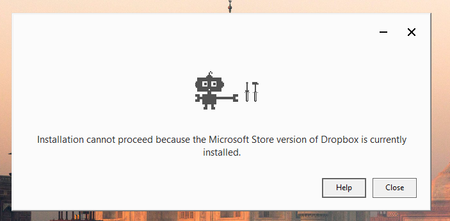
Application Affected Dropbox Device Lenovo laptop Operating System/Browser (if using the web) Windows 11 Dropbox App Version (if using the app) Dropbox 242.4.5815 Offline Installer.x64.exe Question or Issue i couldn't login into dropb and i got the follwing error: bn.BUILD_KEY: Dropbox bn.VERSION: 241.4.4853 bn.constants.WINDOWS_SHELL_EXT_VERSION: 89 bn.is_frozen: True machine_id: cdafbbac-4a5d-44c0-9bea-a72c1c8c8234 pid: 6080 cwd: 'C:\\WINDOWS\\system32' real_path='C:\\Windows\\System32' mode=0o40777 uid=0 gid=0 parent mode=0o40777 uid=0 gid=0 HOME: None appdata: 'C:\\Users\\amir.dar\\AppData\\Local\\Dropbox\\instance6' real_path='C:\\Users\\amir.dar\\AppData\\Local\\Packages\\DropboxInc.Dropbox_xbfy0k16fey96\\LocalCache\\Local\\Dropbox\\instance6' mode=0o40777 uid=0 gid=0 parent mode=0o40777 uid=0 gid=0 dropbox_path: None not found parent not found sys_executable: 'C:\\Program Files\\WindowsApps\\DropboxInc.Dropbox_241.4.4853.0_x64__xbfy0k16fey96\\Dropbox.exe' real_path='C:\\Program Files\\WindowsApps\\DropboxInc.Dropbox_241.4.4853.0_x64__xbfy0k16fey96\\Dropbox.exe' mode=0o100777 uid=0 gid=0 parent mode=0o40777 uid=0 gid=0 trace.__file__: 'C:\\Program Files\\WindowsApps\\DropboxInc.Dropbox_241.4.4853.0_x64__xbfy0k16fey96\\241.4.4853\\python-packages.zip\\dropbox\\client\\ui\\common\\boot_error.pyc' real_path='C:\\Program Files\\WindowsApps\\DropboxInc.Dropbox_241.4.4853.0_x64__xbfy0k16fey96\\241.4.4853\\python-packages.zip\\dropbox\\client\\ui\\common\\boot_error.pyc' not found parent not found TMP: C:\Users\amir.dar\AppData\Local\Temp TEMP: C:\Users\amir.dar\AppData\Local\Temp tempdir: 'C:\\Users\\amir.dar\\AppData\\Local\\Temp' real_path='C:\\Users\\amir.dar\\AppData\\Local\\Temp' mode=0o40777 uid=0 gid=0 parent mode=0o40777 uid=0 gid=0 Traceback (most recent call last): File "desktop/dropbox/client/main.py", line 6945, in _setup_root_for_account File "desktop/dropbox/sync_root/helpers.py", line 199, in create_root_for_account File "desktop/dropbox/foundation/futures/basic.py", line 1040, in result File "desktop/dropbox/sync_root/manager.py", line 382, in create_root File "desktop/dropbox/sync_root/handlers/windows/cloud_files.py", line 299, in register File "desktop/dropbox/sync_root/handlers/windows/cloud_files.py", line 601, in _register PermissionError: [WinError -2147024891] Access is denied So, i've uninstalled the app and deleted the registery key (used chatgpt for those steps) now, i can't reintall the app59Views0likes4Comments
Can't start the Dropbox app on my new Windows device. Nothing happens.
Application Affected Dropbox Device HP generic, new, laptop Operating System/Browser (if using the web) Windows 11 Dropbox App Version (if using the app) Can't really tell since it won't start Question or Issue Have been using Dropbox for years. Recently had to get a new laptop because of work issues. I downloaded the app from dropbox.com. It installs just fine. When I start it and press the login button, it very briefly starts a hidden terminal session. The terminal closes almost instantly without displaying its window (therefore I can't see what it tries to do) and then nothing more happens. It will not even display the login window (username/password). Tried reboots and starting the application with administrator privilegies. Doesn't work. No error messages. Works just fine on my other computers, but this is the one I travel with which is a problem. One thought is that the installer tries to access the Edge browser or its dependencies, which I don't have installed (optional in the EU). Please help!68Views0likes10Comments
Removing Dropbox Context Menu Entries on Windows - Persistent Fix
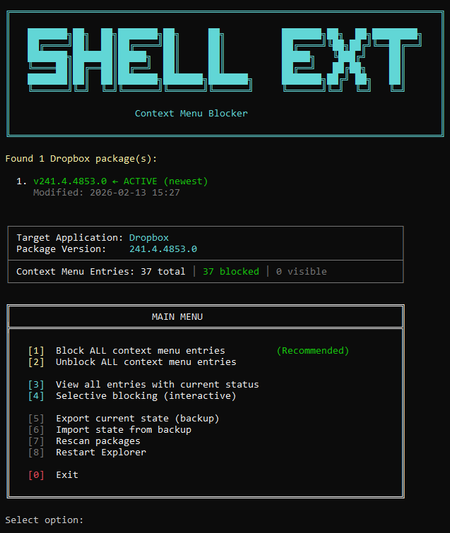
I've seen dozens of threads here from people trying to get rid of the Dropbox right-click context menu entries on Windows. There is no official toggle for this. The common advice involves manually editing registry keys, but people report those changes revert after Dropbox updates. Here is my solution: The linked script solves that differently. Instead of modifying Dropbox's own registry entries (which Dropbox overwrites on update), it uses Windows' built-in Shell Extensions Blocked mechanism — a per-user registry key (`HKCU:\...\Shell Extensions\Blocked`) that Windows itself respects. Dropbox updates don't touch this key because it's not theirs. What it does: Reads Dropbox's AppxManifest to find all context menu CLSIDs automatically Blocks them using Windows' own sanctioned blocking method Fully reversible — unblock everything with one click Interactive menu or silent command-line mode for automation Tested for 2+ months across three machines via PowerShell 7, through multiple Dropbox updates. The entries have never come back. The script is open, readable, and modifies nothing outside that single user-scoped registry key. If you want an independent safety assessment, paste it into any AI assistant and ask. Here is the script + AI safety assessment: https://grok.com/share/bGVnYWN5_e1f2cac5-5e0f-4731-bbbe-63fd72af7a7b70Views1like3Comments
Windows Explorer hangs for 30 seconds
Application Affected (Dropbox Basic) Device Asus Z170-PRO custom build w/ Intel i7-6700K Operating System/Browser (if using the web) Windows 10 Dropbox App Version (if using the app) (242.4.5815) Question or Issue I open Windows Explorer and navigate to the Dropbox folder. When I double-click on a folder in the right panel of Explorer it hangs for 30 seconds. Then the contents are displayed. If I open the folder by using the left navigation bar Explorer does not hang. When I Quit the Dropbox app from the task bar, the hang still occurs. The Dropbox folder is the only one where this hang occurs. Note: I have two Windows user accounts with two separate Dropbox accounts.Solved38Views0likes4CommentsOpening my Dropbox folder is causing Finder to beachball and then lock up
Application Affected (Dropbox and OS X Finder) Operating System/Browser (if using the web) OS X Sonoma Dropbox App Version (if using the app) 242.4.5815 Question or Issue On OS X Sonoma - when I click on the Dropbox folder in finder it beachballs - from ~15 - 30 seconds, sometimes a couple of times. I can't then access any other folders in finder i.e. it locks up all of finder. Tried a bunch of approaches clearign caches etc- does anyone have a potential verified fix for this issue?27Views0likes1Comment