Your workflow is unique 👨💻 - tell us how you use Dropbox here.
Download
83 Topics
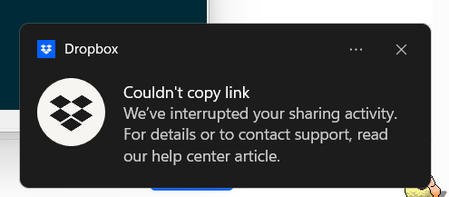
"Couldn't copy link" error only on a specific file
I have added a file to a directory however when trying to download the folder as a zip the file is not there If I try to create dropbox link just to that file I get this message The file is Newtonsoft.Json.dll from microsoft .net SDK Scanning the file with windows defender found no threats. How can I fix this ?Solved121Views0likes9CommentsForcing a shared link to download no longer works; the recipient has to access Dropbox now.
In the past, once I created a folder & uploaded pictures to DropBox, I would click the 'copy link' button. I would then open my email client, start a new email & paste the DropBox link in the message. I then changed the end of the link from 0 to 1. When the recipient clicked on the link, they would get a message to download the folder of pictures WITHOUT having to go to DropBox & create an account. It's not working this way anymore. Am I forgetting something or did DropBox change the download procedure?217Views1like4Comments
Can I download all of the files from a folder that was shared with me?
I need to download all files from a folder someone shared with me, but instructions I've found online mention hovering over files and clicking a checkmark, which is not appearing. I've also seen reference to downloading all as a ZIP file, but this option doesn't appear either. The only option seems to be clicking each file to open it and download it from there, but there are too many files to download each separately. Is there any other way to achieve this download?Solved26KViews0likes7CommentsIt's difficult to download Dropbox folders onto your computer when the hard drive is full
Hi just realized how difficult it is to store the contents from dropbox on to another harddrive if you computer is full. It is not possible to download bigger folders from dropbox unless they fit into a zip Wow, thats horrible. That costs me ages of time77Views0likes2Comments
Remove login pop-up on Dropbox transfer downloads
This has been complained about numerous times and it is absurd that Dropbox seemingly refuses to change this. I've received so many complaints from clients with regards to them claiming they need to signup/give a password to download my transfers because the scummy "Or continue with download only" text is easily missable. Just allow people to click the link, view the files, and download without logging in. What else do I pay Dropbox for? I will move to another service soon if this is not changed.66Views0likes1Comment
"Disable downloads" feature not working on the desktop app
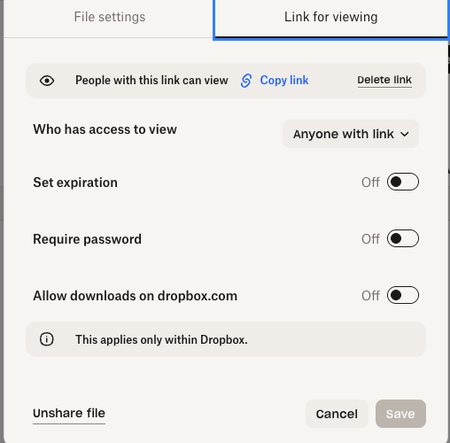
Hi, I have the essentials plan but I do not have the feature to disable downloads. I have the "allow downloads on dropbox.com" toggled off(see picture) but that doesn't work because someone can still download it. Can someone point to me where is this "disable download" feature that I see online? Does it even exist within my current plan? Any help would be greatly appreciated.126Views0likes5Comments
Shared link expired - how can I download the files?
Hi guys. About 8 years ago I did some acting for a film student based in Wellington. I was sent finished projects to my email via Dropbox. Recently I tried to access the works but I can't and displays a message saying link no longer works. I would desperately like to retrieve them. Unfortunately I have long since lost touch with the student involved. Any help would be so so appreciated. Thanks for taking time to read this 🙂☘️Solved6.6KViews0likes3Comments
Users downloading a file from a dl=0&raw=1 shared link get a 0 bytes download
Question or issue I’m trying to share .pdf files with my clients by redirecting (302) them to shared link with dl=0&raw=1 query params in link to force browser open it in browser. By the way, almost every russian client get file download, but receiving 0 bytes, error to download and somehow file name is file.pdf in downloads, but in dropbox is other name, something like Привет.pdf. I’ve tested it by my own and there is no problems. It opens in android and ios in different browsers. Is it problem that they trying to download file in russia?89Views0likes2CommentsDropbox 237.4.5655 - syncing hangs on 30 files forever or '"waiting for download".
Device PC Operating System/Browser (if using the web) Windows 11 Dropbox App Version (if using the app) 237.4.5655 Syncing Status Syncing 30 files Question or Issue This weekend on all my pc's and laptops (all Windows11) the new dropbox update was installed automatically. On my working laptop, this went as a charme, no problem. My backup laptop started to index all files, then syncing and now it stays on "Werkruimte downloaden" (workspace?) - after a reboot, he starts syncing and then it goes to above and stays there. No progress. All files are synced, but Dropbox keeps on "busy". My PC started to index first all files (more than 300k of number of files), then syncing, from 16 hours to 6-8 hours at least. Then it showed, that there were 2 files left to sync, 412KB , so this would be in a blink of an eye. It stayed there forever. Then i tried: clearing cache, unlink/link again and wait again for 6-8 hours. I also tried to deselect the files for syncing, but no solution there. Now it states it still wants to download/sync 30 files.... (waiting for download) and stays there. So one out-of-three the update went smooth, but the other two are still trying to get the syncing finished. Any ideas how to move forward on this update? Kind regards, Jeroen239Views0likes9Comments