Need to see if your shared folder is taking up space on your dropbox 👨💻? Find out how to check here.
Dropbox Backup
123 TopicsIncorrect dropbox space usage on windows
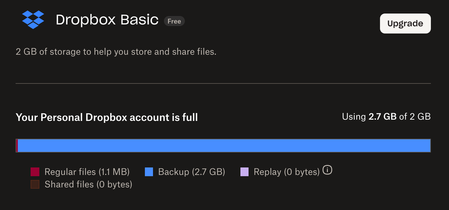
Hi Guys, My local Windows Dropbox is fully synced with my online Dropbox. Windows Explorer file/properties shows my Dropbox folder is 576 MB but to my surprise, dropbox.com and dropbox app both say my dropbox is full. I have checked the plan tab and found my regular file size is 3.4 GB which is not correct. My shared folder only takes less than 100 MB. What is going on here? Why the discrepancy? Any inputs? Thanks, TaoSolved72KViews3likes675CommentsHidden .dropbox_bi folder storing 87GB of files locally!
Hi, I've just recently set up a new Dropbox Professional account. After installing the desktop app on my Mac I also set up a backup of my external SSD, which completed successfully yesterday. Standard Dropbox file sync seems to be working fine, and the Dropbox app says everything is up to date, but for some reason I now have a new hidden folder under my Mac user folder called .dropbox_bi. That folder is storing 87GB of files on my primary SSD, apparently related to the 220GB of data backed up from the external SSD. Is this my life now? Or is there some way to recover that massive waste of precious primary SSD storage space?Solved23KViews2likes92CommentsHaving trouble deleting my content. The option isn't there.
Dropbox Plan Basic Device iMac Operating System/Browser (if using the web) Ventura 13.7.8 Question or Issue An email from DropBox invited me to save my computer's files to DropBox. When I attempted to do so, I ran out of space and I've since changed my mind. I would like to delete EVERYTHING in my DropBox account but when I follow the help directions, (hover over the files, click the three dots, etc.) I don't get an option to delete. I've tried in both "list" and "grid" format. See print screen. Please provide simple instructions for deleting everything. I do NOT want to upgrade.Solved167Views1like6CommentsTrouble with storing my macOS Dropbox app on an external drive
Perhaps someone can walk me through how to take care of these questions: 1. I liked having Dropbox mirror on my desktop, but that became untenable when Dropbox would no longer let me put the desktop contents on an external drive. These days, my Mac internal drive is 500 GB, and there isn’t any room for my photos (1.4TB). Not sure how to make this work using selective sync to move the Dropbox folder to an external drive. How do I make it so the default is an external drive on my Mac? 2. Backup management also needs clearer text to explain its actions. Given I can’t use the desktop sync without an exterior drive, how do I back up an exterior drive using the WEB-based Dropbox?2KViews1like7CommentsBackup, how can I get access and manage what is there?
As I left my previous employer, I'm back to a standard subscription, with 2GB data. This is enough as my personal data is far less. Nevertheless Dropbox is not syncing anymore as there apparently is 10.5GB is my backup. I have no idea how I can get access or manage what is in there. Search already a lot, but didn't find it. Hope someone can explain. Rgs, Michel van der Staak (NL)Solved1.8KViews1like5CommentsCapacity Limit Messages
Hi! A first timer here. I get messages about exceeding storage capacity of 2 gig. My computer shows only 1.35 GB used. The Dropbox site shows 2.8 GB. Not sure why the big difference. But poking around the site shows 1.35 GB on something called USB Disk. Not sure if these are my main files stored or Dropbox is backing up information. I don't need/want back up nor have I asked Drop Box to back up any files. The site gives me the option of deleting this USB Disk. So my question is, if I delete this USB Disk, will it restore my capacity and start synching again. Or will it delete all my stored files? Thanks for your help DanSolved823Views1like3CommentsNo storage space but no files in dropbox
Hi, I have a Dropbox Basic account that I have been using for years. Since a few weeks now, I am having issues. Whenver I have received storage limit notifcations in the past, I was able to remove some files from my account to free up some space. Now I am getting notifications that my account is out of space (I received an email, have a popup at the top of my screen when I'm looking at my files in my browser, and the desktop app says I am out of space) despite that there are no files currently in my dropbox. I haven't uploaded anything out of the ordinary or particularly large to my account. Current displays: Desktop app: 102.4% of 2.4 GB used. Can't sync "filename" (your dropbox is out of space). Any ideas what the root cause is, or why my space usage is not displaying the correct storage? I am perplexed as to why things were operating smoothly and are suddenly not.Solved6KViews1like34Comments