Our Community is in read-only mode until April 8th, learn more here. You can still search existing threads or get help via Dropbox Support, the Dropbox Help Center, or Learn.
Dropbox Backup
52 Topics
Attempted to zip too many files error when wanting to download backup
Hi, iv'e backed up my dropbox files and i'm attempting to download them from the backup site. i'm reffering to: https://www.dropbox.com/backup/ when i go to the website and ask to download it, it tells me "Attempted to zip too many files". this made me loose a heart beat, though i know everything is there. i'm relying on this, which i guess was a fatal mistake. iv'e got all of my important files there, and i need them to continue my work - i used this as actual backup for some files, a big mistake 😞 i know everything is there, but how can i reach it if it can't download them? Thank you in advance.Solved5.2KViews1like8Comments
Is it possible to view backup files on the mobile app?
Hi, all! I have some old flash drives that I just backed up on my MACBOOK. They appear in DropBox Backups. I can’t figure out how to view the backups in my mobile app. I can see the file names in my mobile app. But, when I click on them, it simply takes me to the general list (camera uploads, documents, etc.) TIA!Solved12KViews0likes12Comments
How can I copy the contents of my Dropbox folder to an external drive?
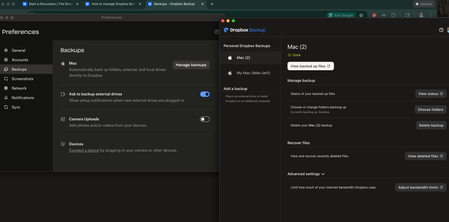
Device (MacBook Pro) Operating System/Browser (if using the web) (macOS15.6) Dropbox App Version/Browser Version 237.4.5655 I am trying to simply copy the contents of my Dropbox folder to an external hard drive as a backup (not with the intention to save regular working files on the external hard drive as I know that would create a problem when the drive is disconnected. I am super confused by the Dropbox Backup website/app: when I go to manage backups I can't see a clear option of how to select my backup drive (Seagate portable drive) and transfer my Dropbox contents over. Instead it is giving me options to backup the folders on my computer (pictures, documents etc.). Please help! This should be super easy and clear???292Views0likes1Comment
Backups do not display on website.
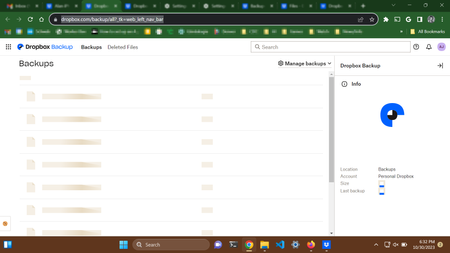
I cannot display my backups on the website. The URL that is not working: https://www.dropbox.com/backup/all?_tk=web_left_nav_bar See screenshot below. That is what I see at the above URL. Here's what I have tried: Three browsers: Chrome, Firefox, Edge. This fails on all three. Signed out and signed back in. Cleared cache and cookies for all *.dropbox.com Tried at different times of the day (this has not been working for about 12 hours) Note: Choosing "View backed up files" from the desktop app works fine to display the files from a backup. I just cannot list the backups and display the files on the website.1.5KViews0likes8Comments
Alias Folders
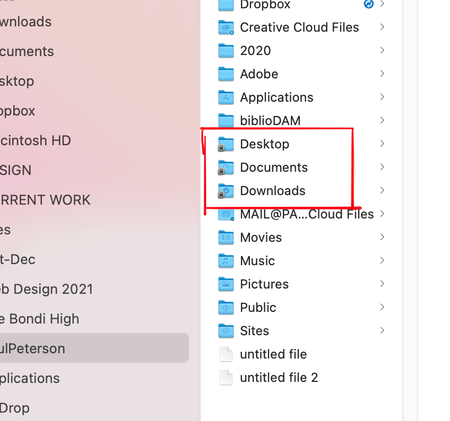
I had to re-sync Dropbox recently and when I sync the app on my iMac Dropbox creates locked alias folders for Desktop, Downloads and Documents. Do I have to wait for the files to sync and the localize the files from Desktop, Downloads and Documents? I want these folders to be on my local computer not aliases that link to Dropbox2.8KViews0likes19CommentsHow to restore files from Dropbox Backup
I recently backed up 200-GB of files from an external hard drive that was getting old. I used the DropBox Backup feature figuring it would be easier to simply use a "restore" feature rather than manually copying files over. I now have a new drive but have found that DropBox backup doesn't actually have a "restore" feature despite market the ability to "restore a new computer from backup". From what I can see you have to manually select files and download them (what I was trying to avoid). Dropbox also forces the files to be ZIPd, which it can't do for 200GB of files. So now my files are literally stuck on Dropbox with no way to get them off. Seems like a completely useless feature? Does anyone know a workaround or am I going to have to manually download 200GB of files in small batches?2.6KViews4likes8Comments
Moving Synced Data To External SSD Drive & Backing Up That Drive
To free up space on my notebook and assist in my DAW performance, I'm using a new external SSD drive to directly write new files too and I want to move my large existing files (already uploaded to Dropbox) to this new drive. I am trying to move these large audio files from my notebook Dropbox folders which become ultimately available "online only", to the external SSD drive then want to back this drive up using Dropbox Backup. The issue I am having is that to move the existing "online only" files they are needing to be downloaded first, then copied to the new external drive and then, once I click to back the new external SSD drive up, will be uploaded back to DBx Backup facility. This process is clogging up my notebook to the point it' going to take days and can' do too much on it. Question: Is there a way to move these "online only" [already uploaded] files directly to the Backup folder one time only to save downloading them, copying to the new drive, then re-uploading the same files??? Maybe I am missing something very easy?? is there a better way? Can i sync two drives instead, maybe?? Many thanks in advance.Solved16KViews0likes5CommentsWhy can I only see some Dropbox backup folders on the desktop app?
Hello! Since I started using dropbox I had 3 laptops. All them are/were backed up in dropbox backup and I could see them in my dropbox desktop app, just by opening any explorer folder and going on the right path. All the files in these folders could be synced online or locally like any other file in dropbox and had the little tick on the bottom left of the file icon, and I could see the main folder with the name of the laptops in my dropbox tree in explorer. The other day, I noticed that the files in my actual laptop's main folders (desktop, download and documents) did not have that icon anymore. I opened explorer, clicked on the dropbox tree and then on the folder corresponding to my actual laptop's and noticed there were different, newly-created desktop, download and document folders in it. So, I deleted that folder associated to my laptop that seemed to be empty (of note, in the dropbox backup website, I could still see all my laptops' backups, including this one that had just disappeared from my desktop), and launched a new backup, hoping it would pop up again in my explorer. It took forever to upload hundreds of GB (that were already there!) and at the end, I still cannot see my laptop's backed up folder on my desktop app. Can someone explain me what happened? And, most of all, how can I put that folder with the content of my laptop on the dropbox desktop app again? All the other old laptops are backed up and visible in the drop box desktop app! I need this because I access the same dropbox from my office computer. Thanks to whoever will be able to help me!1.2KViews0likes4CommentsThe Dropbox Backup feature is not complete
According to the description, Backup "that your content is safe and recoverable it if things go wrong". Recovery was never actually finished when building out this product. 1. .zip's error happens often 2. It cannot manage large files to be exported in any reasonable way 3. Browser timeouts happen 4. There is no premium or advanced method to get data out. Right now, Backup is great for customer retention because if you lose your drive or laptop, the only place the files will be sorted are in Dropbox, which requires a yearly renewal. My idea. 1. Offer a premium method to export the data to help the bottom line. 2. Build in a better download either through the browser, or the agent that is already on my machine. 3. Allow a new external drive to be mounted to export all of the data through the agent. 4. Allow me to order a hard drive at cost, with the data backed up.Solved2.1KViews3likes8Comments