Our Community is in read-only mode until April 8th, learn more here. You can still search existing threads or get help via Dropbox Support, the Dropbox Help Center, or Learn.
Dropbox Backup
46 Topics
There are invisible files taking up my Dropbox space and I can't delete them.
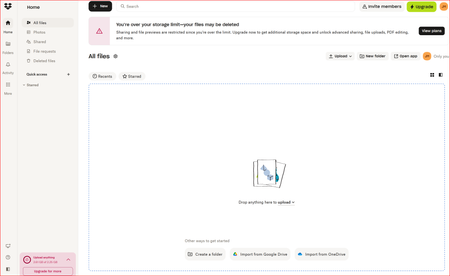
Dropbox Plan I pay for 3 TB A large UpdraftPlus backup was uploaded to my Dropbox. The files appeared briefly in Recent, but the actual folder has never been visible in All files. Search does not find the folder either. I deleted the backup from UpdraftPlus, but Dropbox still says I am massively over my storage limit. My visible files did not explain the storage usage, so I believe hidden UpdraftPlus/app-folder files are still present. And now they are no longer visible in Recent files. How do I find and permanently delete these files?96Views0likes7Comments
Deleted all my files but my account says it's still full.
Device Microsoft Surface 15 Operating System/Browser (if using the web) Windows Issue details: I have been invited to join my attorney's Dropbox to share files. When I try to join it says I am out of storage and need to upgrade. I have now gone in and deleted everything that I can find. There was a shared folder with about 2 GB of photos that I wasn't aware of. But have now deleted it. I sent a help ticket and they had a link to Device Backup - https://www.dropbox.com/backup/all - there I also deleted a device backup with 2 GB How long will it take to be able to join and access my attorney's shared folder. Is there anything else I need to do?79Views0likes2CommentsIt seems that my Backup is using the majority of my storage. What can I do?
Hi I have the basic plan on my Mac and Ive referred many of my friends and now have 7.75gb of storage, more than enough for me. Ive now run out eventhopugh I only have files of around 2gb. It keeps saying backup is using 5gb however I have no files being backed up. Can someone help me? LaloSolved78Views0likes3Comments
Dropbox is full of a backup, but I cannot find the backup anywhere.
Where can you find and deselect the backup dropbox is making. I don't want the dropbox making backups. I only use it to share some files. If u go to preferences / back-ups I don't see any backups and yet there is backup space used in the dropbox.88Views0likes2CommentsDropbox says I have 7.9GB of backup files, but I don’t know how to find them and delete them.
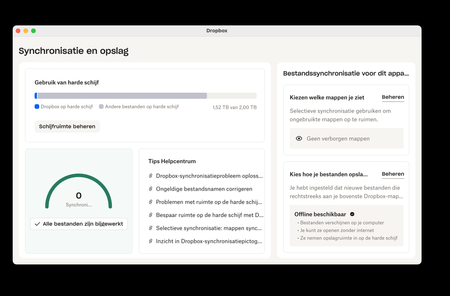
Dropbox plan free Device iPad, iPhone, MacBook Pro Question or Issue The free plan gives me 2gb of storage. Dropbox says I am using almost 8gb, and that almost all of it is in backups. I’m not aware of using any backup features. And I can’t find the backup files. How can I delete all the backup files so I can use my account again?100Views1like2Comments
Not enough storage and missing files after accidentally setting up Dropbox Backup
Hello! I have a client that didn't realize he must've clicked for Dropbox to backup his files, despite having a free account with only 2 GB. Well he got a new computer, and his old drive was cloned to the new computer. Even with Dropbox signed in, the files aren't actually in Dropbox, despite opening programs on the old computer and the path showing something such as: "C:\Users\Owner\Dropbox\My PC (Owner-PC)\Desktop\Clients" The files are accessible on the old computer, despite not showing in dropbox or on dropbox website, so where would I find them since there wasnt space to actually put them in dropbox?176Views0likes7Comments
My Dropbox is full of backup files that I can't remove.
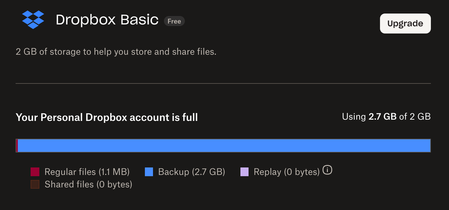
My dropbox claims to be full, but I have no essentially no files on it. When I try to see what's taking up the space, it claims that "Backup" is taking up 2.7gb out of my 2gb of space. But I have no backups, and I have no linked devices. How can I remove these "backups"? What are they backups of? Is there some way I can just "factory reset" my account to just as if I had started a new account, maybe?Solved215Views1like4Comments
Hidden .dropbox_bi folder storing 87GB of files locally!
Hi, I've just recently set up a new Dropbox Professional account. After installing the desktop app on my Mac I also set up a backup of my external SSD, which completed successfully yesterday. Standard Dropbox file sync seems to be working fine, and the Dropbox app says everything is up to date, but for some reason I now have a new hidden folder under my Mac user folder called .dropbox_bi. That folder is storing 87GB of files on my primary SSD, apparently related to the 220GB of data backed up from the external SSD. Is this my life now? Or is there some way to recover that massive waste of precious primary SSD storage space?Solved24KViews2likes92Comments