Your workflow is unique 👨💻 - tell us how you use Dropbox here.
Dropbox Plus
38 Topics
Deleted files keep reappearing
Hi all, I know that many threads on this issue exist in the forum, but I couldn't find anyone that helped in my case, or the issues are slightly different. Before contacting support directly I thought that it might be good to describe it here in the forum (and hopefully someone can help me :)). I have in my dropbox a couple of PDF files in the main Dropbox folder and a subfolder (which has also one subfolder with ca. a hundred PDF files) that always keep reappearing after I deleted them, usually within half an hour (sometimes it happens instantly). They are not shared. I got this issue only very recently, and some time after I upgraded to Dropbox Plus (last month). Before, I had Dropbox Basic and I really never had this issue (which makes it even more frustrating). I have tried everything that I could possibly imagine. I unlinked all of my devices, reinstalled Dropbox, I reverted to an older version of the files, I put them on the hard drive and back again in Dropbox, I (permanently) deleted them in the browser...nothing helps. When I rename them, they are still added with the original name (the renamed copies stay - I probably could multiply them infinitely like that). These files are not old files from two years ago (saw some people in the forum having this issue). The issue appeared when I put these files and folders originally at the same place where they keep reappering now with their original name. Last week, I moved them to another folder and renamed them, but they stayed in my Dropbox. So I have these files/folders with different names and directory, but their "original" versions keep reappearing at their "original" place. It's a bit like these "original" files are stuck in the cloud servers forever, and they are always put back like that in my own Dropbox. I don't know if there was an issue with the syncing, or some other technical problem. It can also be something I did wrong, though I don't really know what. As I said, never had these issues before and use Dropbox a lot, on at least three devices regularly (Mac and Windows). No device has been added shortly before or since I have this issue. I hope that I could describe my problem with as many details as possible, and hopefully as clear as possible. Thank you very much in advance for your help!Solved24KViews2likes11Comments
I need to permanently delete my files, but I get message "x items couldn’t be permanently deleted".
When I wanted to permanently delete a file or folder (which I may have shared with others or not). I used to be able to delete it in Finder and then would get asked by Dropbox: Delete "untitled folder" from everyone's account and all devices? I then confirm with "Delete for everyone" and proceed to empty the trash on my Mac. Now I log on to my Dropbox account, go to "Deleted files" and select the ones I want to permanently delete. Then confirm this and they were gone, space would be freed up. Well, gone are those glory days of simplicity, because: NOW I get told by Dropbox: "File XYZ will be gone forever for everyone, including for anyone still using the folder. Permanently deleting this folder won’t free up space." I confirm by selecting "Permanently delete" NOW I get the message: "x items couldn’t be permanently deleted" Dropbox tells me – uselessly: "What you can do": "Ask the owner to help permanently delete this" I AM the #!*¥ owner, aren't I? Plus, didn't clicking "Delete for everyone" on the desktop version make it clear that ALL those files have to go? Shurely this is a recent bug. It wasn't such a hassle before to get rid of old files. Or am I missing something? GrrrrrSolved18KViews3likes10Comments39 files stuck syncing for weeks
Using the Mac version 88.4.172 of the Dropbox app on my 2015 MacBook Pro (with the latest Catalina macOS 10.15.2). Dropbox has been stuck for several weeks on 39 files syncing. I use Smart Sync for a number of folders. These are the steps I’ve taken to try to fix this issue: Quit Dropbox and restarted. Restarted the MacBook Pro. Killed all Dropbox processes using Activity Monitor (force quit them). Then restarted the MacBook Pro, and restarted the Dropbox app. Deleted and reinstalled the Dropbox app in the normal manner. Deleted and reinstalled the Dropbox app using the Advance Reinstall directions at: https://help.dropbox.com/installs-integrations/desktop/advanced-reinstall Checked for “bad files” — per Dropbox instructions — and got stuck using this link: https://www.dropbox.com/bad_files_check, which froze up on the Safari, Firefox and Opera browsers. This link is discussed in numerous discussions and seems to be something Dropbox has been “working on” fixing for more than a year. Removed all aliases in the Dropbox folder and subfolders. Checked for and removed all symlinks in the Dropbox folder and subfolders. Checked for circular arrow “syncing” symbol in the Dropbox folder and subfolders; found none. All files and folders have the green checkmark symbol. Looked for hidden files that might be causing issues, found none other than normal Mac “.DS_Store” files — in most folders — plus three Dropbox hidden files: “.dropbox”, “.dropbox. cache”, and “Icon?”, in the Dropbox main folder. What else can I do?Solved14KViews2likes37CommentsCan I edit a text (*.txt) file in Chrome browser?
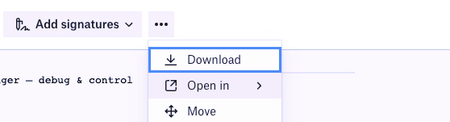
Hi there, I'm struggling to edit a TXT file in Chrome browser on Dropbox. I'm sure I've done it with a .docx file before. When I search for this feature, Google returns results asking for it back to 2012, but there's nothing recently, the feature requests such as this one have been closed, so I'm assuming I'm having an issue with my account. Especially since Dropbox is pushing Family plans, signature, and other feature way more complex and less universal as a simple TXT editor. I've been using link removed it has looked the same for years and works fine, but I find it extra weird that a giant company like Dropbox doesn't have a similar feature. How do you usually edit a TXT file in the browser? I only have a few lines to add/remove, when I'm on a machine without the Dropbox app/daemon installed, and don't want to leave any file traces on that machine. See my environment in Chrome on a Macbook air, as a Dropbox Plus paying client. On TXT files, I have an "Open in" Menu, but the arrow only opens a 2px high line. This is definitely not expected behavior, as if the submenu was empty, it should not appear with an arrow in the first place. What could I be I missing here?Solved12KViews1like22Comments
Latest email from Dropbox contains x-webdoc links that don't work
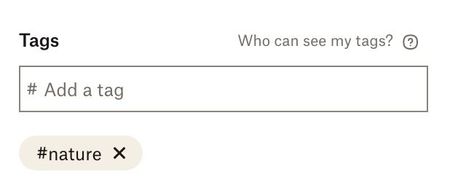
Got an email this morning from Dropbox - subject: "Introducing: Our newest set of tools to simply your life". The email contains links to various new features ... that are going to simply our lives apparently. e.g. x-webdoc://C33115A8-807A-463D-B0AA-ECE1119E84A1/experience.dropbox.com/resources/information-architecture-for-distributed-work?_tk=email&_camp=3216404&_ad=8566dbc5b57a4d3c95d278d1337f7282&utm_source=iter&utm_medium=email&utm_term=us-en&utm_campaign=p1_bb_co_all_pcn_b202111&utm_content=m2_c email link However, I can't find a browser that will open the x-webdoc: protocol. Anyone else able to do get this to work? I tried Mac/Safari, Mac/Chrome, Windows/Chrome - all without success. Whatever happened to just straightforward URL links to a specific page? BTW this is NOT making my life more simply, its complicating it by having to write this forum entry. Plus ... if you go to your Dropbox account, you CAN add tags to folders and files and search for them. This is good for any new folders/files uploaded. However, it doesn't help with 1,000s of existing folders/files. AND - for me, I'd have been MUCH happier have a search feature that I could restrict to just folder names or just file names, not 100s of files that CONTAIN part of whatever it is I'm searching for. So for me, at least, these new features (despite not being able to easily find out about them because of the x-webdoc based link) STILL does not provide a simple search feature for folders and/or files. Another reason I won't be renewing my subscription next September, unless things improve.Solved11KViews0likes3Comments
'Search by tag' not working
I have applied tags to my photos, but the tags are not showing up in the search bar. When I perform the search, I get results that I assume Dropbox's image classifier has unhelpfully recognized as related to my tag search, but I am not able to filter results that actually have that tag. I have cleared my cache, used Firefox and Chrome browsers (most recent versions), I have used the browsers in incognito/private modes, used Windows and macOS operating systems (most recent versions), and tried searching via my desktop file explorers. Nothing works. I have not tried to move the photos into a new folder to tag them there, because the entire point of adding tags was to filter photos that I wanted to move in the first place.Solved8.5KViews4likes19Comments
Edit files in vault on Windows
I've looked into new Dropbox plus features this morning, tried out the new Vault feature. I've realized that, when you are on Windows, there is no way to edit the files you have in the Vault. You can do this on Android with the Dropbox app, because the app has a text editor, but on Windows the way to edit files is to opened the sync file on your machine. However, the Vault folder does not get synced. Text files can't be edited in the browser in Dropbox, so the only options for editing the files in the Vault right now seems to be to move them out of the Vault, edit them, move them back in the Vault. Maybe someone has looked into this more. Is there a way to edit those files without moving them? Is there any plan to implement something to permit this (the Vault is a new feature)? Or will there be an option in the future to sync the Vault folder to Windows (while keeping it secure)?7.1KViews5likes7Comments
Will Dropbox delete my local files?
Dropbox scares me. I just want to have a safe a place to keep my files, and access them from two or three different devices. But sometimes, instead of just saving the file, Dropbox saves it as a separate file. Then I've got two versions of the same file. Over a period of weeks or months, I end up with six or ten versions of the same file. Plus, sometimes my PC or laptop loses its connection, and the device saves a local version. Now I've got a dozen versions, and I'm afraid to work on any of them, because if I choose the wrong one and save it, I could lose hours of previous work. So I have to go through them all, try to figure out which one is the latest one and which one has the revisions I want. Once I find the latest version, I would like to get rid of all the other versions so I don't have to keep doing this. That's when it scares me. When I try to delete one, a box pops up, asking me if I'm sure I want to delete all versions on all my devices. Christ no, that's the last thing I want! But that's the only option it offers. That, or cancel. So I cancel. I'm guessing this function is part of Smart Sync, so I have tried to turn off Smart Sync. There doesn't appear to be any way to do it. But in "settings" there's an option to turn off System Extensions, which, it says, enables Smart Sync. I turned that off. My PC just spent the last half hour doing something with my Dropbox files, but I can't tell what. Frankly, I have no idea what the effect of turning off System Extensions might be. The files seem to be accessible. Have I achieved my goal? Can I now use Dropbox without the threat of it changing or deleting my local files?Solved6.1KViews3likes5Comments
What do I do about my Live Photos and metadata on other uploads?
Dear Dropbox Community, I have read through so many posts after searching the term “Live Photos" but still do not know if Dropbox lets you upload Live Photos from an iOS device, using any method would be fine with me. I only care about preservation and maintaining metadata. So, can I make it simple and ask: Live Photos and DB, do they work together? I mentioned metadata; a possibly completely different question but I believe both belong in one, simple, "do this, ok?" Response. Please and thank you in advance— how should i upload any Photo or Video from my iPhone to Dropbox without wondering or worrying that metadata dates altered because I uploaded, let’s say, by clicking the plus sign in the app or going to the website and uploading that way. Will different ways of uploading result in different versions of the uploads of anything from my iPhone’s Photos? Thanks again, LBN. PS- i need to remove all media from an iPhone 8. My next post will be about not Photos, Live Photos and Videos but about voice memos & their data. But for right now, let’s just tell me what to do about my Live Photos! Hundreds. I hope I don’t have to AirDrop them to another apple device to keep them. I dont have that option. Dropbox is my only backup method for a while going forward. I would hate to end all those Photos as Live ones and hate to have the dates embedded mess up on everything i can upload if I can’t upload the live ones as is. No thread just says in February of 2021, yes DB works with Live Photos or No, you are in trouble. Especially because you don’t know which way you uploaded what. Tried all the ways. Sometimes metadata dates placed videos correctly in the timeline and other times with the exact same file, just left it in “this month”. It was from October 2018, definitely not this month! So i can only imagine what is happening when I upload the Live Photos... I did wonder why some photos didn’t show up on that part of the ios app, and one of the Live Photo threads taught me that edited photos dont. I manually upload everything so i think they are otherwise ok.Solved3.8KViews1like3Comments