Our Community is in read-only mode until April 8th, learn more here. You can still search existing threads or get help via Dropbox Support, the Dropbox Help Center, or Learn.
Dropbox Sign
96 Topics
DropBox Sign - Signers not receiving emails?
Hello, I uploaded a document on Thursday for some of our signers. I sent the email, but it looks like no one received anything when I asked them during our Monday meeting. I sent email reminders, I duplicated and resent, and uploaded the document again and added the signers again, but nothing has worked. I am not sure what is going on. I had one of our signers add noreply@mail.hellosign.com to see if that might help and it did not. They checked their spam and nothing. On my end it shows pending and the documents were sent, but again, no one has received anything. The only thing that is different is that I included a new signer, but the other four have always received an email asking for their signatures. Does anyone have any idea what the issue might be? Thank you, Marcy12KViews1like32Comments
Possible scam email sent directly from noreply@mail.hellosign.com
Hello! This morning I received a strange email from noreply@mail.hellosign.com and it was for a signature for a subscription for Geek $quad(?). It's $399 USD and I have no idea what this service would be for. I Googled the "customer support team" phone number and it came back as potentially being for an escort service in Florida. I checked my bank accounts, Paypal and Venmo, and don't see any pending charges. The signature request is also from an email and name I do not recognize and it appears they're a student at an Italian university(their email may have been hacked I'm guessing). So yeah, definitely not convinced this is a legit charge, but I can't lose $399 dollars either, so I guess I'm trying to see if this legit, or just spam. The fact that it was sent from a legitimate Dropbox email gives me pause. No, I did not click the links, but when I hover my cursor over the links in Chrome, I can see the URLs are for official Dropbox services. I called Geek Squad, just to confirm that there is no account in my name. I'm not sure if there's a specific way to contact Dropbox directly about this, or if this is the appropriate method. Thanks to anyone for offering help! [Removed as per Community Guidelines]Solved11KViews2likes13CommentsYour request contains errors and/or invalid data.
Trying to use a template to send a document out for signing, but it's giving me this error. How do I fix this random error? "The following error was encountered: Your request contains errors and/or invalid data! Please try again."5.7KViews0likes20Commentshellosign failure messages
Hi, I'm trying to use dropbox signatures. I've loaded the document and issues it for signing. Each time someone signs my document, I receive a failure email similar to the one below. I have plenty of space on my dropbox account. Is anyone else getting this issue? I'm concerned about whether my document signing will fail. Subject: eSignature file couldn’t be saved to Dropbox Message body: Something went wrong and <FILENAME> couldn’t be saved to Dropbox. But don’t worry. It was saved successfully to your HelloSign account. View document on HelloSign.com Learn more Note: filename and link redacted.Solved5.4KViews0likes4Comments
Deleting a Signature Request (from DropBox Sign)
How do I delete a signature request that is still pending and no has signed the document? We currently have two requests that are pending, but in one case the client has changed his mind. In the other case, the client has come to our office to fill out the form. in both cases, we would like to cancel the request or simply delete the forms. If I go to the Signatures page, my only option is to Download the files. If I go to All Files and click "progress" I can see several files, but can't determine which files belong to these two particular clients. Not sure where to go from here. Any help would be greatly appreciated.5.1KViews1like16Comments
Dropbox Sign - How can I change email of signers?
I sent a document, but they no longer have access to that email and want it sent to their new email; I can't see an option to update an email? There are multiple signers on the document, and don't want to void the full document and resend, given others have already signed. Is there an option to change an email of a signer?4.8KViews1like7CommentsI'm trying to send a document for signature and it won't allow me to progress beyond "place fields"
I'm sending a document for signature. On the "place fields" screen I've placed my fields. But the "next" button will not light up and become clickable. It remains grey and inert. Help! How do I progress to the next screen to send my document?Solved4.5KViews0likes12CommentsDropbox Sign Bulk send sign requests not working
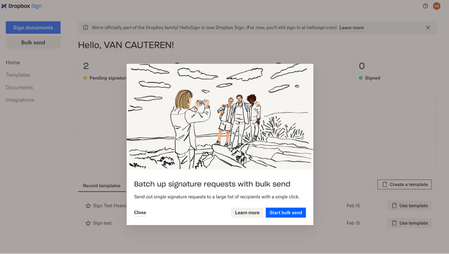
Dropbox is Promoting Unlimited Bulk Sing requests. They even added a button called 'Bulk send'. But whatever I do, I don't see the option to send one document to a CSV list. They even have an FAQ article explaining the steps but is does not look they implemented the feature in the user interface yet. Anyone any idea what is going wrong? Dropbox sign is officially Dropbox since 2 months. "We're officially part of the Dropbox family! HelloSign is now Dropbox Sign. (For now, you'll still sign in at hellosign.com)" Some screenshots:Solved4.3KViews1like14Comments