Our Community is in read-only mode until April 8th, learn more here. You can still search existing threads or get help via Dropbox Support, the Dropbox Help Center, or Learn.
Dropbox Transfer
63 Topics
Dropbox Transfer "Couldn't add some files"
Hello, I am trying to create a Dropbox Transfer of the entire contents of a folder. The folder contains 76.8 GB in total and over 16K of files. I am doing this from my Windows desktop. The folder is already within Dropbox but it appears that Dropbox wants to upload a new copy. I have the Professional plan specifically in order to be able to create large transfers. When I attempt this, adding the 1 folder (and many sub-folders, etc), it successfully seems to prepare the transfer but after I click on Create Transfer, I eventually get the error message "Couldn't add some files. Try adding those files again or removing them." The single folder I added has "Failed to upload" in red text next to it. I attempted again, this time adding by subfolder. It successfully prepared the transfer, with all folder being listed. After clicking on Create Transfer, like the prior attempt, it never left 0% and only showed 0 bytes out of 76.8 GB before failing. Every subfolder had "Failed to upload" next to it in red. I am running Dropbox version 152.4.4880. KathySolved4.7KViews0likes22Comments
Migrating from Mac to Mac using Migration Tool
Greetings, MacBook Pro (old machine): OS 12.6.5 MacBook Air (new machine): OS 13.3.1 1. I have been using Dropbox to backup my files on my MacBook Pro, all my files are online and only the ones I use is made available offline 2. I used "Migrant Assistant" to migrate to a new MacBook Air, so the folders & files in Documents, Downloads, Desktop are seen on my new Mac. 3. I am unable to setup Dropbox on my new MacBook Air. I get the error from Dropbox App which says "cannot setup the folders" (Desktop, Downloads, Documents) For eg it is asking me to move "Move Desktop folder to its original location, then try again" 4. When I click on the Dropbox icon on the toolbar, it says "Upgrade to the latest version of dropbox", but I had downloaded the app just then on MacBook air. I don't know what to do. Please advise. regards, Mahesh4.3KViews0likes24Comments
Dropbox transfer is not showing in menu
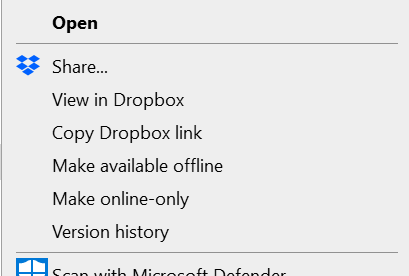
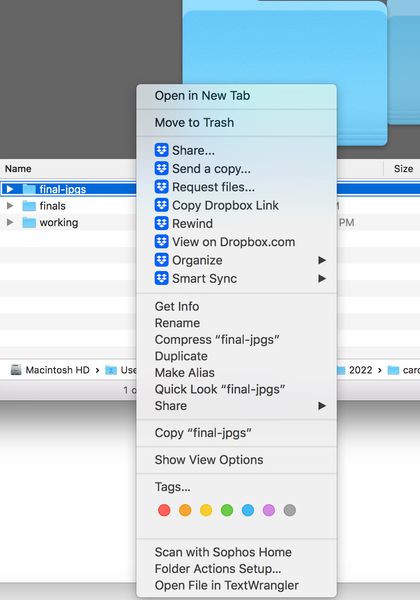
The option to create a transfer has disappeared both on my desktop and on dropbox online. I confirm that I do not have syncing issues, app is running on my computer and "early release" under setting is "off". The "create transfer" option comes and goes, it is incredibly frustrating. Now it is gone from both desktop (right click) and dropbox.com. Screenshots attached. Please help me solve this problem once and for all. PPlease help.Solved4.3KViews0likes6Comments
Can't Copy from Dropbox to Google Drive
I'm trying to copy some photos and an InDesign file from a Dropbox folder to a Google Drive folder and am getting an error that says "this file has properties that can't be copied to the new location" and asks me if I'd like to remove those properties and continue or cancel the copy action. I've found quite a few answers online that suspect this is a file system issue (NTFS vs FAT) but those scenarios were always people trying to copy from Dropbox on a local drive to a folder on an external drive. My Dropbox and Google Drive folders are both stored locally on my laptop, so they should both be using the same file system, right? I'm asking this here instead of Google forums because I was able to copy/paste files from a OneDrive folder to Google Drive with no issue, so I'm suspecting it's a Dropbox issue?Solved3.8KViews0likes4CommentsCan I use an email forwarded for 'Email to Dropbox' feature for attachments?
I've enabled the email to dropbox feature and can receive emails to long email address supplied. I've tried setting up a shorter email on my custom domain to auto forward to the long address but it never seems to receive the attachments. Is there a limitation to this? I would rather share a shorter more memorable email address. Example, but not real details: My custom email [email removed as per Community Guidelines] to auto forward to "random.long.name.generated@addtodropbox.com"Solved3.4KViews0likes9Comments
Dropbox Transfer NOT working
I have used dropbox transfer for several years, however today. 11-18-23 it is not working. Here is the dropbox instructions below. My issue is when using Google Chrome. When I click the grid Icon on top left corner there is No drop down Menu. Nothing happens, is dropbox doing maintenance ? Why is there no dropdown menu ? Thank you for any help with this! How to view and manage sent transfers To view and manage transfers that you’ve sent: Log in to dropbox.com. Click the grid icon in the top-left corner. Click Transfer from the menu that appears.Solved3.1KViews0likes4Comments
How does Transfer actually work - do the files get uploaded twice or just referenced from my "cloud"
It seems DropBox Help don't know the answer to here's the puzzle. I'm trying to share about 750Mb of property photos with an estate agent, but I have a really slow upload speed, 0.5Mbit/s. They do NOT have DropBox, so I need to use "Transfer" not shared folder. So, the folder of photos has been syncing for an hour with DropBox, (just a standard sync, not a Transfer) and probably has at least 2 hrs TO GO . So, if the files are uploading, and have been for an hour, but probably another two hours to go, there are three possible routes... 1. If DropBox Transfer is clever, it will use the uploaded files that have already been uploading for 1 hr, plus another 2 hrs TO GO. 2. if DropBox its not so clever, and required me to upload again from my Mac, then I should stop the standard DropBox sync, and just start a 3-hour transfer. That is one our wasted, so it's going to take 1hr (already gone) + another 3 Hrs TO GO to complete a "Transfer specific" upload. 3. Worst case is if I imagine it is behaving as in 1, so that takes 1 hr gone + 2 hrs more, then I find it behaves as in 2, so another 3 hrs, so 6 total and 5 hrs TO GO. So, that's why I'm asking how the DropBox Transfer sytem works, not which button to press or how to speed up my broadband, sadly DropBox Support don't seem to know. Does that make sense? And if it makes sense, does anyone on this forum know? In 6 hours time I will know myself, but wondered if someone could cut that to 2hrs for me. Thanks StephenSolved3KViews0likes3Comments