Your workflow is unique 👨💻 - tell us how you use Dropbox here.
Folders
67 Topics
Dropbox very slow with Windows explorer
After wasting time, as usual, with Dropbox's assistance, I try to ask here. My problem is relatively simple to explain and consists in the fact that if I use Windows Explorer, navigating in the Dropbox folder is torture since any operation it's very slow (creating a folder, copying a file, etc...) while if I use, for example (but it couldn't be the solution) a file explorer like Explorer++ everything works perfectly. Another thing I verified is that if I navigate to the Dropbox folder from a Windows window that opens for example when I want to open/save a file, everything works without problems. The problem remains confined to windows explorer. Can anybody help me? Thank you7.9KViews11likes12Comments
How can I disable the status column on Windows?
Dear Madam/Sir, I have a paid subscription of Dropbox and as a professional writer I use mainly Explorer and Microsoft Office with hundreds of different files and documents. I am orientated to the name of my files and documents, and therefore I don't want to see any other information, as it is very distracting and useless (for me) as well. Therefore, I choose in Explorer and Office for 'List View'. Since the latest Dropbox-update, however, a "status column" drops up and I cannot get rid of it. Please make it possible to disable this column or tell me where in the registry of Windows 10 I can change this setting permanently. Thank you very much in advance, Alfred van CleefSolved2.5KViews5likes22Comments
Taking a long time to open my Dropbox folders in File Explorer, after updating Win11
After a Win 11 update Dropbox access in File Explorer became very slow. If I click on a subfolder it takes a long time to open subfolder. But, If I click open in new tab or new window, that subfolder opens quickly. Then, if I click on file, pdf or anything else it takes long time to open. If I open Acrobat or an app and select a file from Dropbox folders, that file opens normally. My Dropbox app does not run any more. I click on it, it seems it will open and then nothing. If I try to reinstall the app nothing happens. I can't uninstall the app using the instructions posted on the web site as I don't have the app on my taskbar. Can I just remove the app using Windows option to remove an app...or that is not recommended... ?4.6KViews2likes37CommentsMoving Dropbox folder from ~/Library/CloudStorage
What is the reason for not allowing me to specify where I want to save my Dropbox files in Ventura? I don't have enough space in my system drive to keep a copy of my Dropbox files. And yes, I need a local copy at all times. I tried replacing the folder with a symlink pointing to an external drive but that does not work. Dropbox just refuses to load and these are the last lines of the log file: Traceback (most recent call last): File "dropbox/client/main.pyc", line 5055, in _setup_root_for_account File "dropbox/sync_root/helpers.pyc", line 164, in create_root_for_account File "dropbox/foundation/futures/basic.pyc", line 853, in result File "dropbox/sync_root/handlers/macos/file_provider.pyc", line 121, in set_result_or_convert_exception dropbox.mac.internal.MacError: [Errno 62] Error Domain=NSPOSIXErrorDomain Code=62 "Too many levels of symbolic links" It looks like 1 level of symbolic links is one level too many. A search for Venture did not yield any results I found relevant. I need to know how to relocate the Dropbox folder. If I cannot relocate the folder, Dropbox loses its utility and that only means I will have to look for alternatives. I really hope I don't need to do that.Solved21KViews2likes26Comments
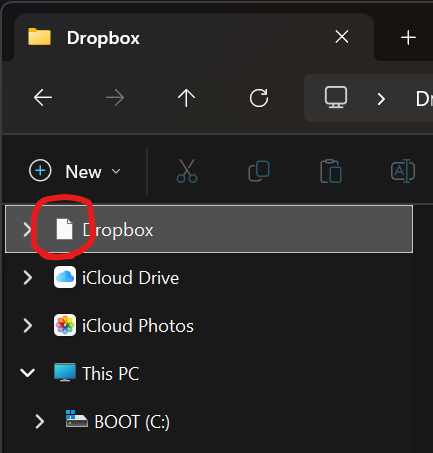
The Dropbox folder icon appears as a blank page on my newly-installed Windows 11.
Application Affected Dropbox (Microsoft Store version) Device Windows 11 Custom Build PC Operating System/Browser (if using the web) Windows 11 Pro 24H2 and now 25H2 Dropbox App Version (if using the app) 234.4.5591 Question or Issue On my new PC I have installed Dropbox via the Microsoft Store. It is all working, except the Dropbox icon itself is wrong in Explorer for my Dropbox folder. It is just showing a plain white piece of paper. Again this is a brand new system with a brand new install of Windows 11 Pro that I did myself - nothing weird, I didn't use any of the means to "debloat" - it is just a default Microsoft Windows 11 24H2 install. I had the problems on 24H2 and it upgraded to 25H2 the other day and that has not changed the issue. It is more of an annoyance than anything because my eyes are used to looking for the dropbox icon appearance to find it and the plain white paper doesn't stand out so much.Solved585Views1like13CommentsI can't locate the Dropbox folder on my Linux device.
About two hours ago i posted a question to the forum. I got several replies and while responding managed to sign out. Now I cannot find my post. Is there some way that I can search for my posts? I also thought I would get an email if I got a response but nothing though I got a message from Dropbox welcoming me. ThanksSolved1.1KViews1like8Comments
Logged out of Dropbox, Now Dropbox Can't See Existing Folder on Windows 11
Hello. I'm on Windows 11, and Friday -- the last time I used my PC -- all was fine with Dropbox. Today, when I turned on the PC, Dropbox was logged out, and when I logged in, it could no longer access my existing Dropbox folder, which is on an external drive. I've uninstalled and reinstalled the desktop app, and tried to select the proper, existing Dropbox folder for years, and I first got an error that the drive couldn't be accessed. Uninstalled and reinstalled again, immediately paused syncing. Now, when I try to move the Dropbox folder in the app to the existing folder on the external drive, I get an error that files are already there. So what the heck do I do? Please help. Thank you.Solved2.7KViews1like15CommentsDropbox Folders in Windows Explorer very slow
Hi, my windows 11 system, my dropbox folder became super slow. When I try to open a (sub) folder, it takes around 30 seconds to open it. I noticed it since a couple of days, I installed Bitdefender and a new graphics card/driver since then. My dropbox folder is on an external drive. Other folders on the same drive are fast. Disabling Bitdefender did not change anything. Uninstalling dropbox made the folder access fast again. I reinstalled dropbox without any effect. I also tried to fix hard links / permissions (via Account -> Support option) without any effect as well. Dropbox Version: 172.3.7538Solved1.9KViews1like5CommentsSyncing multiple hard drives
Hello, I'm going to have to different Mac on two different places and need to synchronise all my datas so when I switch from one computer to another, I can access all my data. The fact is that I have multiple hard drives cause I need lot of space. For each mac, I get 4 disk storage (one SSD inside the mac, and one or two SSD and one SATA). Dropbox Advanced subscription allow me to back up unlimited data, which is perfect for me (I have 20To of Data). Is there a way to asked dropbox to synchronise all my disk storages ? As a intensive user of dropbox, I know that I can only select one location for my main dropbox folder. The easiest way to proceed will be to have only one folder to synchronise, but the fact is there is no SSD on the market with 12To space ... Does anyone know the solution ? Can I define one place for my dropbox folder and then dispatch the folders on other disk storages or does this solution will not synchronise my datas ? Best T/4.8KViews1like12Comments