Your workflow is unique 👨💻 - tell us how you use Dropbox here.
Folders
157 Topics
Removing Dropbox Context Menu Entries on Windows - Persistent Fix
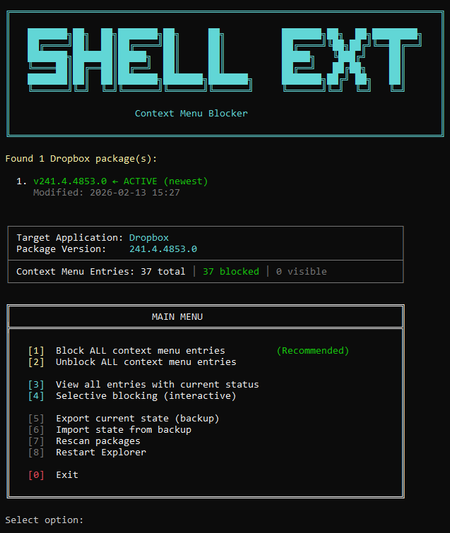
I've seen dozens of threads here from people trying to get rid of the Dropbox right-click context menu entries on Windows. There is no official toggle for this. The common advice involves manually editing registry keys, but people report those changes revert after Dropbox updates. Here is my solution: The linked script solves that differently. Instead of modifying Dropbox's own registry entries (which Dropbox overwrites on update), it uses Windows' built-in Shell Extensions Blocked mechanism — a per-user registry key (`HKCU:\...\Shell Extensions\Blocked`) that Windows itself respects. Dropbox updates don't touch this key because it's not theirs. What it does: Reads Dropbox's AppxManifest to find all context menu CLSIDs automatically Blocks them using Windows' own sanctioned blocking method Fully reversible — unblock everything with one click Interactive menu or silent command-line mode for automation Tested for 2+ months across three machines via PowerShell 7, through multiple Dropbox updates. The entries have never come back. The script is open, readable, and modifies nothing outside that single user-scoped registry key. If you want an independent safety assessment, paste it into any AI assistant and ask. Here is the script + AI safety assessment: https://grok.com/share/bGVnYWN5_e1f2cac5-5e0f-4731-bbbe-63fd72af7a7b45Views0likes1Comment
Can't access shared link. Getting an error that the link has been deleted.
I have been trying to open a dropbox link shared to me. This is a link that was sent by somebody to the person who sent it to me; they have just passed it on. They can access and use the files on the link, but I cannot. Originally I was sent a HTML file in which I can see the files and press the links to open the individual files, but then I get the following error: 'You don't have access. You can ask the person who shared the link to invite you directly.' I have now been passed on the exact link that was sent to the person who sent it to me, who again can open the files fine. I get the following error: 'This link has been deleted. The owner of this link has deleted or disabled this link. You cannot access it at this time.' I think is the more important error to consider as the html file may cause permission errors etc. I have tried everything on Safari, Firefox and Google Chrome and have logged into two different accounts and tried being logged out too. If I am not logged in, and I remove anything past 'rlkey' in the link, it tells me that I can sign up for free and that to keep the file secure it needs to confirm my identity, with the name of the folder included etc. I think possibly as well as being sent the link, the original person may have been added directly to the folder? However if I don’t have access, why does the link tell me it’s been deleted when the other person can still access it right now. They have told me this is all they have been sent. This link is being emailed to many people every month as it is a work resource for a tour. Any help is much appreciated128Views0likes2Comments
Some folders are not available for syncing to my Dropbox folder in the sync options
Device Mac Operating System/Browser (if using the web) Sequoia 15.6.1 Dropbox App Version (if using the app) ?? Syncing Status "Up to date" Question or Issue My son's business uses Dropbox. I also use Dropbox personally. The business has shared many folders with me. When I go into my sync options, not all the folders shared with me by the business show up as options to be sync'd. Why would some folders be available for syncing and others are not?43Views0likes2Comments
Should I make everything online only before moving my Dropbox folder to another drive?
Hi, so I want to move my dropbox folder to another drive with more space. Currently my dropbox have around 500 GB of available offline files. It's a company dropbox so in total it has 6 TB of files. I want to move the dropbox folder to a 2tb drive. I read so many problem about indexing that took forever or other syncing problems, so should I make all my 500gb of available offline files into online only before moving? And can I show all the 6 TB folders on my PC but make it available online only? because last time I tried to show the folder, it automatically tried to sync 6 TB into my PC. I only want to see the folder and it's content but not have it locally stored on my PC.31Views0likes1Comment
Logged out of the Dropbox app and back in and now I have a 'Dropbox (old)' and a 'Dropbox' folder
Application Affected Synching files Device PC Operating System/Browser (if using the web) Windows 11 Dropbox App Version (if using the app) Windows Desktop Question or Issue Had a funny problem with the Windows Explorer status icons not all being corrected, and saw a recommended to "simply" sign out of Dropbox and sign back in. Simple enough. Which I did. I then got a pop up asking me (telling me really) to rename my Dropbox folder. I said OK, and I now have a Dropbox and Dropbox (old) in the User directory. All of my files are in (old). None are in new. Every link on my PC to my old files is now of course broken. I paused syncing because I am worried Dropbox is going to try and create an entirely new copy of all of my files in the new Dropbox folder. Does anyone know what it going on here? And how to put things back to they way they were before? Why on earth would a logout/login totally reorganize all of my files??? I'm kind of dead in the water right now so any help would be greatly appreciated. Dropbox support seems to be non-existent.217Views0likes13CommentsIs there an easy fix for accidentally dragging folders to different locations?
Device HP Z2 Tower G4 Operating System/Browser (if using the web) Windows 10 Dropbox App Version (if using the app) 241.4.4795 I have an ongoing issue with folders in our Dropbox Plus account. We use dropbox for our small company and we have a top level dropbox folder for each of our projects. All folders are owned by my boss (not me). Once in a while I will accidentally drag a top level folder into another folder. Dropbox for some reason allows this drag. But when I go to undo it, then Dropbox tells me that I don't own the folder and I can't move it back! The folder is then stuck in another folder! The only solution I have found to fix this so far is to move the folder back on the website. However this breaks the sharing for the folder so that my boss and any collaborators no longer have access to the folder! I then have to re-share the folder every time I accidentally drag them! This seems very silly, if I don't own the folder and can't move it back, why does Dropbox let me move it in the first place! Is there some better way to fix this?80Views0likes2CommentsNo funciona el "disponible sin conexión"
Dropbox plan: Basic. Used in windows desktop v 240.4.8609 OS: windows 11 pro version 26200.7623 Device: Lenovo e14 ------------------ Tengo activado el "disponible sin conexión", aún así los archivos no están disponibles offline TODAS LAS CARPETAS ESTAN SELECCIONADAS El "tick" verde sólo aparece en algunos archivos. en la mayoría aparece el icono de la nube40Views0likes1Comment
I'm missing some old folders but cannot see them anywhere to restore them
I am missing some older subfolders from a shared folder. None of us deleted it. I do not see it under activity nor do they pop up when I do a search. I am a basic subscriber; will DropBox help me with this? I am logged in online. My app and online shows the same data so it not a syncing issue. TYIASolved108Views1like6Comments