Your workflow is unique 👨💻 - tell us how you use Dropbox here.
Mac
510 Topics
The Dropbox desktop app is stuck at indexing after a MacOS Update to 26.4
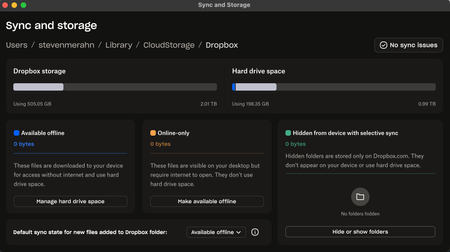
Device MacBook Air M3 Operating System/Browser (if using the web) MacOS Tahoe 26.4 Dropbox App Version (if using the app) 243.3.6895 Syncing Status Fully sync'd no folders visible indexing Question or Issue Updated OS today, could not open Word, Excel or PDF from Dropbox. Tried a few things and decided just to reinstall. Deleted Desktop app, reinstalled desktop app, selective sync for about 1/3 of my folders and selected offline use. Dropbox appeared in Locations of the finder (I took this to be a good sign), but nothing has changed for 12 hours. Restarted the machine a few times, quit and restarted the desktop app a few times. Searched for alternatives to Dropbox a few times. Only squirrely thing is that when I quit the app and restart, I get a "somethign went wrong: refresh" message. The files are clearly there. But they are not. Help please.69Views0likes16Comments
Files are zero bytes on Dropbox on File Provider
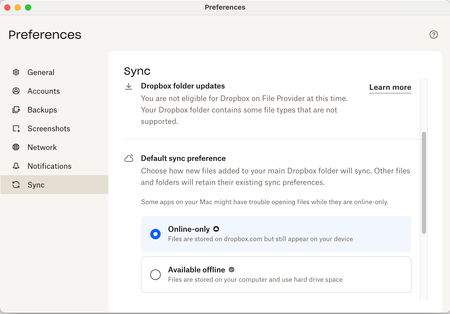
I'm on a Mac with OS Sequoia, running Dropbox Plus, version 242.4.5815. My Dropbox folder location is on my internal hard drive. I've set Default sync preference to online-only since our business had files too numerous to store on my 500 GB internal drive. I have reinstalled the Dropbox app this morning and restarted my computer to try to fix these issues, to no avail. In my Mac Finder, many files are showing as zero bytes. This creates problems with InDesign not seeing linked files. If I double click the zero-byte files and then close them, this activates them somehow, and then InDesign can see them and their true size shows in Finder. How can I make these files available automatically without having to open each one? There are way too many to open each one like this. Additionally, the Dropbox quick action menu is missing when I right click a Finder file. It used to be available. How do I restore this functionality? Why is my system not eligible for Dropbox on File Provider? Is this the source of the problem? Thanks for your help. Regina50Views0likes7Comments
My Dropbox app (on macOS Tahoe 26.3) has been stuck indexing for a few days.
Application Affected Dropbox.app Device MacBook Air M3 Operating System/Browser (if using the web) macOS Tahoe 26.3 Dropbox App Version (if using the app) 242.4.7123 Question or Issue My Dropbox app is not syncing after update of macOS Tahoe 26.3. Message: Indexing…. (for some days now) All files have the cloud-symbol (just a white cloud)Solved73Views0likes5Comments
Some folders are not available for syncing to my Dropbox folder in the sync options
Device Mac Operating System/Browser (if using the web) Sequoia 15.6.1 Dropbox App Version (if using the app) ?? Syncing Status "Up to date" Question or Issue My son's business uses Dropbox. I also use Dropbox personally. The business has shared many folders with me. When I go into my sync options, not all the folders shared with me by the business show up as options to be sync'd. Why would some folders be available for syncing and others are not?43Views0likes2CommentsMy Mac desktop app shows sync issues due to permissions, but all settings are correct.
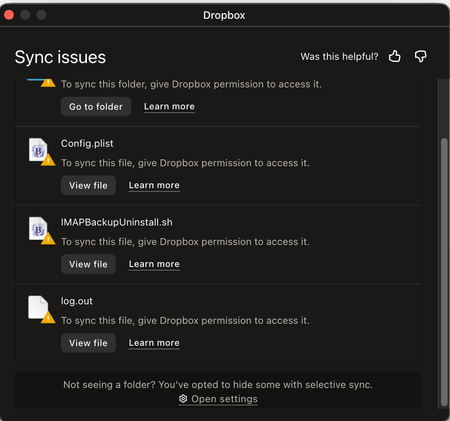
Device (Mac Sudio Operating System/Browser (if using the web) Mac OS 26.2 Tahoe Dropbox App Version (if using the app) 241.4.4853 Syncing Status (Upto date) Question or Issue I am getting sync issues for several files (see message) asking for "permissions," which all permissions in system settings are already given, so I am not sure what they are asking for or how to give it to them.43Views0likes2CommentsGreen checkmarks are missing on my Mac's Dropbox folders.
Device Apple MacBook Pro, 16 inch, 2021, M1 Max Operating System/Browser (if using the web) MacOS Tahoe 26.2 (25C56) Dropbox App Version (if using the app) 241.4.4853 Syncing Status Up to date Question or Issue I've noticed that the dropbox folders on my local drive are no longer displaying the green checkmarks to indicate which of them are synced locally. Both my operating system and app are up-to-date and I've tried all the obvious troubleshooting techniques; closing/restarting/reinstalling the app, restarting my laptop, relaunching finder, etc. This will really affect my work if I can't resolve it ASAP, so could someone please suggest how I may be able to get the sync icons back please? Many thanks, Ben69Views0likes2CommentsMy macOS desktop app has been stuck syncing 10MB for 3 days.
Application Affected Dropbox Device MacBook Air Operating System/Browser (if using the web) OS 15.7.3 Dropbox App Version (if using the app) 238.4.6305 Question or Issue Three days ago I noticed an error message at the top of the finder window which was open to my Dropbox folder (stored in "locations"). The message said something to the effect that my Dropbox app couldn't be found. I thought that was strange, because Dropbox was open. So I quit the app and then reopened it, and that's when things really started getting strange. Now, day three, Dropbox is constantly in sync mode. The icon up in the task bar shows the circle of arrows, and when I click on it says syncing down at the bottom. But for most of the last two days there was no progress bar and no information about what was syncing. Now I'm getting "syncing [x number of files]." When I first looked this morning it was at 500+ 10 MB. Now it's down to 444 files, 9 MB. Progress! The thing is, I only use Dropbox for syncing one particular application, Scrivener. My entire storage on Dropbox is only 275 MB. It usually takes seconds to sync the updated files. The other strange thing is that on the activity monitor Dropbox never rises above 4% CPU. It's been going for more than 48 hours at a snail's pace to sync relatively tiny files. Possibly relevant, or just coincidental: about two weeks ago I cleared the data from the MacBook and reinstalled everything. After that, everything appeared to be in place and working just fine. This problem appeared after I returned from about 10 days travel over the holidays in which I was rarely on the computer. I've quit and reopened Dropbox multiples times. I've restarted the computer. None of it has helped.169Views0likes17Comments
Syncing icons are missing on Mac OS
Application Affected Dropbox desktop app / newest update as of 2/3/2026 Device M3 iMac Operating System/Browser (if using the web) Sequoia Dropbox App Version (if using the app) 241.4.4795 Question or Issue DB auto updated the other day. I am running the desktop app on 2 machines, an M3 and M4. Both the same OS. After the update, the M3 lost the BLUE Sync icon when syncing and then the GREEN icon when synced. Nothing has changed on the machine other than DB update. Now the M4 machine is running fine. No issues with the BLUE or GREEN icons. I did some research and it was suggested to remove any apps like ONE-DRIVE so I did remove it on the M3 but that didn't help. I also have ONE-DRIVE on the M4. So I need this fixed as I work off of DB all the time and need to know what it synced, what is being synced. So if anyone has a fix - that would be awesome. If there is a way to install the previous DB app that did work and turn off auto-update, that would be great. It is a little concerning that DB automatically updates its app without my permission and if there is a glitch that can corrupt or erase all my files, that could be a major issue. Glad this glitch is only the icons but it could be worse so I don't think DB should do auto-update. THANK YOU!222Views0likes25CommentsHow to sync to an external Thunderbolt 3 SSD Drive on Mac?
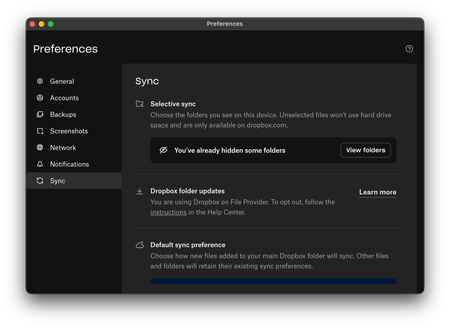
Device Mac Studio M1 Max Operating System/Browser (if using the web) macOS Tahoe 26.2 Dropbox App Version (if using the app) (240.4.8609) Dropbox Plan (Plus) Question or Issue I have purchased a 2TB Thunderbolt 3 SSD to use as an external drive for Dropbox as I am running out of space on my 1TB drive in the Mac Studio. For the life of me, I cannot figure out a way in Preferences to point it to the external TB3 SSD drive. It says I am using Dropbox on File Provider and I cannot see the option that will allow me to point it to the external drive. I had previously done so in the past with no problems, till the update to macOS Tahoe when suddenly the link to the external USB-C drive was severed. It worked for a while as I have sufficient space on my 1TB and I did selective sync. Now, I am running out of storage space, I appreciate guidance.71Views0likes2Comments