Our Community is in read-only mode until April 8th, learn more here. You can still search existing threads or get help via Dropbox Support, the Dropbox Help Center, or Learn.
Mac
25 Topics
I'm constantly getting out of space messages
As described at English | The Dropbox Community except now these notifications are coming up every couple of minutes after I dismiss them. This is insane and unworkable. I have 500MB free; that’s more than plenty. I’m nowhere near running out of space. Something’s got to change.137Views0likes9Comments
Switching to legacy mode and Dropbox icon next to search bar on Finder
Is there a way for me to switch from file provider to legacy mode and also get the dropbox icon to appear next to the search bar on the finder. My co-worker is saying this is important to our workflow but we can't figure out how to set this up.56Views0likes2Comments
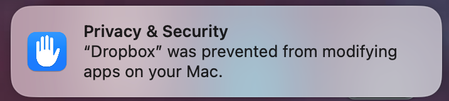
Why am I getting a notification on my Mac about Dropbox modifying apps?
Hi everyone! We're starting to notice this Drobox notification below pop up on our Mac community. When we click it, it takes us to Privacy & Security in System Settings but then does nothing. Anyone know what exactly this modifying apps means and what its asking for? Should we be concerned? This particular MBP is running macOS 15.7.4 (Intel) and version 243.4.6956 of the Dropbox app. Thank you!55Views0likes1Comment
Dropbox not syncing to Apple folders (Desktop, Documents, Downloads)
Device MacBook Air M4 Operating System/Browser (if using the web) Sequoia, Tahoe Dropbox App Version (if using the app) 241.4.4853 Dropbox Plan Family Question or Issue My files are on Dropbox online. I now need to download them to my Mac (I've tried this on both a Tahoe and a Sequoia machine). Although the Mac already has Desktop, Documents and Downloads folders, the Dropbox app creates a new parallel set of (virtual) folders under the same names, residing in the Dropbox folder (~/Library/CloudStorage/Dropbox. In the past Dropbox used to sync with the existing Apple folders, but that's not been the case since a few OS X/Dropbox versions. It is my understanding that the parallel folders are supposed to be there, but Mac would mirror these, to make it look like they are in the `Apple folders. It makes no difference whether either File Provider and/or Backup is on or off. How do get rid of this double folder issue?85Views0likes2Comments
You are not eligible for Dropbox on File Provider at this time
Device Macbook Air 2020 M1 Operating System/Browser (if using the web) Tahoe 26.3 Dropbox App Version (if using the app) 241.4.4853 Dropbox Plan Standard 2TB Question or Issue I have selective sync on. When I look at the Sync tab in Preference, it says "You are not eligible for Dropbox on File Provider at this time" under Dropbox Folder Updates. All of my synced files are defaulted to be online only and shows Zero bytes in Finder. There is no right click option that I can make them offline available.101Views0likes2CommentsScreenshot shortcut conflicting on Mac not allowing me to take screenshots
I have a free dropbox account and Command+Shift+3 & Command+Shift+4 to make screen captures seems to be conflicting with the Dropbox app. Nothing happens when I press the keys. I have a iMAC (intel) w/apple keyboard and am using macOS Sequoia 15.7.3. All the apple system keyboard short cut preferences are on. Is there a setting that needs to be turned off in the Dropbox preferences or a work around? The only time I can get it to work is when I am logged out of Dropbox. I have no problems with Dropbox syncing or conflicting with any other keyboard shortcuts.Solved231Views0likes4Comments
How can I remove the Dropbox contextual menu items on Mac?
Macox, any version, I cannot remove the Dropbox contextual menu. Another thread on this topic is marked "Solved" but no solution is included, only a request to submit the request. Has a solution been provided yet? thanks!Solved197Views0likes5Comments
How to stop Dropbox from opening automatically on my Mac?
I've tried to follow the instructions that were provided to Walter on 2/6/23 to disable automatic Dropbox start-up when I open my Mac. When I click on the Dropbox icon at the bottom of my screen, I get the file folders that I've set up, not a page that has my Profile initials. Where do I locate the Preferences? Thanks for your help.Solved4.2KViews0likes2Comments
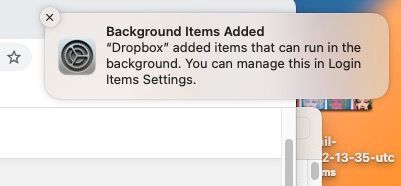
How do I end "Background items Added" notification and/or process?
I uninstalled Dropbox but keep getting this annoying notification on my mac that Dropbox is adding items that can run in the background even though the app is deleted and it is disabled in the appropriate setting. How do I get this to end once and for all? Thanks!Solved11KViews0likes19Comments